
Don't just scan the essay. Watch it being written.
Paraphrasers beat text matchers. Humanizers beat AI detectors. Nothing beats the writing session itself. Checkmark reconstructs how each submission came together - what was typed, what was pasted, and when - and lets you replay it.
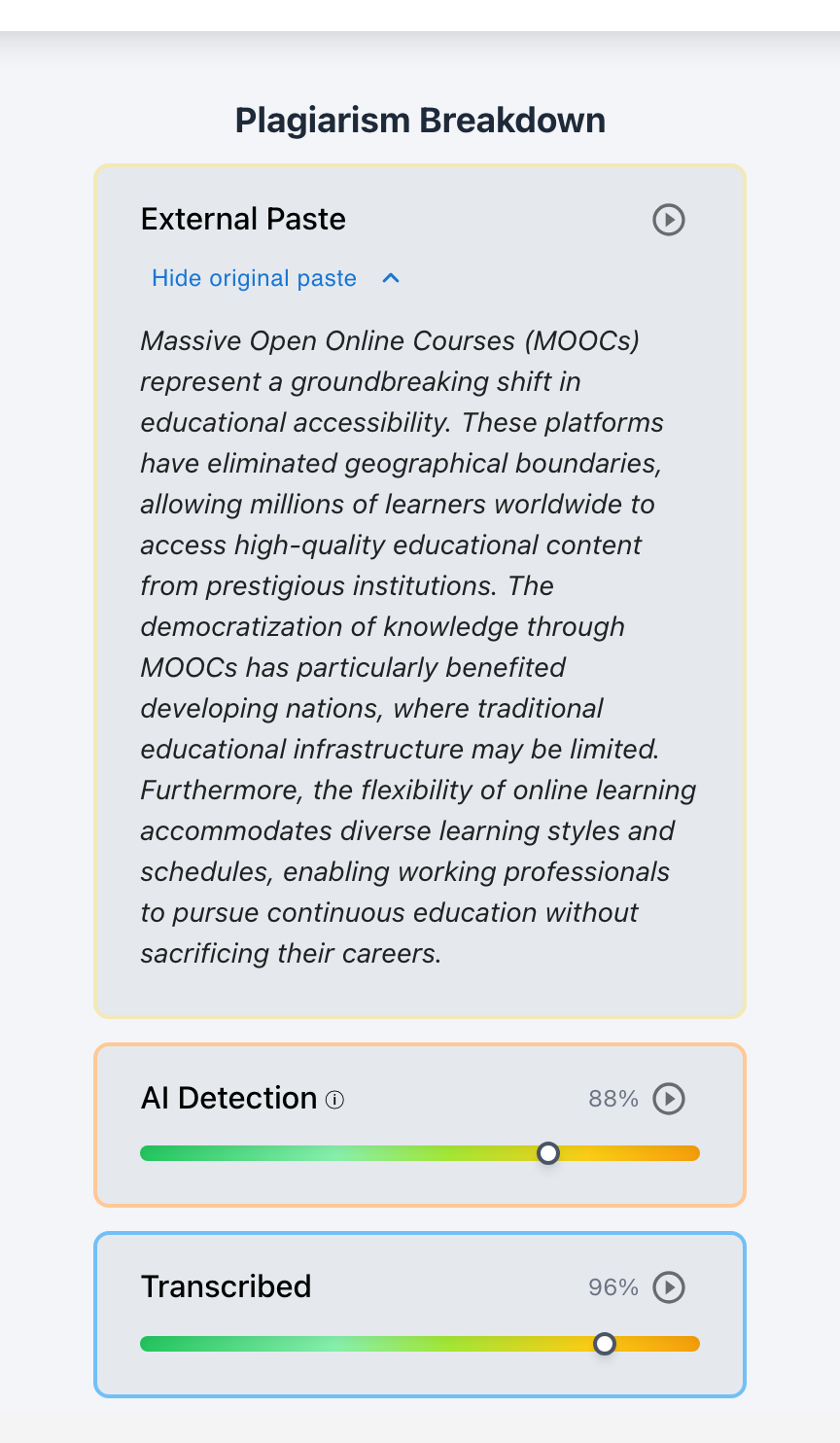
External Paste
Text pasted from outside the document is captured with a timestamp and the full original paste - even if the student edited it afterward.
Transcribed
Steady, unnatural typing that mirrors an existing source - retyping from a second screen or dictation - is flagged as transcription.
Playback
Replay the entire session keystroke by keystroke at 1x–8x speed, with a scrubber to jump straight to any moment.
The paste, preserved in full
When content enters the document in one jump, the report keeps the receipt. Each External Paste card records when it happened and stores the complete original text. A student can rewrite every sentence afterward - the card still shows exactly what arrived and when.
- Timestamped paste events, in order
- The full original pasted text, expandable on the card
- A play button on every card that rewinds Playback to just before the paste landed
- Total Pasted percentage summarized at the top of the report
Playback: the writing session, replayed
One button on every report opens a player that re-types the essay in front of you - pauses, deletions, rewrites, and pastes included.

Play at 1x to 8x
Watch the full session or skim it at 8x. Skip forward and back ten seconds at a time.
Scrub to the moment that matters
The timeline slider marks each step of the session, so you can jump straight to a paste event or a suspicious stretch.
Jump from evidence to replay
Every paste card links into Playback a few edits before the event - context first, judgment second.
Where the writing process is captured
Process signals come from how students write, so coverage depends on the submission path - and Checkmark supports the ones classrooms actually use.
Google Docs
Submissions imported from Google Drive bring their revision history with them - drafting over days, not just the final text.
Typed-in editors
Essay editors embedded in Canvas and Buzz assessments capture the session as students type - no setup for students at all.
Word documents
DOCX submissions carry process data when written with Checkmark's editor tooling; standard DOCX files still get full plagiarism and AI analysis.
Process evidence protects honest students. A visible drafting history is the strongest possible answer to a false AI flag - which is exactly why we show authentic effort as clearly as we show shortcuts.
Watch a session for yourself
The live demo analyzes a real submission end to end - paste something in and open the report.