
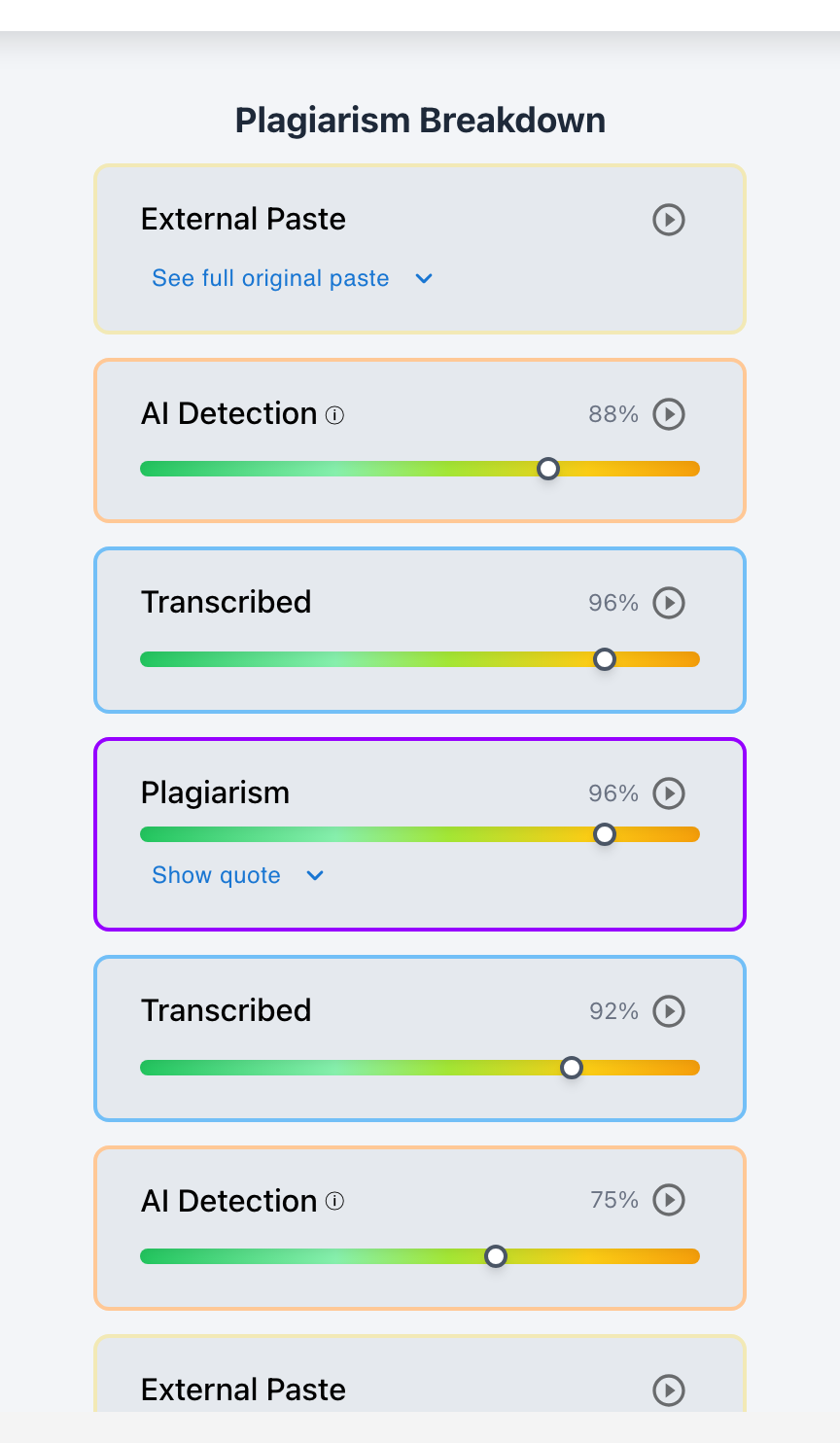
No. Native Google Docs revision history alone is not enough to detect AI writing—because students can bypass basic snapshot tracking by manually retyping ChatGPT text from a smartphone, using auto-typer browser scripts, or pasting text during autosave intervals. To reliably detect AI, educators require a multi-signal platform like Checkmark Plagiarism, which pairs Google Docs keystroke cadence telemetry with neural perplexity classifiers, automated citation checks, and writing playback video.
Many educators believe that checking Google Docs version history is a foolproof defense against generative AI: "If the document shows multiple version saves and characters were added over time, the student must have written it." While version history catches naive copy-paste shortcuts (where an entire 1,500-word essay appears in a single snapshot), it is blind to sophisticated evasion tactics. A student who spends 45 minutes manually transcribing an AI essay from their phone will produce a "typed" revision history in Google Docs. Catching modern AI use requires multi-signal triangulation.
Below is a comprehensive guide on the limitations of native revision history and why multi-signal detection is essential.
Checkmark Plagiarism solves revision history blind spots by pairing essay writing playback with AI detection, plagiarism detection, autograding, and integrations with Google Classroom and Canvas.
The 4 Critical Blind Spots of Native Google Docs History
1. Manual Phone Transcription Blindness
When a student manually types ChatGPT text from another screen, Google Docs records normal character additions, failing to recognize that the text was composed by AI.
2. Zero Linguistic & Perplexity Classifiers
Google Docs has no built-in AI detection engine; it cannot analyze syntactic burstiness, token perplexity, or formulaic AI discourse markers.
3. Lack of Automated Source / DOI Verification
Google Docs cannot check whether cited DOIs and academic sources actually exist in published literature or represent synthetic AI hallucinations.
4. Coarse Snapshot Interval Gaps
Periodic 10-minute snapshot bundles mask the exact micro-timing of paste events, making it easy for students to disguise pasted blocks with minor edits.
Why Multi-Signal Triangulation Is Mandatory
Understanding how Checkmark combines telemetry with neural classification:
- Keystroke Cadence Telemetry: Detects the flat, mechanical typing rhythm and 0% backspaces characteristic of transcribing AI text from a phone.
- Sentence-Level AI Heatmaps: Identifies low-perplexity token distributions even if the text was typed by hand character-by-character.
- Automated DOI & Citation Checks: Instantly queries Crossref and Google Scholar databases to flag hallucinated journal articles.
Read more in how Checkmark writing process analysis works.
Comparison: Native Google Docs History vs. Checkmark Multi-Signal Platform
Checkmark Multi-Signal Platform (Complete Coverage)
- Continuous keystroke writing playback video.
- Biometric keystroke cadence analysis (flags transcription).
- Sentence-level neural AI probability heatmaps.
- Automated Crossref DOI verification for fake citations.
Native Google Docs History (Incomplete Defense)
- Coarse periodic snapshots saved every 5–15 minutes.
- Vulnerable to manual transcription from phone screens.
- No AI language modeling or perplexity analysis.
- Cannot verify whether cited academic sources exist.
A 5-Step Educator Protocol for Comprehensive AI Auditing
Multi-Signal AI Audit Checklist:
- 1. Open the student's submission in Google Classroom or Canvas SpeedGrader with Checkmark enabled.
- 2. Check the Tri-Signal Overview: review AI Probability %, Active Typing Duration, and Plagiarism Similarity %.
- 3. Inspect the Keystroke Cadence Graph: verify whether typing exhibits organic human jitter or flat transcription.
- 4. Check the Source Verification Card: confirm that cited DOIs and journal references physically exist.
- 5. Hold a 2-minute oral check-in if multi-signal data confirms synthetic generation.
How Checkmark Plagiarism Powers Complete Detection
Checkmark Plagiarism combines **AI detection, essay writing playback, static AI detection, plagiarism detection, autograding, and Canvas/Google Classroom integrations** to turn Google Docs into a fully fortified, multi-signal integrity environment.
Frequently Asked Questions
Can a student type ChatGPT text into Google Docs without getting caught?
Not with Checkmark. While native Google Docs sees characters being added, Checkmark's Cadence Engine detects the flat transcription speed, low backspaces, and AI token perplexity.
Why do students retype AI text instead of pasting?
Students believe that typing text manually will create a clean revision history that fools teachers and automated checkers.
What is 'transcription cadence' in writing telemetry?
It is the distinct, unvarying typing pattern produced when a student reads text from a phone and copies it without pauses for cognitive formulation or organic deletions.
How does Checkmark detect fake citations in Google Docs?
Checkmark automatically extracts cited DOIs and journal titles, querying academic indexes like Crossref to confirm whether they exist in published literature.
How does Checkmark Plagiarism integrate with Google Classroom?
Checkmark integrates seamlessly with Google Classroom, displaying writing playback, AI heatmaps, and source checks directly in the grading sidebar.
What if a student has rich version history but fake sources?
Fake citations are definitive proof of AI generation, regardless of whether the student pasted the text or typed it from an AI chat window.
Can writing playback prove an essay is authentic even if an AI detector flags it?
Yes. If writing playback shows 4 hours of typing, healthy backspaces, and genuine research sources, the student is cleared of all suspicion.
How long does a multi-signal review take in Checkmark?
With Checkmark's unified SpeedGrader dashboard, reviewing telemetry, AI heatmaps, and citations takes less than 60 seconds per submission.
Why is a single detection method never enough?
Because generative AI requires multi-signal verification: telemetry proves physical composition, neural classifiers evaluate language, and database checks verify facts.
How does multi-signal detection protect student due process?
By triangulating physical keystrokes, language models, and source checks, educators ensure decisions are grounded in undeniable evidence.
A Fortress of Integrity for Modern Education
Navigating the AI era requires advanced, multi-signal verification. By pairing Google Docs with Checkmark Plagiarism's comprehensive keystroke telemetry, neural classifiers, and citation verification, educators eliminate forensic blind spots, protect honest writers, and uphold academic excellence.
Checkmark Plagiarism supports this comprehensive approach with AI detection, essay writing playback, static AI detection, plagiarism detection, autograding, and integrations with Google Classroom and Canvas.
See how Checkmark pairs Google Docs writing playback with multi-signal AI detection. View a sample report or request a demonstration.