
Most integrity tools analyze a finished document. Checkmark also analyzes how the document got finished. This explainer covers what that means concretely: where the data comes from, what the report shows, and what it can and cannot tell you.
The core idea: provenance over prose
A finished essay is easy to launder. Paraphrasing tools rewrite copied text until it slips past matchers; so-called humanizers rewrite AI output until detectors shrug. What none of these tools can rewrite is the writing session itself - the sequence of keystrokes, edits, pauses, and pastes that produced the document. If 900 words appeared in a single paste at 11:42 PM, that fact survives any amount of after-the-fact editing.
Checkmark reconstructs that sequence - we call it the changelog - and derives its process signals from it.
Where the changelog comes from
There is no spyware in this story: process data comes from how the student writes, through channels they already use.
- Google Docs. When a student submits a Doc from their own Drive, its revision history comes with it - the drafting timeline Google has been recording all along.
- Typed-in editors. Assignments in Canvas and Buzz can embed a Checkmark essay box. Students just type; the editor records the session as it happens.
- Word documents. DOCX files written with Checkmark’s editor tooling carry their edit history inside the file. A plain DOCX without it still gets full plagiarism and AI analysis - the process tiles simply read N/A.
That last point is a design choice worth naming: when the data is not there, the report says N/A. It does not guess.
What the report derives from it
Four things, mainly.
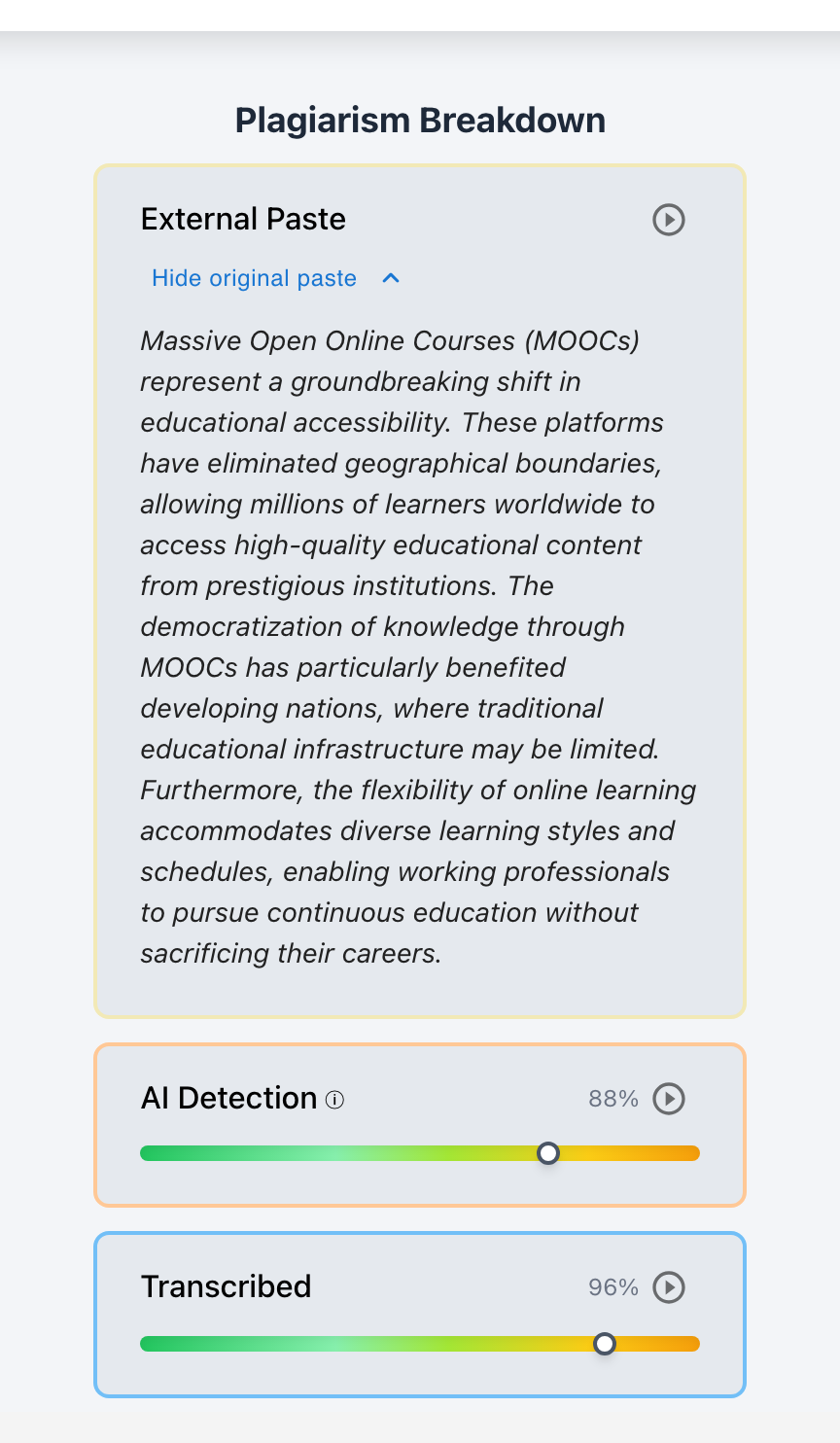
External Paste events. Content that entered the document in one jump, from outside it. Each paste is recorded with a timestamp and the complete original pasted text - preserved even if the student edits every sentence afterward. In the report, each paste is an evidence card with the original text expandable in place.
Transcription. Typing that mirrors an existing source - retyping from a phone, a second monitor, or dictation - does not look like drafting. Real composition is bursty: it pauses, backtracks, deletes, and rewrites. Transcription is steady and linear. The report flags stretches of typed-but-copied text as Transcribed, with their own cards and their own tile.
Uncited and AI context. Process signals sit in the same report as source matching and AI detection, so each finding can corroborate - or complicate - the others. An AI-flagged passage that was visibly drafted and revised over forty minutes deserves a different conversation than one that arrived in a single paste.
Playback. The whole session is replayable. One button re-types the essay in front of you at 1x to 8x speed with a scrubber; every paste card has a play button that jumps the replay to just before the paste landed.

What it cannot tell you
Honesty about limits is part of how this tool is meant to be used.
- Process analysis cannot see work done entirely outside a tracked surface - an essay drafted in an untracked app and pasted in arrives as exactly that: one large paste. That is a signal to ask about, not proof of misconduct.
- A paste is not a verdict. Students paste their own text moved from another document, quotes they intend to cite, and outlines they wrote themselves. The report preserves what was pasted precisely so a teacher can tell these apart.
- Typing steadily is not a crime. Transcription flags describe a pattern; the teacher supplies the context.
This is why every process signal in Checkmark is presented as evidence with receipts, not as an accusation score - and why flag statuses in the report are visible to teachers only.
Why this protects honest students
The same evidence that exposes shortcuts vindicates real work. A student falsely flagged by an AI detector, any AI detector, has, in their revision history, the strongest rebuttal that exists: the visible record of their own drafting. We built the report so that record is one click away, every time.
See it in the product on our Writing Process Analysis page, explore tailored solutions for High Schools and Private Academies, walk through a full report in the teacher guide, or try the live demo.