
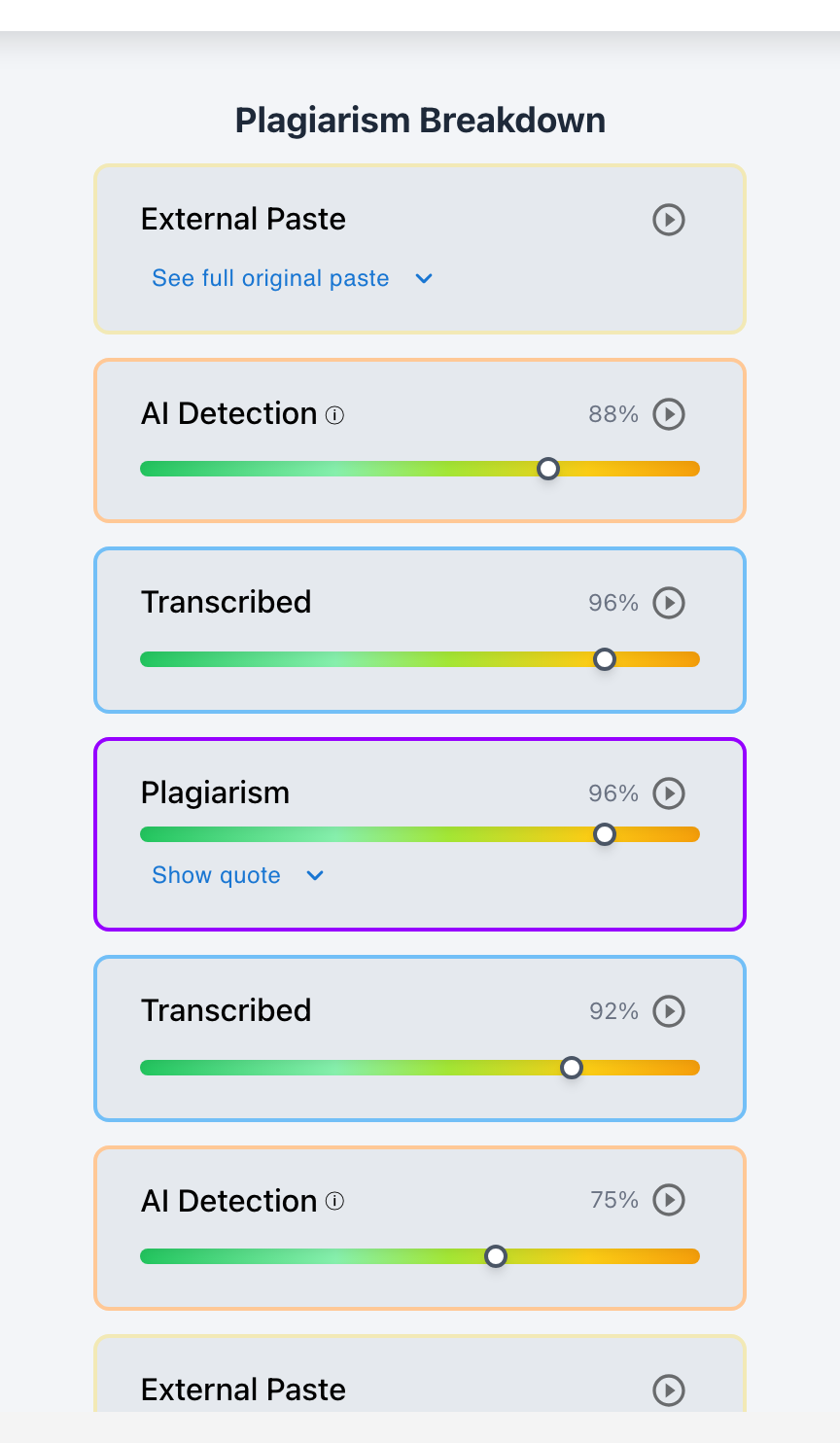
Draft history can give teachers something an AI detector alone cannot: evidence about how an assignment developed over time.
Instead of reviewing only the final essay, a teacher may be able to see whether a student built the assignment gradually, revised ideas over several sessions, added large sections of text at once, replaced rough writing with much more polished passages, or pasted a nearly complete draft into the document.
These patterns help teachers investigate possible ChatGPT or other AI use. But draft history should not be treated as automatic proof: a large block of text appearing at once could come from AI, or it could come from the student's own draft written in another document.
The best approach is to use draft history to identify specific questions, then compare those observations with AI detection, previous student writing, sources, plagiarism results, and the student's explanation.
Checkmark Plagiarism's essay writing playback helps teachers examine the writing process alongside AI detection, static AI detection, plagiarism detection, autograding, and integrations with Canvas and Google Classroom.
What Is Draft History?
Draft history records how a document changed during creation: when text appeared, what was deleted, how paragraphs moved, and when sources were added. While the submitted paper answers "what did the student submit?" draft history helps answer: "How did the student get from a blank page to this final assignment?"
Use Draft History to Generate Questions, Not Conclusions
1. Look for Gradual Drafting
Gradual drafting (outlines, rough drafts, rewritten sentences, reorganized arguments) indicates a substantial multi-session writing process. However, do not assume gradual drafting guarantees zero AI assistance, as students may use AI for brainstorming or sentence-level suggestions.
2. Look for Large Additions of Text
When 700+ words appear in a single event, ask: "Where did you write this section before adding it here?" The draft may have originated from Microsoft Word, another Google Doc, research notes, or generative AI.
3. Look at Activity After a Large Addition
Compare whether an inserted block undergoes substantive multi-paragraph revisions or only cosmetic comma and typo edits. Minimal subsequent editing suggests the text was finalized elsewhere.
4. Look for Abrupt Changes in Writing Quality
When an essay transitions from informal, error-prone sentences to complex academic clauses with flawless punctuation, draft history helps identify whether that stylistic shift coincided with an isolated text insertion.
5. Look for Paragraph Replacements
A rough student paragraph suddenly swapped for sophisticated academic prose warrants inquiry: "How did you revise this paragraph from the earlier version to this one?"
6. Look at How Sources Enter the Draft
Verify whether citations and quotes appeared gradually alongside student analysis or arrived as a complete multi-paragraph block. Hallucinated or non-existent citations provide clear objective evidence of generative AI involvement.
How Checkmark Plagiarism's Essay Writing Playback Helps
Checkmark Plagiarism's essay writing playback allows teachers to examine drafting, large additions, revisions, deleted material, and editing behavior over time. Instead of relying on vague impressions like "this feels AI-generated," educators can ask: "I noticed these paragraphs appeared together near the end of the writing process. Can you explain where they came from?" Read more in how Checkmark writing process analysis works.
Draft History vs. AI Detection vs. Plagiarism Detection
AI Detection (The Product)
Analyzes statistical language patterns (perplexity, burstiness) in the final submitted text.
Draft Playback (The Process)
Examines timeline changes, keystrokes, revision cycles, and text insertion events over time.
What Does a Concerning Pattern Look Like?
Concerning Corroborating Pattern
- 1,300 words appear in one instant block
- Near-zero subsequent revisions
- Writing style diverges completely from past work
- AI detection raises severe flags on pasted text
- Several citations do not exist in databases
- Student cannot explain arguments or source origins
Valid External Drafting Pattern
- 1,200 words pasted from external Word doc
- Student provides earlier Word draft with multi-session logs
- Student fluently explains thesis, terms, & citations
- Citations are fully verified in academic databases
- Explanation completely resolves the initial paste question
What If There Is No Draft History?
When students submit PDFs or Word files, Checkmark Plagiarism's static AI detection provides an objective analysis of completed submissions to pair with baseline comparisons, citation checks, and student conferences.
A Practical Draft-History Investigation Process
A Practical 15-Step Draft-History Investigation Process:
- 1. Read the finished assignment submission thoroughly first.
- 2. Identify what specific textual or conceptual elements raised initial concern.
- 3. Review how the draft developed across the document timeline.
- 4. Note large additions, major paragraph replacements, or abrupt style changes.
- 5. Examine what editing occurred immediately before and after those events.
- 6. Compare the submission against previous student writing baselines.
- 7. Review AI detection reports as one corroborating signal among several.
- 8. Check plagiarism detection results for traditional source matches.
- 9. Verify suspicious sources, quotes, and citations in academic databases.
- 10. Ask the student neutrally to explain unusual drafting activity.
- 11. Ask the student to explain the content, thesis, and reasoning of questionable sections.
- 12. Give the student an opportunity to provide earlier draft files or version logs.
- 13. Inquire neutrally about generative AI tools, writing assistants, and tutoring support.
- 14. Compare the student's explanation with the observable draft history.
- 15. Apply course AI policy and school academic-integrity procedures if concerns persist.
How Checkmark Plagiarism Helps Teachers Investigate Draft History
Checkmark Plagiarism combines **essay writing playback, AI detection, static AI detection, plagiarism detection, autograding, and Canvas/Google Classroom integrations** to evaluate both the final assignment and the drafting process behind it.
Frequently Asked Questions
Can teachers use draft history to detect ChatGPT?
Draft history reveals writing patterns that justify further investigation, such as large polished text additions or sudden rewrites. It usually cannot prove by itself that ChatGPT was the source.
What should teachers look for in draft history?
Look for large text additions, abrupt changes in style, substantial replacements, minimal revision after polished content appears, and activity that conflicts with the student's explanation.
Does a large paste mean a student used AI?
No. The student may have drafted elsewhere in Word or notes and moved their own writing between documents.
Can gradual drafting prove that the student did not use AI?
No. AI could still have been used for brainstorming, feedback, outlining, or sentence-level assistance.
Should teachers compare draft history with previous assignments?
Yes. Previous writing and drafting habits provide useful baseline context, although student workflows can legitimately evolve.
What should I ask about a suspicious text addition?
Ask: "I noticed this section appeared at once. Can you explain where it came from?"
What if the student says they drafted in another document?
Consider the explanation and, when appropriate, ask whether the earlier draft or version history is available.
Can draft history help resolve a false AI suspicion?
Yes. A detailed drafting and revision process consistent with the student's explanation can provide important context that weakens an initial suspicion.
Is draft history better than AI detection?
They provide complementary evidence: AI detection analyzes the final text, while draft history shows how the document developed.
How does Checkmark Plagiarism help teachers investigate draft history?
Checkmark Plagiarism combines essay writing playback, AI detection, static AI detection, plagiarism detection, autograding, and Canvas and Google Classroom integrations.
Use Draft History to Understand the Process, Not to Automatically Label It AI
Draft history is most powerful when it turns a general suspicion into specific, answerable questions about how an assignment was created. By combining process playback with multi-signal detection and student conferences, teachers can reach fair and evidence-based conclusions.
Checkmark Plagiarism supports this evidence-based approach with essay writing playback, AI detection, static AI detection, plagiarism detection, autograding, and integrations with Canvas and Google Classroom.
See how Checkmark pairs essay writing playback with multi-signal detection to investigate draft histories with complete evidence context. View a sample report or request a demonstration.