
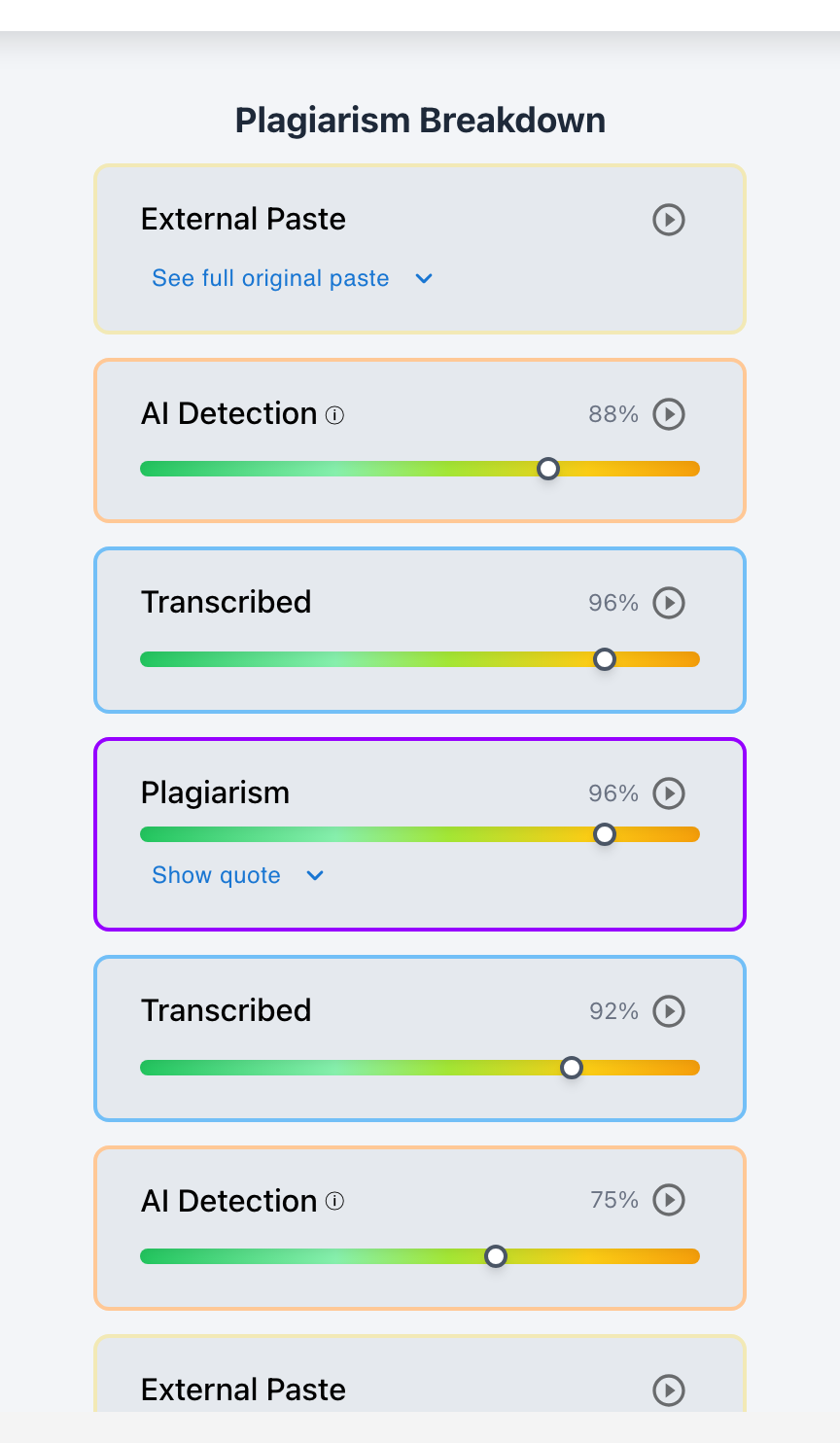
To check for AI writing inside Canvas, enable Checkmark Plagiarism & AI Detection in your Canvas assignment settings—allowing you to view AI probability scores, paragraph heatmaps, and keystroke writing playback directly inside Canvas SpeedGrader.
As generative AI tools like ChatGPT, Claude, and Gemini become ubiquitous, educators need a fast, reliable method to verify student authorship without leaving Canvas. Relying on external copy-paste websites disrupts grading workflows and violates student data privacy. By integrating Checkmark Plagiarism via LTI 1.3, Canvas SpeedGrader becomes a unified integrity hub: displaying AI detection scores, paragraph-by-paragraph text heatmaps, and video replays of student drafting history in a single sidebar.
Below is a comprehensive guide on configuring and using AI detection inside Canvas LMS.
Checkmark Plagiarism powers Canvas AI verification by pairing AI detection with essay writing playback, plagiarism detection, autograding, and native Canvas LMS integration.
The 4 Layers of AI Detection Inside Canvas SpeedGrader
1. Overall AI Probability Badge
Appears directly in the SpeedGrader assessment panel, displaying the calculated likelihood (0–100%) of synthetic machine generation.
2. Paragraph-by-Paragraph Heatmap
Highlights specific sections of the essay in color, identifying which individual paragraphs exhibit low perplexity and AI sentence patterns.
3. Integrated Essay Writing Playback
Allows teachers to watch a 15-second video replay of the student's typing history, confirming whether the flagged text was typed or pasted.
4. Original Paste Payload Tracking
Captures and stores the unedited text of any external clipboard paste event before the student made subsequent cosmetic revisions.
How to Enable AI Detection on Canvas Assignments
Setting up AI detection in Canvas takes less than 30 seconds per assignment:
- Step 1: Assignment Setup: Create a standard Canvas assignment with "Online" submission type (File Upload or Text Entry).
- Step 2: Enable Checkmark Review: In the "Plagiarism Review" dropdown menu, select Checkmark Plagiarism & AI Detection.
- Step 3: Automated Processing: Submissions are automatically scanned by Checkmark's multi-signal engine the moment students click "Submit."
- Step 4: Review in SpeedGrader: Open Canvas SpeedGrader to inspect the AI probability score, text heatmap, and drafting timeline simultaneously.
Read more in how Checkmark writing process analysis works.
Comparison: Standalone AI Websites vs. Checkmark Native Canvas Integration
Standalone AI Detection Websites (Disjointed)
- Must download files and copy/paste into external tabs.
- Displays only a single percentage score without evidence.
- Zero insight into whether the student typed or pasted.
- Risks FERPA violations and student data exposure.
Checkmark Native Canvas Integration (Seamless)
- Embedded directly inside Canvas SpeedGrader.
- Displays AI score + paragraph heatmap + writing playback.
- Verifies active typing hours, backspaces, and paste logs.
- 100% FERPA-compliant and institutional-grade secure.
A 5-Step Educator Protocol for Investigating AI in Canvas
Educator Canvas AI Audit Checklist:
- 1. Open Canvas SpeedGrader and review the student's AI Probability score badge.
- 2. Click the badge to view highlighted sentences in the paragraph heatmap.
- 3. Open the Essay Playback video replay to inspect active drafting hours and backspaces.
- 4. If active typing exceeds 3 hours and backspaces exceed 15% → dismiss the high AI score.
- 5. If active typing is under 5 minutes → review paste logs and hold a brief student conference.
How Checkmark Plagiarism Powers Canvas AI Detection
Checkmark Plagiarism combines **AI detection, essay writing playback, static AI detection, plagiarism detection, autograding, and Canvas/Google Classroom integrations** to make AI checking inside Canvas fast, multi-signal, and legally defensible.
Frequently Asked Questions
Does Canvas have its own built-in AI detector?
No. Canvas does not include a native AI detector. Institutions integrate certified tools like Checkmark Plagiarism via LTI 1.3 to check assignments.
Where do I see the AI detection score in Canvas?
AI detection scores appear directly inside Canvas SpeedGrader in the assessment sidebar next to the student's submission.
Can teachers see which paragraphs were written by AI?
Yes. Checkmark highlights specific paragraphs in color to show which sections triggered high AI probability patterns.
How does writing playback verify AI detection inside Canvas?
Playback shows active typing hours and keystroke history, proving whether an essay was typed by hand or pasted in an instant 1-second burst.
Can students see their AI score in Canvas?
Instructors can configure report visibility: showing reports to students immediately, after grading, or keeping them strictly teacher-facing.
How does Checkmark Plagiarism integrate with Canvas LMS?
Checkmark provides 1-click LTI 1.3 installation, SpeedGrader sidebar embeds, two-way grade passback, and single sign-on (SSO).
What happens if an essay has a high AI score but 4 hours of typing?
The writing history proves the high AI score is a false positive on an articulate human writer; the paper should be graded on merit.
Can Checkmark check for plagiarism and AI at the same time in Canvas?
Yes. Checkmark runs simultaneous AI detection, plagiarism database matching, writing playback, and autograding in a single SpeedGrader view.
Is student data secure and FERPA compliant?
Yes. Checkmark adheres to strict enterprise encryption standards and FERPA regulations, ensuring student writing is never shared or sold.
How fast are AI detection results returned in Canvas?
AI detection reports and writing playback replays are generated in under 15 seconds upon student submission.
Unified Academic Integrity Inside Canvas SpeedGrader
Checking for AI writing shouldn't require jumping between tabs or relying on unexplainable percentages. By pairing AI detection with essay writing playback inside Canvas SpeedGrader, Checkmark Plagiarism gives educators the complete truth in under one minute.
Checkmark Plagiarism supports this comprehensive approach with AI detection, essay writing playback, static AI detection, plagiarism detection, autograding, and integrations with Canvas and Google Classroom.
See how Checkmark pairs Canvas AI detection with multi-signal playback to verify student writing inside Canvas SpeedGrader. View a sample report or request a demonstration.