
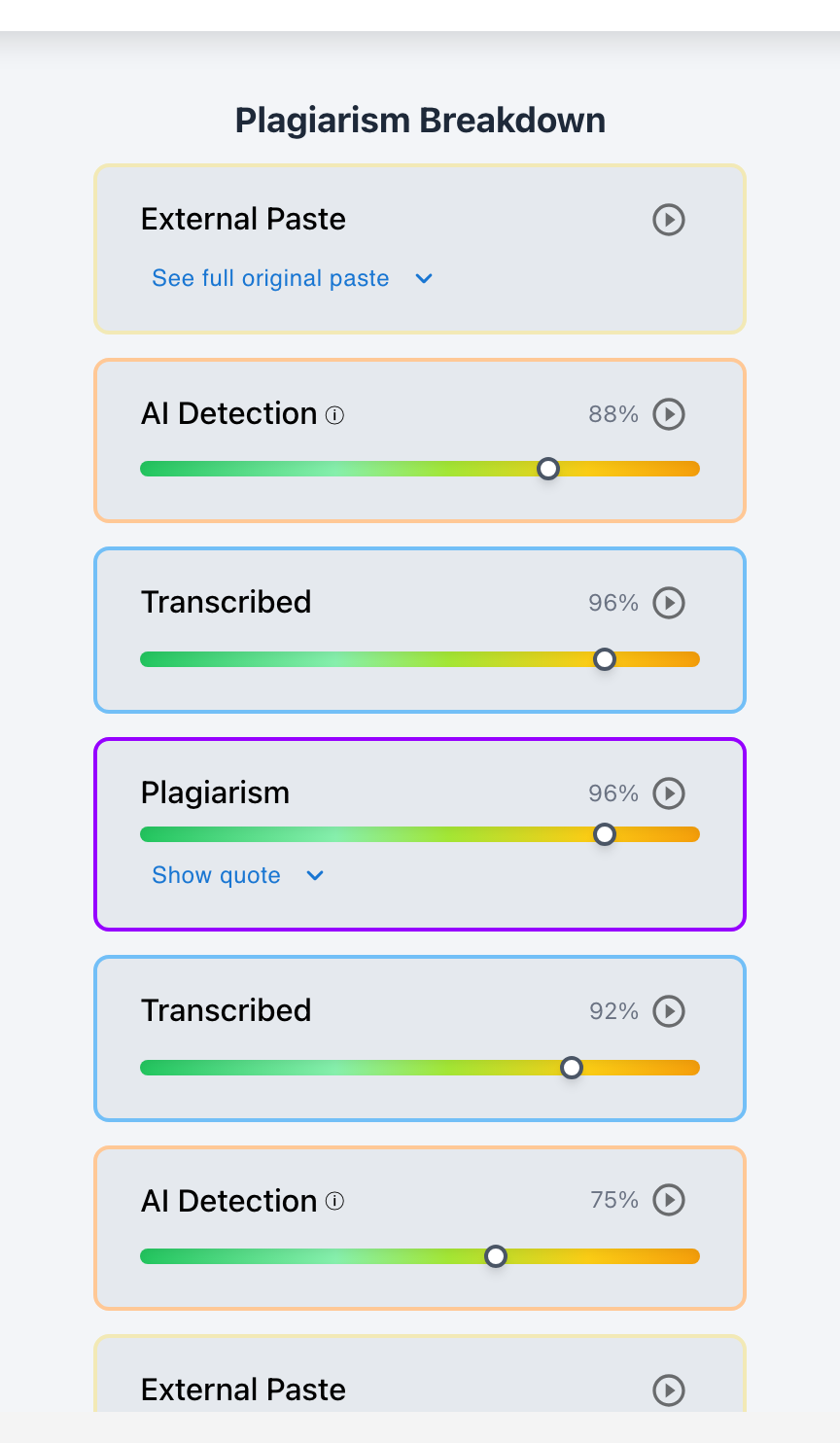
Yes. Teachers using modern writing analytics and document audit logs can immediately tell if an essay was drafted in an external application and pasted into the assigned LMS document.
When an essay is composed directly in an integrated document editor, the creation timeline shows hours of continuous keystrokes, typing pauses, backspaces, and paragraph reorganizations. In contrast, when an essay is composed in an external application—whether in Microsoft Word, Apple Pages, a personal Google account, or generated by ChatGPT—the assigned document remains completely blank until a single, massive paste event populates the entire text in a fraction of a second.
Through Checkmark Plagiarism's External Paste Detection, educators receive instant visual summaries of external paste events, keystroke-to-paste ratios, and total active drafting durations.
Checkmark Plagiarism supports external paste verification by pairing essay writing playback with AI detection, plagiarism detection, autograding, and integrations with Canvas and Google Classroom.
The 4 Forensic Clues of an Externally Drafted Essay
1. Zero Incremental Keystroke History
The assigned LMS document has 0 keystrokes recorded for thesis formulation, outline expansion, or paragraph drafting.
2. 100% Paste-to-Keystroke Ratio
Checkmark's dashboard flags that 100% of the document characters were inserted via external clipboard paste rather than manual typing.
3. Minimal Active Document Duration
The total active editing session on the LMS lasts only 2–3 minutes (just long enough to paste, format the title, and click Submit).
4. External Formatting Artifacts
Pasting from external software often carries subtle HTML artifacts, non-standard line breaks, or font family shifts embedded in the payload.
How to Differentiate Legitimate Offline Writing from AI Cheating
When an essay is pasted from an external source, how can a teacher verify whether the student genuinely wrote it in Microsoft Word or generated it with ChatGPT?
Legitimate Offline Human Writing
- Student can produce original .docx file with creation metadata.
- Word document contains multi-day save history and revisions.
- Citations point to real academic sources in library databases.
- Student fluently explains vocabulary and arguments in a conference.
Unauthorized External AI Paste
- Student has no intermediate drafts, notes, or previous files.
- Checkmark AI detection flags 95%+ probability on pasted payload.
- Citations contain hallucinated authors or non-existent DOIs.
- Student struggles to define complex vocabulary orally.
Read more in how Checkmark writing process analysis works.
Guidelines for Students Who Prefer Drafting in Word
If students prefer to draft offline, provide clear instructions to protect their academic standing:
- Keep Version History Active: Enable AutoSave and revision tracking in Microsoft Word or Apple Pages.
- Save Milestone Files: Save drafts as Draft_v1.docx, Draft_v2.docx, and Final_Essay.docx across multiple days.
- Transfer Early: Paste rough outlines into the LMS editor during early checkpoints and complete final polishing within the platform.
A 5-Step Educator Verification Protocol
Educator External Paste Audit Checklist:
- 1. Check the Checkmark writing playback summary in SpeedGrader for active typing duration.
- 2. Note whether the entire submission consists of a single external paste event.
- 3. Inspect the Original Preserved Paste payload for AI language markers and fake citations.
- 4. If the student claims offline drafting, request the original external file with metadata.
- 5. Hold a 2-minute oral check-in to confirm spoken alignment with the submitted text.
How Checkmark Plagiarism Powers External Paste Detection
Checkmark Plagiarism combines **AI detection, essay writing playback, static AI detection, plagiarism detection, autograding, and Canvas/Google Classroom integrations** to make external paste events immediately visible, transparent, and easy to verify inside your LMS.
Frequently Asked Questions
Can teachers see if I wrote my paper in Microsoft Word and pasted it into Google Docs?
Yes. The Google Doc timeline and Checkmark playback will show that 100% of the text appeared in a single paste event with zero native typing time.
Is it against the rules to write my essay in Word?
Not unless your teacher's syllabus explicitly requires drafting directly inside the LMS editor. Always retain your original Word files with version history.
How does writing playback catch ChatGPT essays pasted from another tab?
Playback logs show an empty document receiving thousands of words in a single millisecond, paired with 0 active drafting hours and high AI probability scores.
Can teachers tell which software I used to write the pasted text?
Pasting carries subtle clipboard formatting metadata (such as Word XML tags or Google Docs span wrappers) that can indicate the application of origin.
What if I wrote my essay by hand and typed it in?
Typing in a handwritten essay generates steady human keystrokes (30–60 WPM) over hours of typing, which playback logs accurately record.
How can an honest student prove they wrote an essay offline?
Share your original Word/Pages file showing creation timestamps, multi-day save history, rough outline notes, and speak comfortably about your research.
What should a teacher do if an entire essay is a single paste event?
Ask the student to share their original offline working file or outline notes, and conduct a brief oral conference to evaluate conceptual mastery.
How does Checkmark Plagiarism integrate with Canvas SpeedGrader?
Checkmark Plagiarism embeds visual writing playback timelines, paste-to-keystroke ratios, and dual AI/plagiarism reports directly inside Canvas SpeedGrader.
Does external paste detection track my computer outside the LMS?
No. It only logs keystrokes, active editing duration, and paste events inside the assignment document, respecting student privacy.
Why is requiring in-LMS drafting the best prevention method?
Drafting within the integrated LMS editor creates continuous, automated proof of human authorship, completely eliminating the need to verify external files.
Clarity, Transparency, and Authentic Authorship
External drafting creates clear timeline anomalies that are easily identified with modern writing analytics. By establishing clear drafting policies and verifying creation with essay writing playback, educators support student flexibility while maintaining unassailable integrity standards.
Checkmark Plagiarism supports this comprehensive approach with AI detection, essay writing playback, static AI detection, plagiarism detection, autograding, and integrations with Canvas and Google Classroom.
See how Checkmark pairs essay writing playback with multi-signal detection to identify external paste events with precision inside your LMS. View a sample report or request a demonstration.