
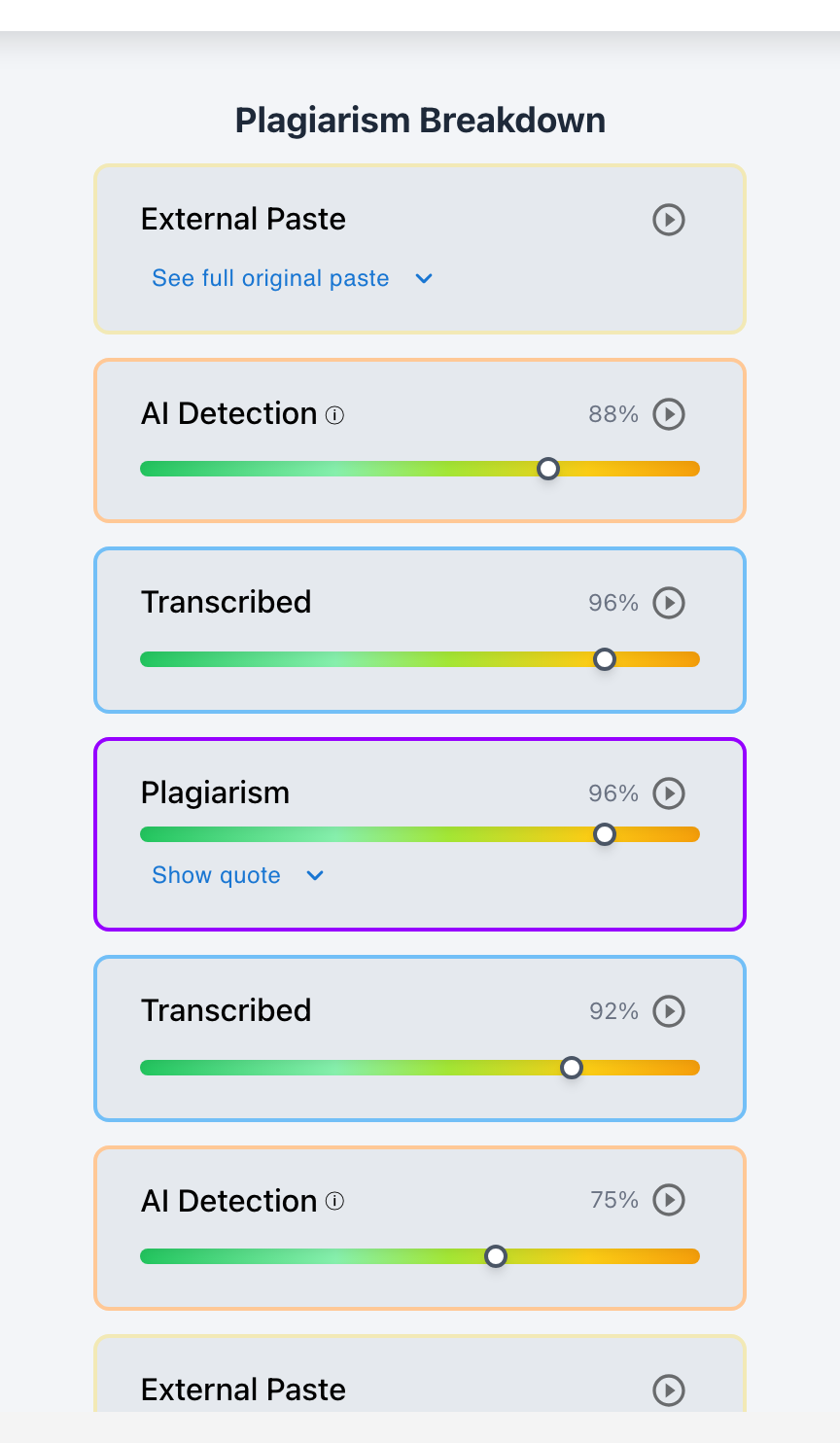
Yes. While Google Docs version history provides basic snapshot visibility of added text, dedicated writing-process analysis platforms can see the exact content, character count, and timestamp of every pasted text block.
Many students believe that pasting text into a Google Doc and making a few quick edits hides the external copy-paste action. In reality, Google Docs records revisions in chronological snapshots. Furthermore, when paired with Checkmark Plagiarism's Writing-Process Analysis, instructors gain complete forensic visibility into active drafting duration, keystroke cadences, and raw paste payloads.
Below is a breakdown of what teachers can see using standard Google Docs version history versus advanced writing-process analysis.
Checkmark Plagiarism elevates Google Docs integrity by pairing essay writing playback with AI detection, plagiarism detection, autograding, and integrations with Canvas and Google Classroom.
What Teachers See in Standard Google Docs Version History
1. Batched Revision Snapshots
Google Docs groups changes into periodic snapshots (every 2–10 minutes). Teachers can click a snapshot to see all text added during that window highlighted in color.
2. Sudden Word Count Jumps
If a document goes from 0 to 1,200 words between 11:15 PM and 11:18 PM, the sudden surge is visually obvious in the revision sidebar.
The Limitations of Native Google Docs Checking
While version history is helpful, relying on it manually has major limitations:
- No Keystroke vs. Paste Distinction: If a student pastes text and then types a sentence within the same 5-minute snapshot window, Google Docs colors both green, obscuring the exact moment of the paste.
- Time-Intensive Manual Review: Clicking through 30 collapsed snapshots for 100 students takes over 10 hours of manual grading time.
- No Automated Analytics: Google Docs does not calculate paste-to-keystroke percentages or active typing hours automatically.
How Checkmark Writing-Process Analysis Solves the Problem
Checkmark Plagiarism's Writing-Process Analysis transforms Google Docs checking into an automated, visual audit:
- Granular Keystroke Logging: Records every individual keystroke, backspace, and deletion, separating human typing from instant paste events.
- Raw Paste Payload Capture: Preserves the exact external text pasted into the doc, even if the student deleted or rewrote it moments later.
- Active Drafting vs. Idle Time: Distinguishes between time spent actively typing on the keyboard and hours where the browser tab was left idle in the background.
- 10-Second Video Playback: Provides an accelerated visual replay directly inside Canvas SpeedGrader or Google Classroom.
Read more in how Checkmark writing process analysis works.
Comparison: Google Docs Version History vs. Checkmark Writing-Process Analysis
Google Docs Version History (Manual)
- Batched snapshots every few minutes.
- Requires manual expansion of snapshot trees.
- Cannot calculate active vs. idle typing duration.
- Lacks integrated dual AI and plagiarism scanning.
Checkmark Writing-Process Analysis
- Granular keystroke and paste event logs.
- Instant automated replay in LMS grading view.
- Calculates exact active typing time and paste ratios.
- Combines playback with AI detection and citation checks.
A 5-Step Protocol for Teachers Using Google Docs
Educator Google Docs Process Protocol:
- 1. Require students to draft all assignments in Google Classroom with Checkmark enabled.
- 2. Check the automated writing process summary in SpeedGrader for total active typing time.
- 3. Look for flagged paste blocks exceeding 200 words.
- 4. Click flagged paste blocks to view the raw unedited pasted text.
- 5. Cross-reference paste events with citation audits and hold an oral check-in if needed.
How Checkmark Plagiarism Seamlessly Integrates with Google Classroom
Checkmark Plagiarism combines **AI detection, essay writing playback, static AI detection, plagiarism detection, autograding, and Canvas/Google Classroom integrations** to give teachers automated writing-process analysis directly within their everyday workflow.
Frequently Asked Questions
Can teachers see copy and pasted text in Google Docs?
Yes. Version history highlights added text in color, and platforms like Checkmark log the exact timestamp and character count of every paste event.
Can teachers see what I pasted if I delete or edit it later?
Yes. Writing-process analysis platforms preserve the initial raw paste payload in the chronological audit log, regardless of subsequent edits.
What if I write my paper in Microsoft Word and copy it into Google Docs?
It will appear as an external paste event. Provide your original Word document with version history to prove authentic human drafting.
How does writing-process analysis calculate active typing time?
It tracks active keystrokes, mouse clicks, and cursor movements, ignoring idle periods when the document was open but inactive.
Can students fake typing in Google Docs?
Faking hours of typing, natural pause cadences, and backspaces takes longer than writing the essay, completely defeating the purpose of a shortcut.
Does checking Google Docs revision history take too long for teachers?
Manual checking is slow, but Checkmark's automated writing-process analysis summarizes drafting sessions and highlights paste events in seconds.
How does writing-process analysis protect honest students?
It provides an unassailable record of multi-session typing, protecting students from false AI detector accusations.
What should a teacher do if a student has a single large paste event?
Review the raw pasted text, check for AI flags and hallucinated citations, and ask the student to explain their drafting process in a conference.
How does Checkmark Plagiarism integrate with Google Docs?
Checkmark Plagiarism captures writing playback directly within Google Classroom assignments, displaying visual replays in the grading screen.
Why is writing-process analysis better than static AI detection?
Static detectors give probabilistic scores, while writing-process analysis provides physical, timestamped proof of human typing vs. copy-pasting.
Transform Process Visibility into Learning
Understanding how documents are created allows educators to celebrate authentic writing habits and identify integrity issues with confidence. With writing-process analysis, teachers gain total transparency while saving valuable grading time.
Checkmark Plagiarism supports this comprehensive approach with AI detection, essay writing playback, static AI detection, plagiarism detection, autograding, and integrations with Canvas and Google Classroom.
See how Checkmark pairs essay writing playback with multi-signal detection to automate writing-process analysis in Google Docs. View a sample report or request a demonstration.