
Teachers may identify signs that a student used ChatGPT, but no detector can prove authorship with complete certainty. AI-detection tools look for statistical patterns associated with machine-generated text, while teachers may also review drafts, writing history, source use, previous assignments, and the student’s explanation of the work. An AI score should be treated as a reason to review the assignment, not as proof of misconduct.
The rapid adoption of generative artificial intelligence in education has left teachers, students, and parents navigating complex questions about academic integrity. When evaluating student writing, educators draw a clear distinction between identifying statistical writing patterns, determining whether ChatGPT was used, and deciding whether a student followed assignment guidelines. Depending on course policies, AI assistance may be explicitly permitted, restricted to brainstorming, or completely prohibited.
This guide explains how educators evaluate AI detection for student writing, how detection tools analyze prose, why false flags happen, and why combining process evidence with teacher judgment creates a fairer review for everyone.
How Do Teachers Detect Possible ChatGPT Use?
Teachers identify potential AI writing by evaluating multiple independent signals rather than relying on a single piece of software. Modern educators combine digital tools with pedagogical context.
Common methods teachers use to detect potential ChatGPT involvement include:
- AI-Detection Software: Automated algorithms that screen document text for statistical patterns typical of large language models.
- Writing-Process & Revision History: Examining document creation timelines, edit sessions, copy-paste events, and typing activity in Google Docs or LMS editors.
- Comparison With Previous Assignments: Noting sudden changes in a student's vocabulary, syntactical style, or subject comprehension.
- Source & Citation Audits: Verifying whether cited articles exist and whether quotations accurately reflect the referenced literature.
- Prompt & Assignment Knowledge: Spotting generic responses that ignore specific in-class discussions, localized prompts, or required readings.
- Student Conversations & Oral Defense: Asking students to explain their thesis, research process, and drafting choices in their own words.
- Drafts, Outlines & Notes: Reviewing preliminary work, hand-written notes, or research logs submitted during the writing process.
What Does an AI Detector Actually Identify?
A common misconception is that AI software searches for a secret digital watermark or hidden ChatGPT tag inside student text. In reality, an AI detector for teachers analyzes mathematical text characteristics.
Detectors evaluate writing by measuring key statistical metrics:
- Perplexity (Word Choice Predictability): Generative AI models select words based on statistical probability. Text with low perplexity uses highly predictable word choices, whereas human writing features unexpected vocabulary and creative turns of phrase.
- Burstiness (Sentence Length & Structural Variation): Humans naturally vary their sentence structures-combining short, punchy statements with long, complex clauses. AI models tend to produce uniform sentence lengths and consistent paragraph rhythms.
- Tone & Vocabulary Uniformity: AI prose frequently exhibits an overly neutral, polished tone with characteristic transition words ("furthermore," "moreover," "in conclusion", "it is important to note") and balanced paragraph lengths.
- Passage Discrepancies: Statistical differences between individual paragraphs within a single document, which may indicate that sections were generated separately or combined with human drafting.
The software uses these metrics to output a probability score or confidence classification. It does not output a verified historical fact about who typed the words.
Can an AI Detector Prove a Student Used ChatGPT?
No. An AI detector score cannot prove that a student used ChatGPT.
AI detectors generate probabilistic estimates, which means they are subject to inherent limitations:
- False Positives: Authentic human writing identified as AI-generated because the student used formal, structured, or predictable phrasing.
- False Negatives: AI-generated text flagged as human because the prompt produced unusual phrasing or the student edited the output.
- Tool Discrepancies: Two different detection platforms often give completely different scores for the exact same paper.
- Sensitivity to Minor Edits: Changing a few adjectives or rearranging sentences can dramatically alter a detector's score.
Furthermore, an AI score cannot tell a teacher which specific model was used, who typed the prompt, whether the student used AI for permitted editing versus full text generation, or what the student's intentions were.
Why AI Detectors Can Make Mistakes
Understanding AI detector limitations helps prevent unfair accusations. Detection software can produce false flags due to several factors:
- Short Document Length: Brief responses (under 150–200 words) lack sufficient statistical sample size for accurate pattern classification.
- Formulaic Writing Templates: Standard lab reports, 5-paragraph essays, or rigid argumentative structures naturally resemble machine patterns.
- Highly Polished Prose: Clear, grammatically flawless human writing often gets misclassified because algorithms associate precision with AI models.
- Non-Native English Speakers: Multilingual learners often write with simpler, more regular vocabulary and rigid grammar patterns, which can trigger false positive flags.
- Permitted Tutoring or Writing Center Help: Heavy editing assistance from a tutor can standardize a student's prose, causing it to pattern like machine text.
- Human-Edited AI Output: A student who heavily rewrites ChatGPT text may lower the score, while an honest student who writes formally gets flagged.
Signs That May Cause a Teacher to Review an Assignment
Rather than relying solely on automated flags, educators watch for qualitative signs a student used ChatGPT:
- Abrupt Vocabulary Elevation: A paper using graduate-level vocabulary that contrasts with the student's established writing style.
- Vague, Generic Statements: Flawless prose that speaks in broad generalities without citing specific lectures, textbook chapters, or classroom discussions.
- Plausible Hallucinations: Confident assertions of false historical facts or scientific principles generated by language model hallucination.
- Fabricated Citations: Footnotes or APA references citing academic papers or authors that do not exist.
- Repetitive Paragraph Rhythms: Essay sections that consistently open with identical transition phrases and end with generic summary sentences.
- Failure to Answer the Prompt: A beautifully written response that addresses a slightly different topic than what was assigned.
- Suspicious Document Logs: An entire 1,500-word essay appearing in a Google Doc via a single paste event shortly before the deadline.
None of these signals prove misconduct by themselves, but together they justify a follow-up review.
Why Writing-Process Evidence Matters
To move beyond guesswork, modern educators rely on writing history AI detection. Writing-process evidence analyzes how an assignment was built over time, offering objective proof of human drafting.
Key Process Evidence Signals
- Session Start Time & Duration: Verifying that the student spent hours or days actively working in the document.
- Typing vs. Pasting Rhythms: Differentiating between steady keystroke drafting and sudden multi-paragraph paste blocks.
- Active Revision & Backtracking: Observing natural sentence deletions, structural reorganization, and typo corrections.
- Citation Entry Timelines: Checking whether sources were added gradually during research or pasted all at once.
- Screen Transcription Detection: Spotting rapid, unbroken typing that mirrors retyping text from a secondary device.
Process evidence is powerful because it vindicates honest students. If a student's paper receives a high AI score due to formal sentence structure, opening their Google Docs revision history to reveal three hours of active typing and revision immediately resolves the concern.
Reviewing Drafts and Version History
Instructors frequently inspect version history in Google Docs, Microsoft Word, or LMS submission portals to verify authentic effort.
However, educators keep version history limitations in mind:
- A student may legitimately draft an outline in an offline notebook or separate app before copying it into the final document.
- Importing a personal draft from another word processor creates a large paste event that looks suspicious if taken out of context.
- Some word processors do not record detailed keystroke-level logs.
For guidance on managing version records, see our article on Google Docs version history best practices.
Comparing the Assignment With Previous Student Writing
Teachers evaluate consistency by comparing a flagged paper against earlier work submitted by the same student.
Instructors look at:
- Vocabulary and Grammatical Complexity: Does the vocabulary match the student's past essays and in-class writing?
- Argumentative Structure: Does the organization reflect how the student typically structures their thoughts?
- Subject Knowledge: Does the written analysis align with the student's verbal contributions in class?
Caution for educators: Students can improve dramatically over a semester after visiting a writing center or receiving feedback. A shift in style should prompt conversation, not immediate disciplinary action.
Reviewing Sources, Citations, and Factual Claims
Generative AI tools frequently invent source citations-a phenomenon known as hallucination. Checking citations is one of the most reliable ways for schools to detect AI writing errors.
Teachers use a simple 6-step citation audit workflow:
- Open Cited Links: Click URLs or search journal titles to confirm the sources exist.
- Verify Authors & Dates: Confirm that publication years, volume numbers, and author names are accurate.
- Check Claim Support: Read the cited passage to ensure it actually supports the student's claim.
- Verify Direct Quotes: Search for quoted text within the original article.
- Review Assignment Guidelines: Ensure required primary sources were utilized.
- Discuss Source Selection: Ask the student how and where they located the cited literature.
Talking With the Student About the Assignment
A supportive, fact-finding conference allows students to explain their work and resolves most AI concerns quickly.
Educators often use seven neutral questions during student meetings:
- "Can you walk me through how you developed your main argument?"
- "Which section of the assignment was most challenging to write?"
- "Which sources had the biggest impact on your perspective?"
- "Can you explain this specific paragraph in your own words?"
- "What changes did you make between your early draft and final submission?"
- "Did you use any digital or AI tools to assist your process, and if so, how?"
- "Can you share the research notes, outline, or early drafts you created?"
When an instructor states concerns neutrally and shares the available evidence, honest students can easily demonstrate their understanding.
Required Classroom Examples
Example 1: Incorrect AI Flag (False Positive Resolved by Process Evidence)
Scenario:
A high school senior submits an AP Literature essay that receives an 82% AI score on a commercial detector due to its formal, structured prose.
Review & Outcome:
The teacher opens Checkmark's writing-process timeline and reviews 4.5 hours of documented editing across three days, including outline expansion, sentence revisions, and typo fixes. The process evidence proves authentic student authorship, and the essay is graded normally.
Example 2: Suspicious Writing Process (AI Generation & Hallucinated Sources)
Scenario:
A history paper arrives as a single 1,200-word paste block 10 minutes before the deadline, showing zero drafting history. Three cited journal articles do not exist in any academic database.
Review & Outcome:
The combination of instant paste creation and hallucinated citations justifies an academic review conference. The teacher meets with the student to discuss source selection and review course AI policies.
Example 3: Permitted AI Use (Transparent Disclosure)
Scenario:
A teacher allows students to use ChatGPT for brainstorming essay topics provided prompts are disclosed. A student submits an original paper and attaches an appendix listing their AI prompts.
Review & Outcome:
Because the student followed disclosure guidelines and wrote the actual essay independently (supported by revision history), the submission fully complies with course expectations.
Can Teachers Detect ChatGPT After the Text Is Edited?
Human editing alters the statistical word patterns that AI detectors measure. However, editing creates different evidence trails:
- Lightly editing AI text may lower a software score, but it does not create a natural drafting history.
- Inserting personal anecdotes or local class details makes prose sound more individual.
- Combining human paragraphs with AI output creates mixed report signals.
- Running text through AI paraphrasing tools creates distinct patchwriting patterns.
A lower AI score does not prove zero AI was used, just as a high score does not prove misconduct. Writing-process history remains the most reliable check regardless of editing.
Can Teachers Detect ChatGPT Used Only for Brainstorming or Editing?
If a student uses ChatGPT solely to generate topic ideas, create an outline, or check grammar, the final document text is written by the student. Automated tools cannot reliably spot pre-writing AI assistance in final prose.
That is why schools establish clear guidelines for:
- Permitted Uses: Brainstorming, outlining, grammar checking, concept explanation.
- Prohibited Uses: Generating full paragraphs, writing essays, creating false citations.
- Disclosure Rules: Requiring students to include an AI use statement or prompt log.
Is ChatGPT Use the Same as Plagiarism?
While AI use and plagiarism overlap, they are distinct issues:
- Plagiarism: Passing off existing human writing or ideas as your own without source attribution.
- Unauthorized AI Use: Submitting machine-generated text as original human drafting, violating course assignment rules.
For a complete comparison, read our guide on AI Detection vs. Plagiarism Detection.
What Should a Teacher Do When an Assignment Is Flagged?
Follow a fair 10-step protocol when an assignment produces a concerning AI indicator:
- 1 Evaluate the AI score in context (consider passage length and style).
- 2 Highlight the specific passages flagged by the software.
- 3 Re-read your assignment instructions and AI policy.
- 4 Audit source citations and check factual claims.
- 5 Inspect document revision history and paste logs.
- 6 Compare the work with the student's previous submissions.
- 7 Schedule a private, supportive conference with the student.
- 8 Invite the student to share outlines, notes, or early drafts.
- 9 Follow school academic integrity guidelines.
- 10 Document all evidence and record the outcome clearly.
What Can Students Do If Their Work Is Incorrectly Flagged?
Students can protect themselves against false AI flags by following smart drafting habits:
- Keep Version History Active: Write directly in Google Docs or tracked word processors rather than copying text from untracked apps.
- Save Outlines & Notes: Retain preliminary research notes, brainstorm outlines, and rough drafts.
- Disclose Permitted Tool Use: Include a brief statement detailing any AI tools used for brainstorming or editing.
- Offer an Oral Explanation: Be prepared to explain your research process and thesis in a meeting.
- Follow School Appeal Procedures: Request a review that incorporates writing-process evidence.
How Checkmark Helps Teachers Review Possible AI Use
Checkmark equips educators with a transparent, multi-layered evidence report inside your existing LMS workflow.
Checkmark provides:
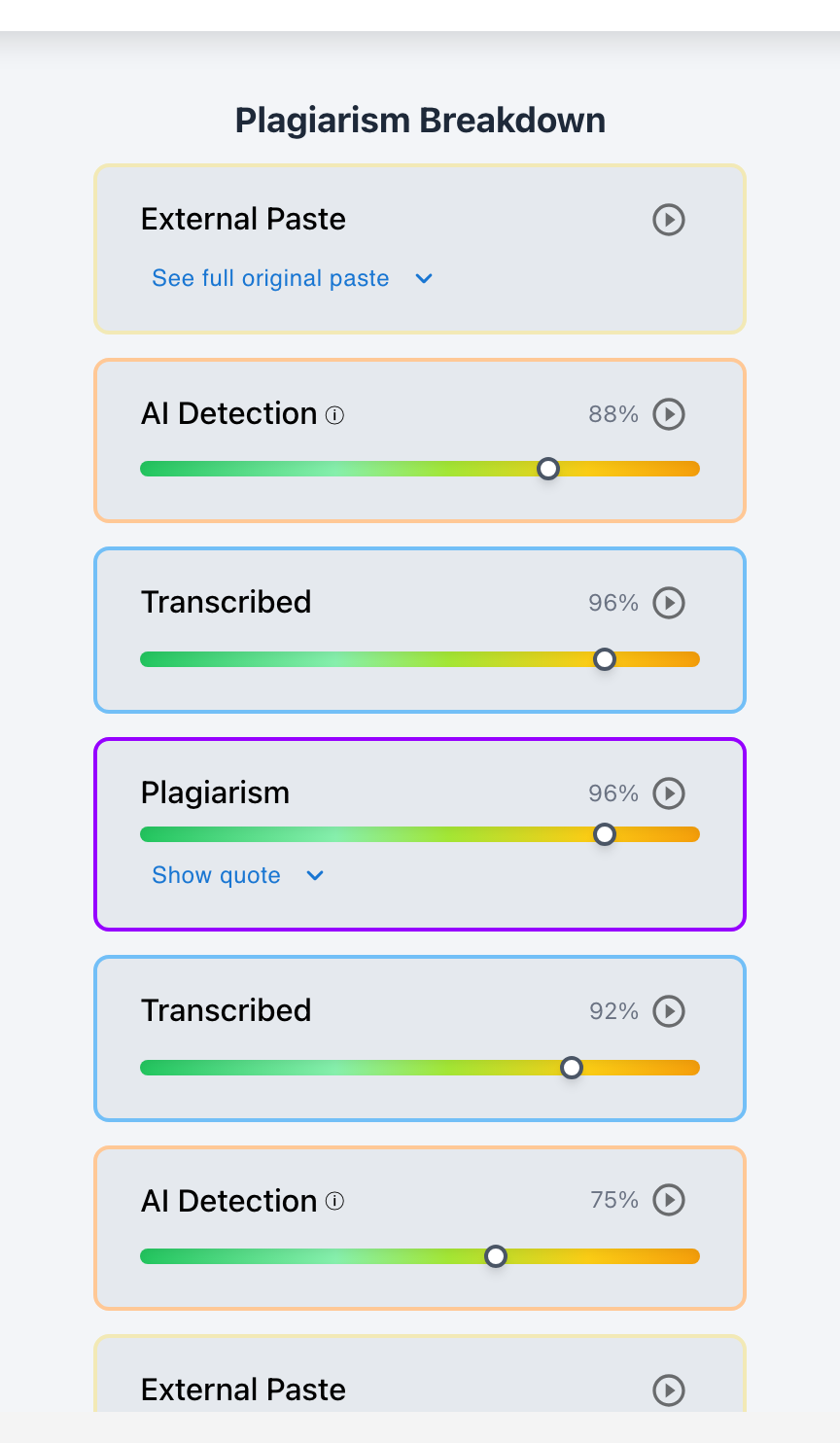
- Passage-Level AI Indicators: Calibrated confidence sliders across highlighted passages without black-box percentage claims.
- Plagiarism & Web Source Matching: Side-by-side quote comparison across billions of web pages and publications.
- Writing-Process Playback: Session replay showing how an essay evolved line-by-line over time.
- Copy-Paste & Transcription Audits: Instant detection of massive paste blocks and screen retyping patterns.
- LMS Workflow Integration: Direct access within Google Classroom and Canvas LMS.
Frequently Asked Questions
Can teachers tell exactly which AI tool a student used?
Usually not with certainty. An AI detector identifies statistical writing patterns common to large language models, but it cannot definitively prove whether text came from ChatGPT, Claude, Gemini, or another model.
Can Google Classroom detect ChatGPT?
Google Classroom does not natively include an AI detector, but schools connect specialized integrations like Checkmark to screen Google Docs submissions directly within Google Workspace. Read our guide on Google Classroom AI detection workflows.
Can Canvas detect ChatGPT?
Canvas LMS relies on external LTI integrations like Checkmark to provide AI detection and writing process evidence inside SpeedGrader. Read our guide on Canvas LMS detection features.
Can professors detect ChatGPT in college essays?
Yes. College professors combine AI detection tools with source verification, drafting history, comparison with past student papers, and oral defense questions during office hours.
Is a high AI score proof of cheating?
No. An AI score is a statistical signal that justifies further teacher review, not standalone proof of misconduct.
Can ChatGPT writing avoid detection?
AI-generated text can sometimes produce low or inconsistent detector scores, especially after editing. This is why teachers evaluate writing history and citations alongside AI software.
Can human writing be incorrectly flagged as AI?
Yes. False positives occur, particularly for non-native English speakers or formal academic prose. Teachers should review revision history and speak with the student before reaching conclusions.
See how Checkmark helps teachers evaluate possible AI use with more context than an AI score alone. View a sample report or request a demonstration.