
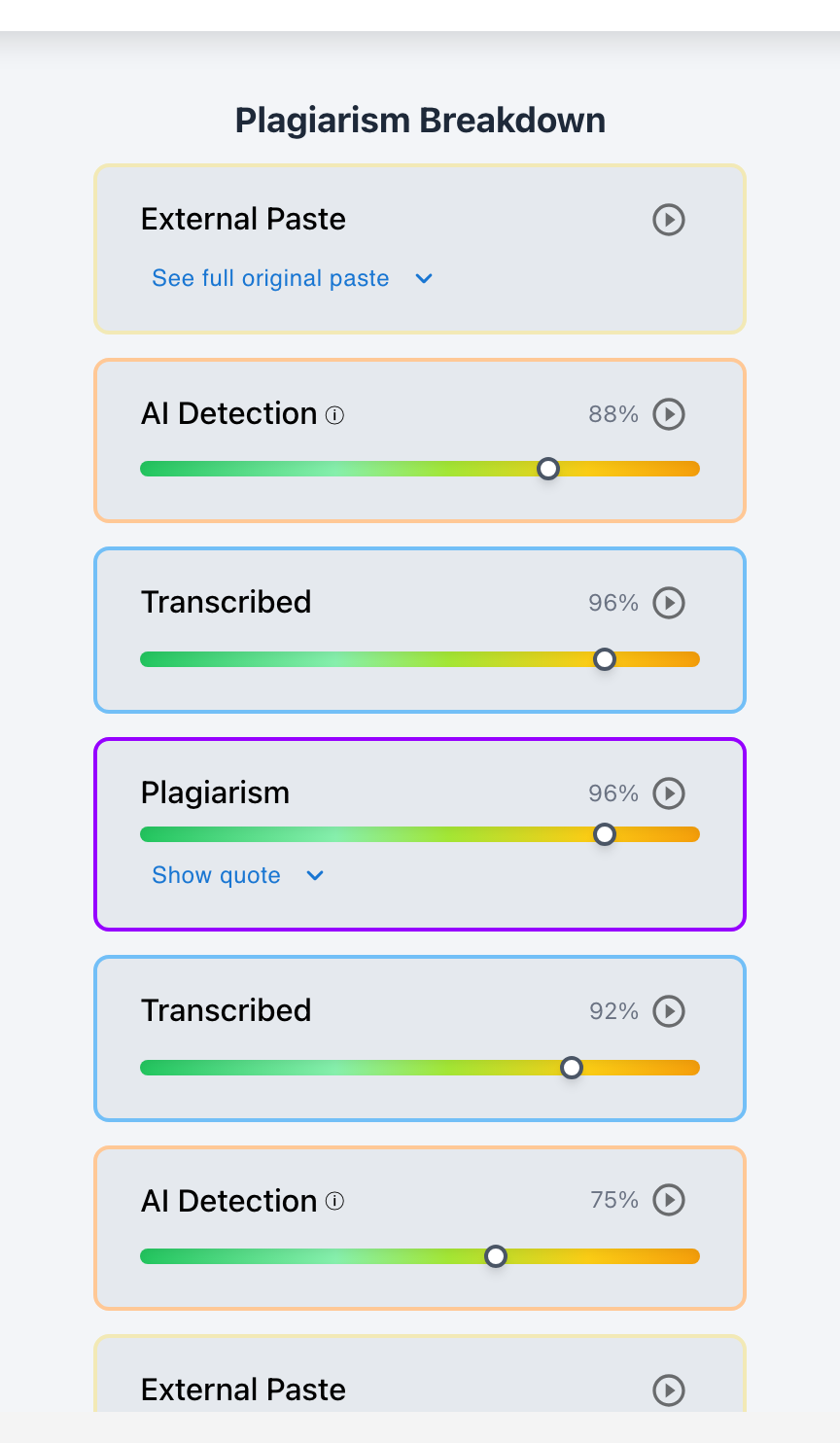
Yes. Modern academic integrity platforms like Checkmark Plagiarism combine AI detection, web plagiarism matching, peer-to-peer similarity, citation verification, and keystroke writing playback into a single, unified report directly inside Canvas SpeedGrader and Google Classroom. Instead of juggling multiple disjointed software tools, educators view a synchronized tri-panel dashboard showing plagiarism percentage, AI probability, and active typing hours side-by-side.
For years, educators were forced to use fragmented, siloed tools: one vendor for web plagiarism checking, another subscription for AI detection, and native Google Docs for checking version history. This fragmentation created massive cognitive friction: a teacher had to open three separate websites, re-upload documents multiple times, and try to mentally reconcile conflicting data points. The Unified Integrity Report solves tool sprawl by bringing all textual, neural, and behavioral process evidence onto a single interactive canvas. Checkmark Plagiarism delivers this all-in-one experience natively in LMS grading workflows.
Below is a comprehensive guide on the architecture, advantages, and usage of unified integrity reports.
Checkmark Plagiarism unifies integrity analysis by pairing plagiarism detection with AI detection, essay writing playback, autograding, and integrations with Canvas and Google Classroom.
The 4 Pillars of a Unified Integrity Report
1. Tri-Signal Dashboard Overview
Displays the three critical integrity metrics side-by-side at the top of the report: Plagiarism Similarity %, AI Probability %, and Active Typing Duration.
2. Color-Coded Multi-Layer Canvas
Highlights text with distinct color-coded layers: Blue for web plagiarism, Orange for peer copying, Red for AI generation, and Purple for patchwriting.
3. Embedded Keystroke Playback Player
An interactive video player embedded directly in the report that replays the document's construction, deletions, and paste events in 15 seconds.
4. Automated Source & DOI Verification Card
An integrated table displaying the live status of all cited DOIs and references, flagging unresolvable hallucinations alongside plagiarism matches.
Why Unified Reporting Catches Complex Hybrid Cheating
Understanding how cross-signal correlation exposes sophisticated shortcuts:
- The "AI Paraphrased Web Source" Shortcut: A student copies text from Wikipedia, runs it through QuillBot to bypass plagiarism checks, and pastes it in. A standalone plagiarism checker sees 0% similarity; a standalone AI detector is unsure. Checkmark's unified report connects the paste event, the AI perplexity shift, and the semantic web match simultaneously.
- Instant False Positive Elimination: When an AI detector outputs an 85% score, the teacher glances immediately at the unified report's Active Typing Duration metric (4.2 hours) to dismiss the alarm in 5 seconds.
- Single Exportable Record: Generate a unified, FERPA-compliant PDF dossier containing all signals for immediate administrative approval.
Read more in how Checkmark writing process analysis works.
Comparison: Fragmented Siloed Tools vs. Checkmark Unified Report
Checkmark Unified Report (All-in-One Dashboard)
- Similarity, AI scores, and typing hours in one view.
- Color-coded canvas showing all violation types.
- Embedded 15-second writing playback video.
- Integrated directly in Canvas SpeedGrader.
Fragmented Siloed Tools (3 Separate Logins)
- Separate web tabs for plagiarism and AI detection.
- No integrated keystroke writing playback.
- Conflicting data points that confuse educators.
- Requires downloading, converting, and re-uploading files.
A 5-Step Educator Protocol for Unified Report Navigation
Unified Report Navigation Checklist:
- 1. Open the student's submission in Canvas SpeedGrader with Checkmark enabled.
- 2. Review the Tri-Signal Header: check Plagiarism %, AI %, and Active Typing Duration.
- 3. Inspect the Unified Highlight Layer: toggle between Plagiarism Sources and AI Heatmaps.
- 4. Click the Play button to watch the 15-second Writing Playback video in the sidebar.
- 5. Approve Autograder feedback or export the unified PDF case dossier in one click.
How Checkmark Plagiarism Powers Unified Reporting
Checkmark Plagiarism combines **AI detection, essay writing playback, static AI detection, plagiarism detection, autograding, and Canvas/Google Classroom integrations** into a single, cohesive interface that eliminates tool sprawl and accelerates grading.
Frequently Asked Questions
Does Checkmark require separate subscriptions for AI and plagiarism?
No. Checkmark includes AI detection, web plagiarism checking, peer matching, and writing playback in a single unified platform.
Can teachers toggle off specific highlight layers on the document?
Yes. You can easily toggle between Plagiarism Highlights, AI Heatmaps, and Revision Diffs using the filter checkboxes in the sidebar.
How does the unified report appear in Canvas SpeedGrader?
Checkmark embeds a clean, collapsible sidebar inside SpeedGrader, displaying all metrics, video playback, and source cards natively.
What if plagiarism and AI detection give conflicting results?
The unified report's writing playback telemetry serves as the ground truth arbiter: physical keystroke hours determine authentic composition.
How does Checkmark Plagiarism integrate with Google Classroom?
Checkmark provides single sign-on (SSO) and auto-syncing, embedding the unified integrity report directly into the Google Classroom grading view.
Can students view the unified report?
Teachers can choose to share the unified report with students, allowing them to see their writing analytics and citation matches formatively.
Does the unified report increase page load times?
No. Checkmark's cloud infrastructure processes all signals in parallel, loading the complete unified report in under 2 seconds.
How does Autograder integrate with the unified report?
Checkmark Autograder evaluates student arguments against rubric criteria while cross-referencing similarity and AI metrics in the same view.
Can unified reports be downloaded as PDF files?
Yes. Checkmark exports standardized, high-resolution PDF dossiers containing all multi-signal highlights, telemetry charts, and notes.
Why is unified reporting the gold standard for school districts?
Because eliminating multiple software subscriptions saves administrative budgets, streamlines IT management, and provides educators with a single, reliable workflow.
All-in-One Simplicity for Modern Academic Integrity
Educators should not have to navigate a maze of disparate software tools to evaluate student writing. By uniting AI detection, plagiarism screening, and keystroke writing playback into a single, elegant interface with Checkmark Plagiarism, teachers grade with unmatched speed, clarity, and confidence.
Checkmark Plagiarism supports this comprehensive approach with AI detection, essay writing playback, static AI detection, plagiarism detection, autograding, and integrations with Canvas and Google Classroom.
See how Checkmark combines AI detection, plagiarism checks, and writing playback into one report. View a sample report or request a demonstration.