
Teachers do not need convincing that grading essays eats evenings and weekends - we have written about the numbers before. The real question about AI grading tools is not whether they save time. It is whether the time saved comes at the cost of the two things a grade has to be: accurate to the rubric, and owned by the teacher. Here is how Checkmark’s autograder is built around that question.
It grades your rubric, not ours
The autograder has no house rubric. It scores each submission against the criteria the teacher attached to the assignment, and those criteria can arrive however you have them:
- Built in the app - a rubric builder with criteria, rating levels, and live point totals, structured the way Canvas rubrics are.
- Uploaded - an existing rubric as a document, or even a photo of a paper rubric; Checkmark normalizes it into gradable criteria.
- Reused - a Rubrics Library keeps everything you have made, ready to duplicate and attach across courses and terms.
- Synced - Canvas, Buzz, and Google Classroom assignments bring their rubrics along automatically. Buzz rubrics are converted from their native format on the way in.
Scores that show their work
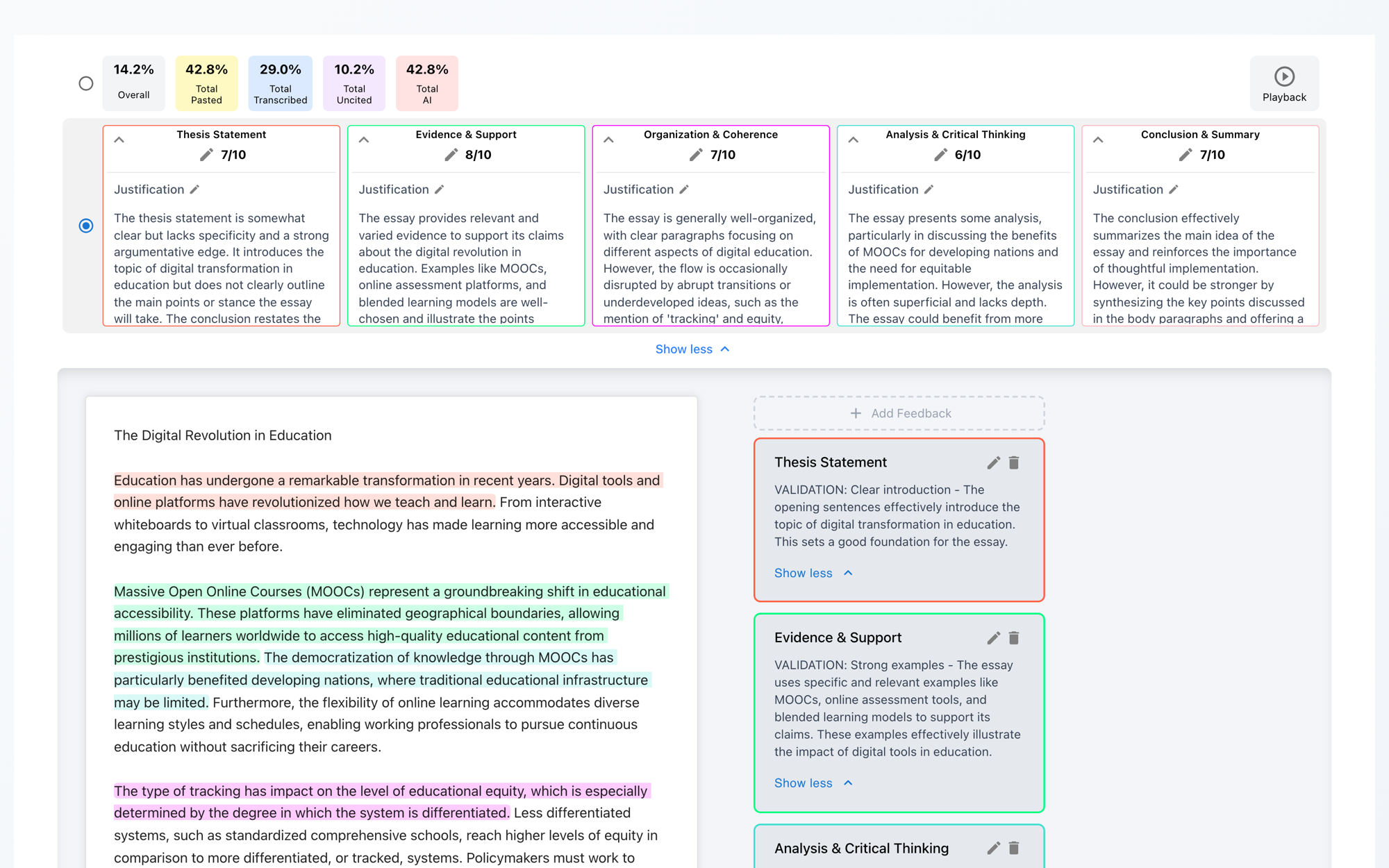
When a submission is analyzed, each rubric category gets its own score out of its own point value - Thesis Statement 7/10, Evidence & Support 8/10 - never one opaque total. Every score comes with a written justification tied to what the student actually wrote, and the report adds feedback items anchored to specific quotes in the essay: click one and the essay scrolls to the sentences it refers to.
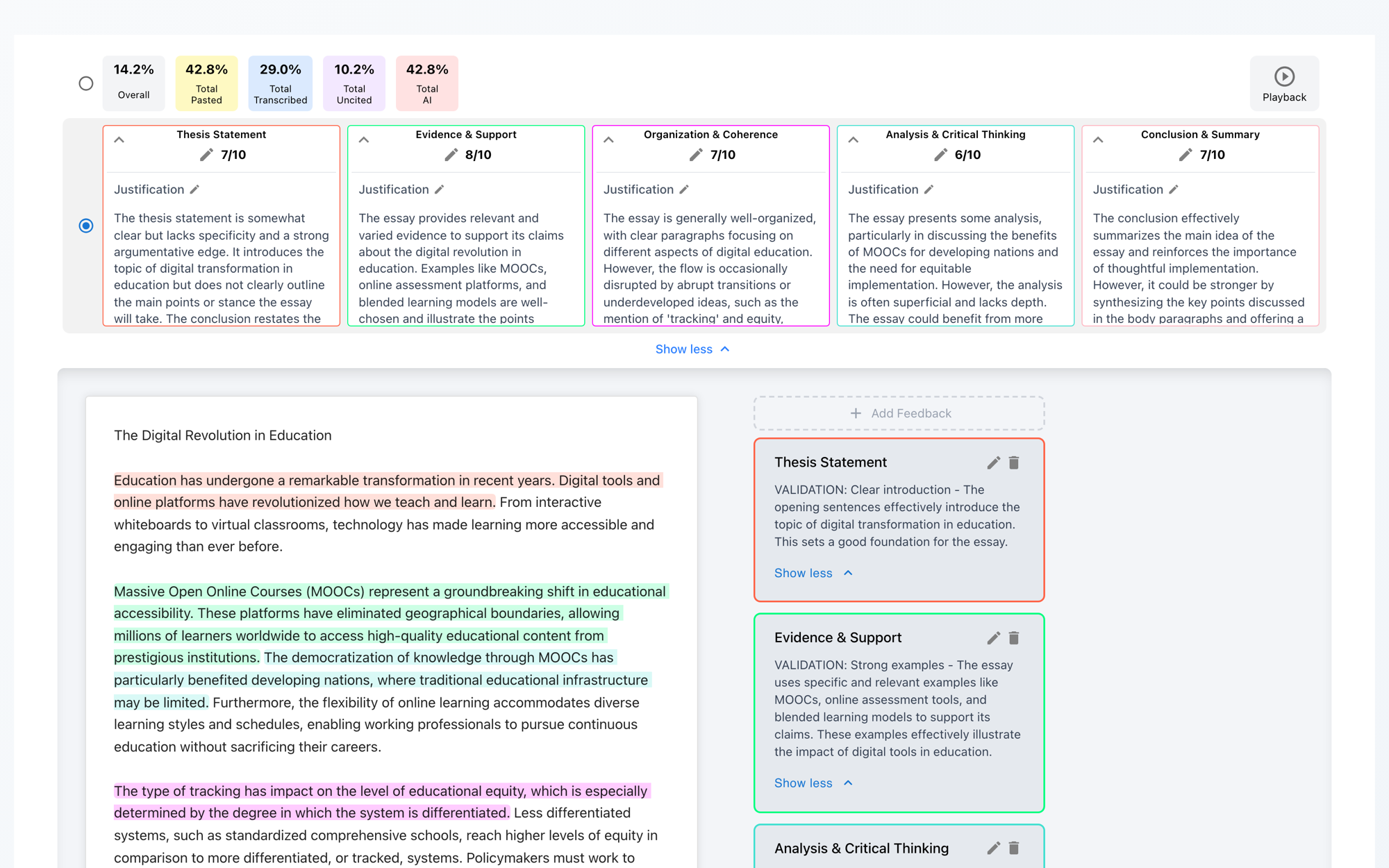
The justifications are the part teachers tell us changes the workflow. A bare score still forces you to re-read the essay to decide whether you agree. A paragraph of reasoning - referencing the student’s own thesis, examples, and transitions - lets you audit the grade in seconds and correct it in one click where you disagree.
The teacher is the pipeline, not a step in it
Everything the autograder produces is a draft. In the grading view, every score has a pencil next to it; every justification is editable; feedback items can be rewritten, recategorized, or deleted. Select any text in the essay and click Add Feedback to leave your own quote-anchored comment alongside the machine’s.
And none of it is visible to students until the teacher publishes. Publishing snapshots exactly what you approved - the scores and feedback as you left them, not as the model first wrote them. There is no mode where the autograder grades a class on its own.
Grades land where your gradebook lives
Publishing is LMS-aware. Canvas assignments get a Push to Canvas button that sends the score into SpeedGrader; Buzz assignments push back into Buzz grading; Google Classroom assignments sync to Classroom; web-app assignments publish inside Checkmark. A bulk publish flow on each assignment page shows which submissions have scores, which are already published, and which have unpublished changes - then pushes the whole set at once.

Grading next to integrity, on purpose
The autograder shares a report with plagiarism, AI, and writing-process analysis, and that adjacency is the point. Reading a justification for an Evidence & Support score while the same page shows an uncited-source card changes the feedback you write. Seeing strong scores alongside a clean writing process is, for most submissions, the fastest possible confirmation that everything here is fine - which is what most submissions deserve.
The mechanics, end to end, are in our Autograder & Rubrics guide, and the service overview lives at AI Autograder & Rubrics. Or watch it grade something real: the live demo scores a sample essay against a rubric and writes out its reasoning while you wait.