
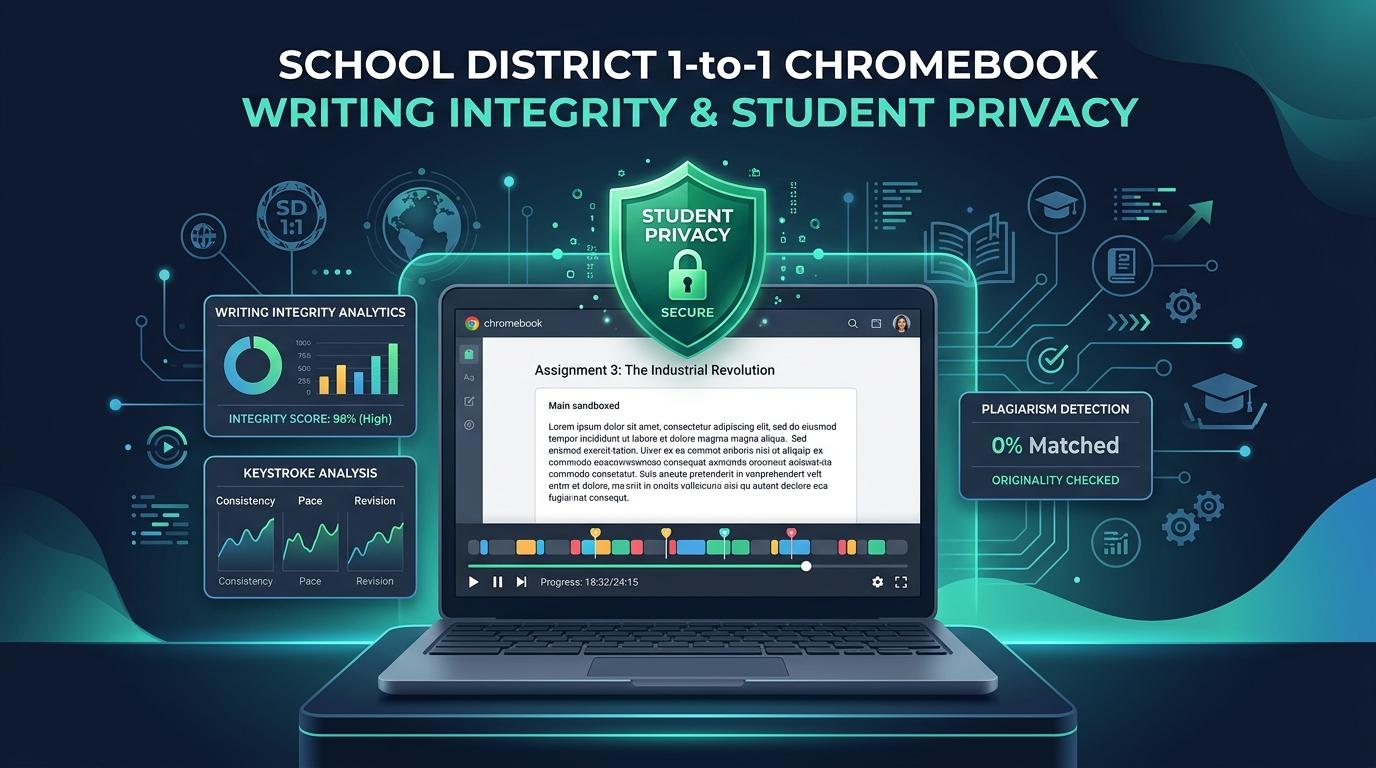
Over 90% of U.S. school districts maintain 1-to-1 device programs dominated by Google ChromeOS fleets. In an attempt to maintain academic integrity and classroom focus, many districts deployed aggressive screen-monitoring, tab-locking, and continuous device surveillance software. However, this invasive spyware model is failing on multiple fronts: it violates student privacy across school-home boundaries, triggers severe surveillance anxiety, provokes legal scrutiny from civil liberties organizations (ACLU, EFF), violates state privacy statutes (e.g., NY Ed Law § 2-d, Illinois SOPPA, California SOPIPA), and fundamentally fails to prevent modern generative AI fraud. When students use secondary mobile devices, voice dictation, or off-hours LLM generation, live screen broadcasting catches nothing while black-box AI percentage detectors generate unprovable, punitive false accusations.
The sustainable path forward for District Chief Technology Officers (CTOs), Directors of Instructional Technology, and Superintendents is Sandboxed Assignment Telemetry. By shifting from invasive, OS-level device surveillance to non-invasive, assignment-bound writing process verification, districts can audit authentic authorship, reconstruct full revision history via patent-pending Essay Playback™, pinpoint external paste injections, and provide transparent passage-level AI and plagiarism analysis—all with zero device software agents, zero home privacy intrusion, and absolute compliance with FERPA, COPPA, and strict zero-training data privacy mandates.
Checkmark Plagiarism enables school districts to verify authentic student writing without invasive software agents through Essay Playback™ process analytics, passage-level AI confidence scoring, side-by-side plagiarism verification, and quote-anchored rubric autograding integrated natively with Canvas LMS, Google Classroom, and Agilix Buzz LMS.
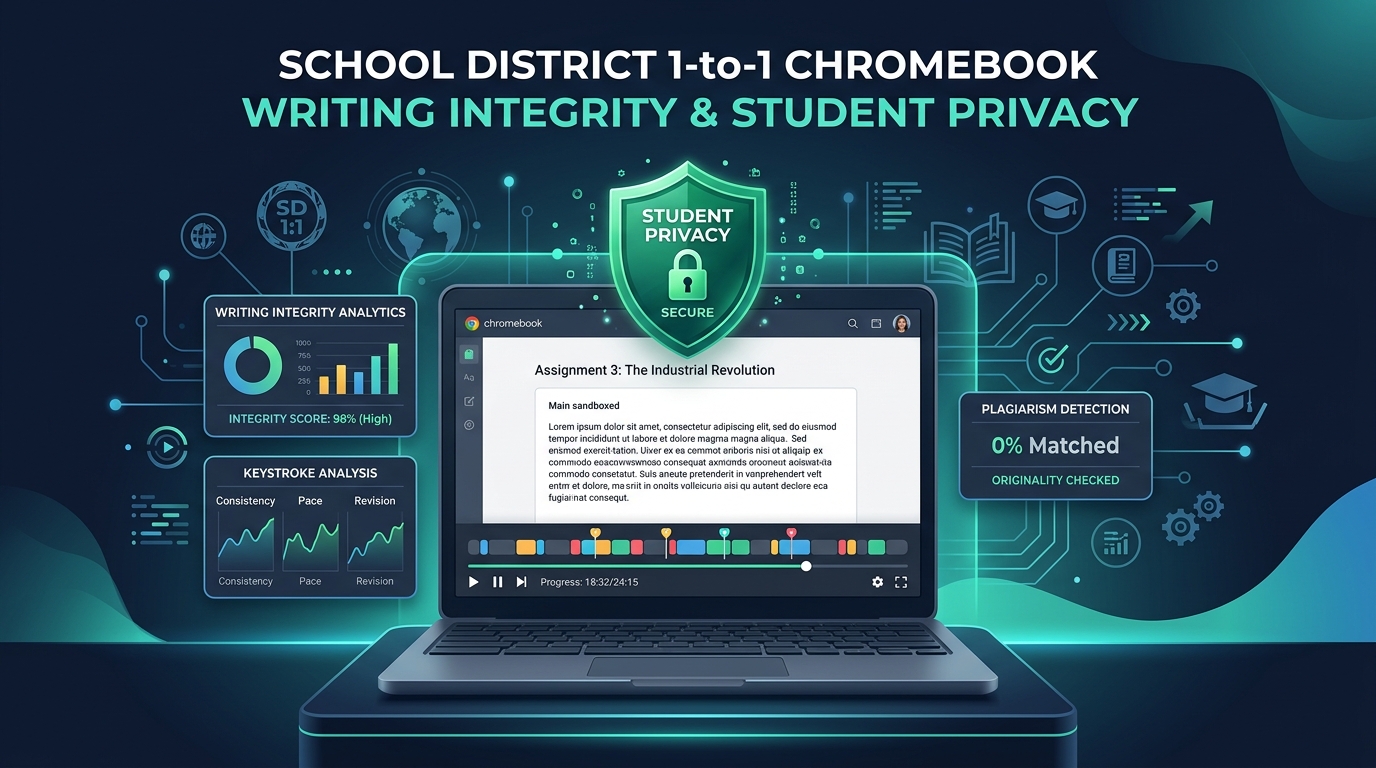
1. The 1-to-1 Chromebook Fleet Dilemma: The Crisis of Invasive Classroom Monitoring
Over the past decade—accelerated by post-2020 federal emergency funding—the deployment of 1-to-1 student devices transformed public and private education. Today, millions of K-12 students complete nearly all their daily coursework, research, and composition on district-managed Chromebooks integrated with Google Workspace for Education and cloud Learning Management Systems (LMS) such as Canvas, Buzz, and Google Classroom.
• Severe surveillance anxiety & chilling effects on research
• Legal liabilities & ACLU / EFF civil liberties investigations
• Zero forensic efficacy against asynchronous AI drafting & phones
To manage these massive fleets and curb classroom off-task behavior, district IT departments historically installed aggressive device-management agents and browser extensions (including platforms like GoGuardian, Securly, LanSchool, Hapara, Lightspeed Classroom, and Aristotle). While initially intended as digital classroom management and content filtering tools, these systems expanded into continuous, multi-vector monitoring platforms featuring:
Live Screen Grids & Broadcasting
Teachers and administrators can view real-time, high-definition video tiles of every student's desktop screen simultaneously across the fleet.
Remote Screen Takeover & Tab Locking
Educators can forcibly close browser tabs, push URLs, lock student screens into single-task views, or freeze input remotely.
OS-Level Activity & Keystroke Logging
Background processes record search queries, URL navigation trails, time spent on individual windows, and raw clipboard activity across the entire operating system.
Automated Flagging & Geo-Tracking
Algorithmic triggers capture screenshots of suspected inappropriate behavior or sensitive terms, often sending alerts to administrators 24 hours a day, 365 days a year.
The Five Critical Failure Modes of Invasive Device Surveillance
Despite widespread adoption, district leaders face mounting evidence that invasive screen monitoring creates severe institutional liabilities while failing to solve the core pedagogical challenge of academic integrity in the age of generative artificial intelligence:
1. Home Privacy Violations and Bedroom Surveillance
Because district-issued Chromebooks go home with students in the evenings, over weekends, and across school breaks, persistent device-level extensions frequently monitor students inside their private domestic spaces. Automated screen captures and activity logs record private family emails, telehealth interactions, personal creative projects, and sensitive searches conducted late at night in private bedrooms.
2. Student Surveillance Anxiety and Chilling Effects
Comprehensive investigations by civil liberties organizations—including the Electronic Frontier Foundation (EFF), the American Civil Liberties Union (ACLU), and the Center for Democracy & Technology (CDT)—demonstrate that continuous visual surveillance induces pervasive psychological distress. Students report feeling untrusted, anxious, and hesitant to explore complex academic questions or access critical counseling resources, knowing their every keystroke and screen state is broadcast to school personnel.
3. Deepening Socioeconomic and Racial Equity Disparities
Invasive Chromebook monitoring disproportionately impacts lower-income, marginalized, and rural students. Affluent students often own personal MacBooks, iPads, or desktop PCs where they can draft essays and conduct research without district surveillance. In contrast, under-resourced students who rely exclusively on district-issued hardware for all computing needs bear the full brunt of 24/7 surveillance, creating an inequitable dual standard of digital privacy.
4. The “Second-Screen” & Asynchronous Evasion Blind Spot
Screen monitoring is inherently real-time and device-bound. It is fundamentally incapable of detecting modern academic dishonesty vectors:
- The Secondary-Screen Vector: A student opens an AI chatbot (ChatGPT, Claude, Gemini) on their personal smartphone or tablet, then manually transcribes or rewords the synthetic text directly onto their Chromebook. The live screen monitor shows only a benign Google Doc or LMS text box with a steadily increasing word count.
- Asynchronous & Off-Hours Generation: If an essay is drafted at home without the teacher actively viewing the monitoring dashboard, live screen broadcasting offers zero retrospective forensic evidence of how the text was composed.
- AI Text Humanizers & Paraphrasing: When text generated by an external LLM is pasted or typed, screen monitoring provides no linguistic analysis, no baseline pacing comparisons, and no proof of authorial process.
5. Black-Box AI Detectors as a Flawed Counterweight
Faced with the inability of screen monitors to catch AI generation, many districts turned to generic whole-paper AI detection percentage checkers (e.g., Turnitin AI detector, GPTZero, CopyLeaks). These tools produce opaque, single-number percentage scores (e.g., “78% AI Generated”) without passage-level receipts or defensible proof. Because these detectors rely on probabilistic token distributions, they suffer from unacceptable false-positive rates—frequently misclassifying neurodivergent writers, English Language Learners (ELL), and students adhering to standardized, formulaic writing rubrics (such as five-paragraph essays or AP DBQs).
| Threat Vector | Why Live Screen Monitoring Fails Completely | How Sandboxed Telemetry Solves It |
|---|---|---|
| Secondary Device Transcription (Phone / Tablet + Chromebook) |
Screen monitor displays an active, approved LMS or Google Docs tab; teacher sees normal typing. | Detects unnatural mechanical velocity, lack of organic composing pauses, and absent revision deletions. |
| Asynchronous / Take-Home Writing (Evenings, Weekends, Holidays) |
No teacher is watching the live dashboard at 10:30 PM; no retrospective process record is preserved. | Records persistent, cryptographically timestamped keystroke telemetry accessible on-demand anytime. |
| External AI Paraphraser Tools (QuillBot, Undetectable AI) |
Screen captures cannot distinguish student synthesis from machine-spun prose. | Combines external paste inspection with passage-level perplexity and burstiness analysis. |
| Offline Ghostwriting & Dictation (Paid contractors, peer copying) |
Third-party generation occurs off-device; monitor sees only the final text entry. | Isolates sudden bulk paste events and preserves the exact raw external text in the sidebar. |
2. The Legal, Regulatory & Pedagogical Mandate for District Leadership
School District Chief Technology Officers (CTOs), District Privacy Officers, Superintendents, and School Boards operate under an increasingly stringent matrix of federal regulations, state privacy statutes, and civil rights mandates. Continued reliance on invasive screen-monitoring software creates severe legal, financial, and reputational exposures.
| Statute / Authority | Legal Scope & Mandate | Impact on Device Monitoring vs. Sandboxed Telemetry |
|---|---|---|
| FERPA (34 CFR Part 99) |
Protects student education records and personally identifiable data from unauthorized disclosure. | Prohibits continuous, non-consensual secondary-use data aggregation across non-educational student activities. |
| COPPA (15 U.S.C. §§ 6501–6506) |
Prohibits behavioral profiling and data harvesting for children under age 13. | Schools cannot consent to commercial surveillance profiling on behalf of parents for general device monitoring. |
| CIPA (47 U.S.C. § 254(h)) |
Mandates internet safety policies and technology protection measures. | Requires content filtering against obscenity, NOT continuous behavioral, screen-level, or webcam surveillance. |
| NY Education Law § 2-d (New York State) |
Mandates strict NIST CSF standards, data encryption, and vendor data security agreements. | Requires zero-retention, encryption, and strict prohibitions on commercial exploitation of student activity logs. |
| Illinois SOPPA (105 ILCS 85/) |
Prohibits student profiling, targeted advertising, and unauthorized data retention. | Mandates that all vendor data collection be strictly limited to direct, stated educational service fulfillment. |
| California SOPIPA (Cal. Bus. & Prof. Code) |
Prohibits student profiling and data warehousing for K-12 students. | Forbids retaining student behavioral records beyond immediate educational assignment completion. |
| Fourth Amendment & Civil Liberties (U.S. Constitution) |
Protects against warrantless search and unreasonable surveillance by government actors. | Pervasive off-campus device monitoring without individualized reasonable suspicion triggers severe constitutional risk. |
A common misconception among school district administrators is that the Children’s Internet Protection Act (CIPA, 47 U.S.C. § 254(h)) mandates continuous screen monitoring, keystroke tracking, or remote screen takeovers. In statutory reality, CIPA requires schools receiving E-rate discounts to enforce a Technology Protection Measure (TPM) that blocks visual depictions of obscenity, child pornography, or material harmful to minors at the network or DNS level. CIPA does not require, recommend, or protect OS-level screen broadcasting, continuous tab surveillance, or webcam tracking. Blurring the boundary between statutory network filtering and pervasive classroom surveillance exposes districts to legal challenges under federal civil rights laws and state wiretapping statutes.
State Student Online Personal Protection Acts (SOPPA, NY Ed Law 2-d, SOPIPA)
State legislatures have enacted comprehensive student privacy protections that strictly regulate third-party vendor data access:
- New York Education Law § 2-d: Requires districts to adopt a Parents’ Bill of Rights for Data Privacy and Security, ensuring that third-party contractors adhere to the National Institute of Standards and Technology (NIST) Cybersecurity Framework (CSF) and never sell, harvest, or repurpose student data.
- Illinois Student Online Personal Protection Act (SOPPA, 105 ILCS 85/): Forbids educational software operators from engaging in student behavioral profiling, amassing persistent activity databases, or using student metadata for internal model training.
- California SOPIPA (Cal. Bus. & Prof. Code §§ 22584–22585): Strictly bars the creation of personal profiles of K-12 students and mandates that vendor data must be deleted upon the district's request or when no longer needed for educational purposes.
The Pedagogical Breakdown: Restoring Educator-Student Trust
Beyond legal vulnerabilities, invasive device surveillance undermines the core pedagogical mission of English, humanities, and social studies educators. Writing is fundamentally an act of vulnerability, trial, error, cognitive exploration, and synthesis. When students know that every pause, typo, backspace, and window transition is being broadcast to a live dashboard, they experience cognitive inhibition and disengage from authentic drafting.
Furthermore, when teachers are positioned as punitive digital surveillance officers tasked with watching screen grids, their relationship with students shifts from instructional mentorship to adversarial policing. Academic integrity cannot be built on fear and surveillance; it requires transparent, defensible evidence that supports restorative, formative coaching.
3. The 1-to-1 Chromebook Integrity Matrix: Comparing Three Approaches
To assist District CTOs, Instructional Tech Directors, and Curriculum Coordinators in evaluating their technology stack, the matrix below compares the three primary methodologies across 11 critical technical, legal, and instructional dimensions:
| Feature / Dimension | Invasive Screen Spyware (GoGuardian, Securly, etc.) |
Generic Black-Box AI Scores (Turnitin, GPTZero, etc.) |
Checkmark Sandboxed Telemetry (Non-Invasive Architecture) |
|---|---|---|---|
| 1. Client Footprint & Agents | High: Heavy Chrome extensions, OS daemons, background CPU overhead. | Zero (server-side text post), but zero process context or history. | Zero Device Agents: Operates 100% within LMS / web editor canvas. |
| 2. Student Privacy Protection (FERPA, COPPA, SOPPA) |
Low: Full OS/browser tracking, off-hours bedroom captures. | Medium: Retains student text in global model training databases. | Maximum: Telemetry strictly isolated to active assignment editor only. |
| 3. Off-Campus / Home Hours Surveillance Breach | High Risk: Captures private family activity, telehealth, personal searches. | N/A (Only scores submitted static final document). | Zero Intrusion: Only logs active keystrokes inside assignment canvas. |
| 4. Second-Screen Phone Vector (AI phone transcribing) |
Ineffective: Displays an approved, active document tab; misses phone. | Ineffective: Flags false scores; cannot prove fraud or provide receipts. | Effective: Detects mechanical typing cadence and zero composing pauses. |
| 5. External Paste Capture & Clipboard History | Ineffective: Only logs that a paste occurred; loses original raw text. | None: Treats pasted text the same as typed text. | Complete: Captures raw external text, timestamp, and jump-to-playback. |
| 6. Writing Process Evidence (Forensic Replay) |
None: Ephemeral live video tiles; no persistent replay history. | None: Only analyzes static, submitted final token state. | Patent-Pending Essay Playback™: Keystroke replay with 1x–8x scrub speed. |
| 7. False-Positive Exoneration for Honest Students | Ineffective: No proof of drafting evolution or organic brainstorming. | Zero: Opaque single percentage creates unprovable, punitive claims. | Absolute: Authentic keystroke history proves human authorship conclusively. |
| 8. Passage-Level Granularity | None: Generic screen monitor without linguistic analysis. | Poor: Highlights whole docs or broad opaque paragraph blocks. | Calibrated Confidence: Specific passage cards with human/AI sliders. |
| 9. Side-by-Side Plagiarism Verification | None: Relies on external third-party tools. | Standard text matches without uncited source coaching badges. | Linked Evidence Cards: Side-by-side quotes + clickable live web links. |
| 10. AI Autograding & Formative Feedback | None: Screen monitoring only. | Basic autograding without deep quote anchoring. | Teacher-in-the-Loop: Quote-anchored rubrics + 1-click LMS passback. |
| 11. Zero-Training LLM Guarantee | Ambiguous: May store telemetry for commercial telemetry R&D. | High Risk: Ingests student writing into global training datasets. | Verifiable: 100% Zero Training Covenant; ephemeral memory vaults. |
4. Technical Architecture: Sandboxed Assignment Telemetry vs. Device-Level Spyware
The technological breakthrough that enables school districts to audit writing authenticity without invasive spyware is Sandboxed Assignment Telemetry.
Understanding the structural difference between Device-Level OS Spyware and Sandboxed In-Document Telemetry is critical for Chief Technology Officers, Instructional Technology Directors, and District Information Security Teams.
The Mechanics of Sandboxed Document Mutation Tracking
Unlike invasive spyware that hooks into the operating system kernel or browser window manager, Checkmark operates strictly inside the authenticated assignment container via standard LTI 1.3 integrations (with Canvas LMS, Google Classroom, Buzz LMS, Moodle, and Google Docs).
Strict Sandbox Isolation
Checkmark has zero visibility into other browser tabs, desktop windows, personal search history, webcam streams, or off-canvas applications. The telemetry pipeline activates only when the student focuses within the specific essay drafting container and terminates immediately when they leave.
Event-Driven Mutation Logging
Rather than taking crude video screenshots of the screen, the engine captures micro-level document mutation events (insertions, deletions, cursor repositions, paste operations, and pause durations).
Bandwidth-Efficient Telemetry Vectorization
Capturing discrete document mutation events consumes less than 1/1,000th of the network bandwidth required by real-time video screen streaming. While streaming 30 live student screens can saturate school Wi-Fi access points and overload home cellular hotspots, Checkmark's lightweight telemetry packets transmit effortlessly even over low-bandwidth rural connections.
Defensible Cryptographic Hashing
Every editing state is cryptographically timestamped and linked to the student’s authenticated LMS session. This creates an unalterable, mathematically verifiable record of the essay's evolutionary development from the initial blank page to the final submitted draft.
5. Step-by-Step District Architecture & Audit Protocol for 1-to-1 Chromebook Fleets
District technology leaders, instructional coaches, and curriculum directors can deploy a comprehensive, non-invasive writing integrity audit protocol across their entire Chromebook fleet using the following four-phase implementation framework:
Phase 1: Centralized Zero-Agent Deployment via LTI 1.3
- Action: District Technology Directors configure Checkmark at the root administrative level in their central Learning Management System (Canvas LMS, Buzz LMS, or Google Classroom) using the LMS LTI 1.3 / 1EdTech standard.
- Chromebook Zero-Touch: The IT department does not push any Chrome extensions, does not modify ChromeOS enterprise policies, and does not install local software agents.
- Authentication: Single Sign-On (SSO) is handled seamlessly through Google Workspace for Education, Microsoft Entra ID (Azure SSO), or Canvas LMS OAuth 2.0, ensuring strict identity verification without storing duplicate student credentials.
Phase 2: In-Document Assignment Scaffolding
- Action: Curriculum coordinators and department chairs establish standardized multi-draft writing assignments directly inside the LMS.
- Process Logging: When students open their research papers, DBQs, or analytical essays on their Chromebooks, Checkmark’s sandboxed editor captures the drafting timeline.
- Privacy Boundary: Students can research in adjacent tabs, consult library databases, or write notes without the software monitoring their broader browsing habits. Only text entered into or pasted into the assignment canvas is analyzed.
Phase 3: Automated Multidimensional Integrity Triage
Upon draft or final submission, Checkmark executes its four-pillar integrity analysis:
- Passage-Level AI Detection: Evaluates linguistic perplexity and burstiness, flagging specific sentences with calibrated confidence sliders rather than assigning a whole-paper percentage score.
- Side-by-Side Plagiarism Matching: Scans billions of live web pages and student repositories, providing clickable source links and separate visual styling for uncredited source usage.
- External Paste Tracking: Detects any text block pasted from external sources, logs the exact timestamp and character count, and archives the original pasted text.
- Transcription Detection: Flags continuous, high-velocity typing streams that lack organic composing pauses or revision backspaces (identifying students retyping from secondary phone screens).
Phase 4: Restorative Integrity Conferences & Objective Exoneration
In the event of flagged content, teachers avoid adversarial confrontation or punitive automatic zero grades. Instead, they conduct a Restorative Writing Conference:
- The teacher and student open the Essay Playback™ viewer together.
- They scrub through the timeline at 2x or 4x speed, reviewing the student's authentic brainstorming pauses, paragraph reorganizations, and vocabulary revisions.
- If a student is falsely flagged by a generic detector, their authentic keystroke timeline serves as definitive, unassailable proof to exonerate them immediately.
- If unauthorized pasting or transcription occurred, the objective timeline provides clear evidence for a constructive coaching dialogue focused on proper research methods and ethical revision.
6. Checkmark Plagiarism: The Privacy-Preserving Integrity Suite for Modern Districts
Checkmark delivers an enterprise-grade, comprehensive academic integrity platform engineered specifically to meet the security, privacy, and pedagogical requirements of modern K-12 school districts and higher education institutions.
Essay Playback™
Keystroke replay with 1x–8x scrub speed, composing pause analysis, and complete organic revision archaeology.
External Paste Inspector
Timestamped paste captures preserving raw external clipboard text with direct jump-to-playback navigation.
Passage-Level AI Confidence
Sentence-specific confidence sliders and perplexity metrics. No whole-paper black-box percentages; N/A for short text.
Defensible Plagiarism
Live web & student cohort scans with separate Uncited Source badging and two-way linked side-by-side evidence cards.
Teacher-in-the-Loop Autograder
First-draft rubric evaluations anchored to student quotes with 1-click grade passback to Canvas, Buzz, and Classroom.
Zero-Training Privacy Shield
100% Zero-Model-Training guarantee. Full FERPA, COPPA, SOPPA, and NY Ed Law § 2-d statutory compliance.
1. Patent-Pending Essay Playback™: The Ultimate Restorative Evidence
Rather than guessing whether an essay was drafted by a human or generated by an algorithm, educators can view the complete writing session keystroke-by-keystroke:
- Timeline Scrubbing (1x to 8x Speed): Teachers can watch the essay unfold in real time or scrub rapidly across multi-hour sessions in seconds.
- Composition Dynamics: Visualizes natural pauses where students stopped to think, re-read, consult sources, or outline ideas.
- Organic Revision Archaeology: Displays how sentences were restructured, words were deleted and replaced with synonyms, and paragraphs were moved around.
- Protection for Honest Students: When an overzealous detector flags a sophisticated student draft, Essay Playback provides the transparent “receipts” that prove genuine human authorship without dispute.
2. External Paste Inspector with Raw Clipboard Preservation
A major limitation of standard document revision histories (such as Google Docs version history) is that they collapse long editing sessions into coarse, 15-minute periodic snapshots, often failing to record what was originally pasted before subsequent edits took place.
- Timestamped Paste Logging: Captures the exact second any external text block enters the document.
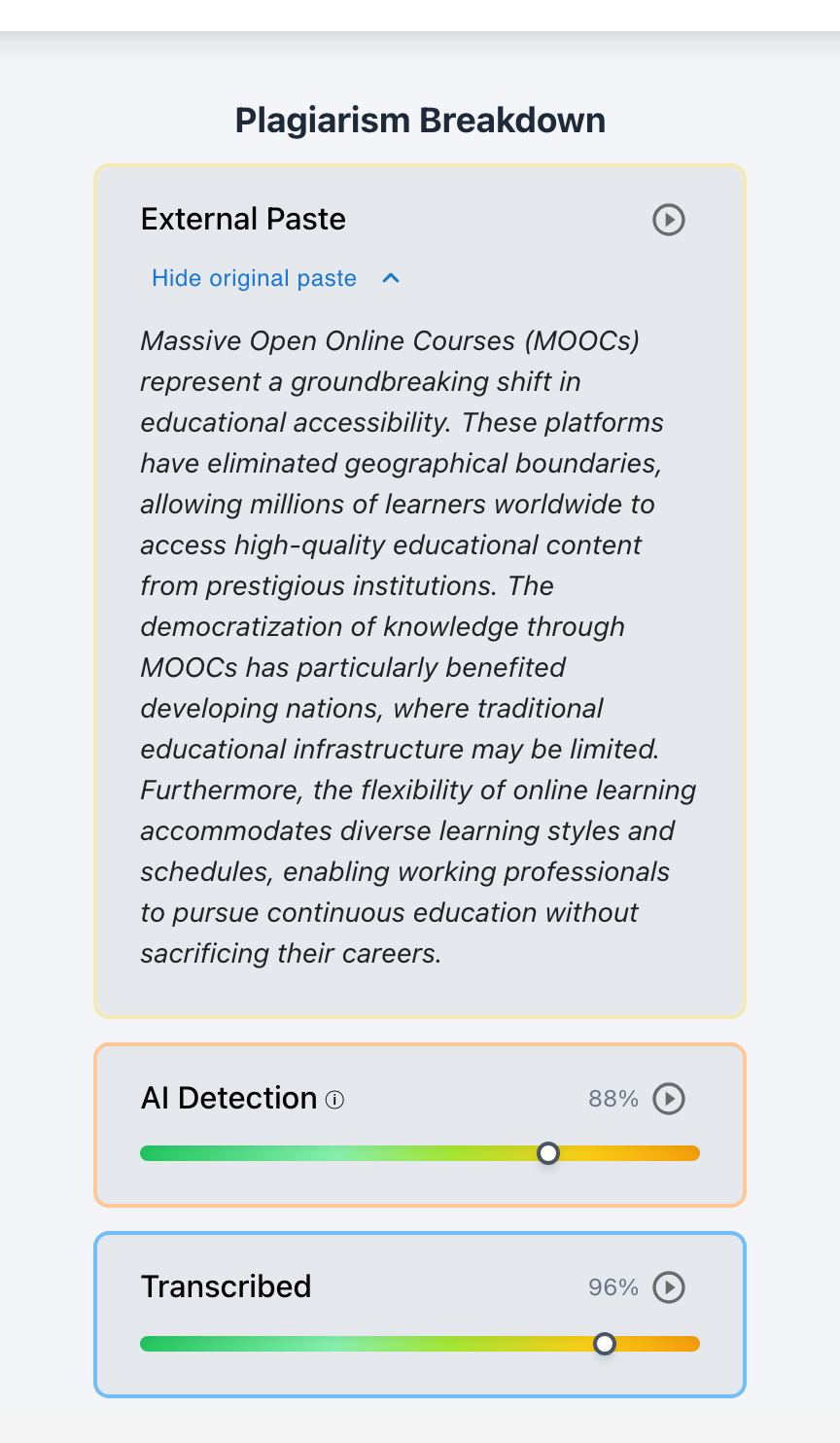
- Complete Clipboard Archiving: Preserves the complete raw text of the paste in the sidebar, even if the student subsequently rewrites, rewords, or deletes every individual word.
- Direct Jump-to-Playback: Clicking the paste event instantly jumps the Essay Playback video timeline to the exact moment of insertion, enabling teachers to inspect the surrounding context.
3. Linguistic Pattern Analysis & Passage-Level Confidence Sliders
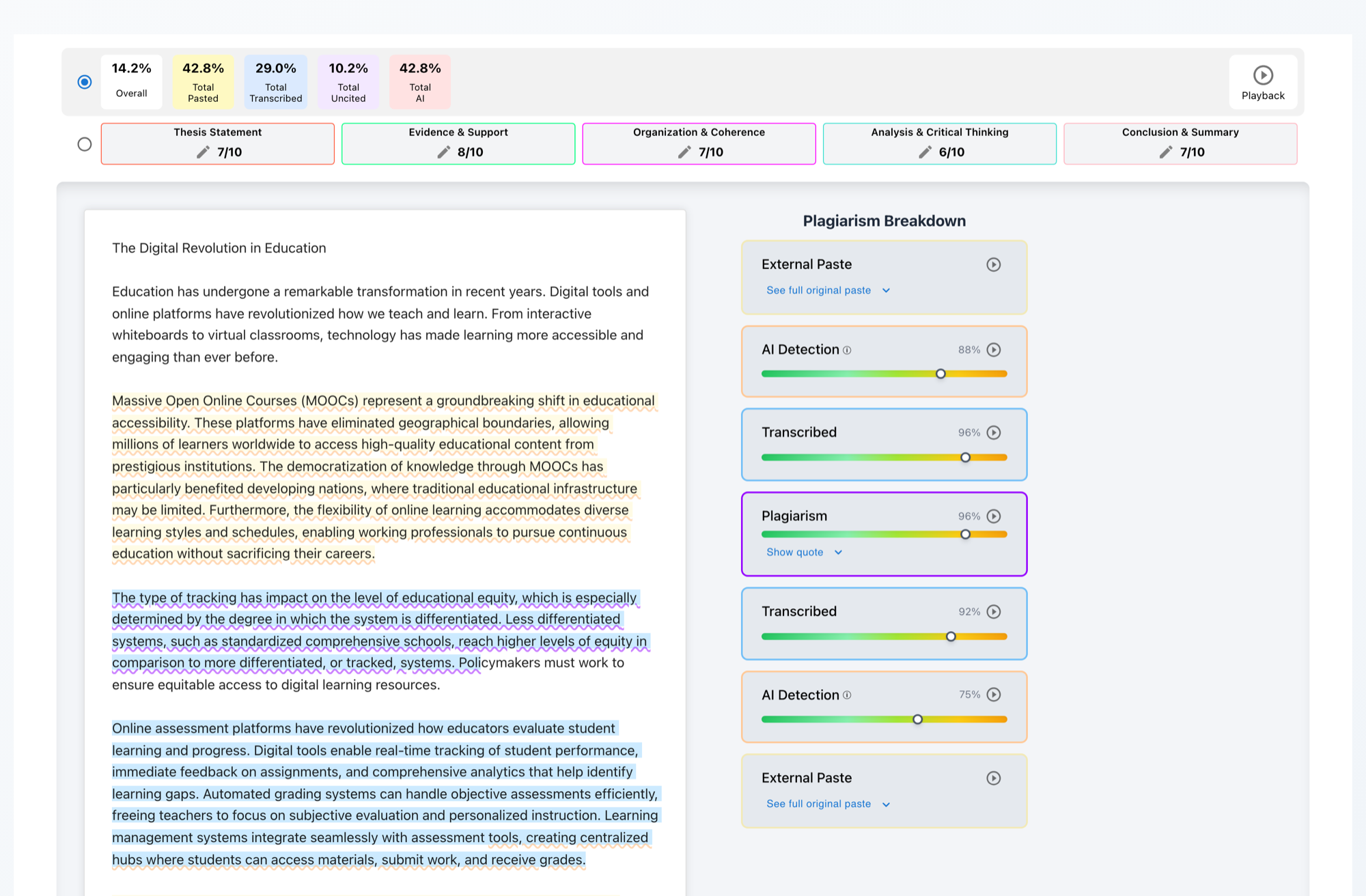
Checkmark eliminates opaque, punitive whole-paper percentages (e.g., “65% AI”) in favor of granular, transparent passage-level evidence:
- Passage-Specific Underlining: Highlights individual sentences and paragraphs directly within the essay canvas.
- Calibrated Sidebar Confidence Cards: Displays a two-way confidence slider showing typical human syntactic variance versus typical AI language model predictability.
- Perplexity and Burstiness Metrics: Measures sentence structure diversity, rhythm, transition predictability, and lexical distribution.
- Honest Short-Text Guardrails: Submissions or short-answer responses under ~150 words display
N/Arather than guessing on statistically insufficient sample sizes. - Educator-Only Flag Statuses: Flags (
Flagged,Resolved,Not Flagged) remain private to the educator to prevent unwarranted accusations or student anxiety.
4. Defensible Multidimensional Plagiarism Detection
- Live Web & Peer Matching: Scans billions of indexed web pages, online publications, reference repositories, and student cohort archives.
- Dedicated Uncited Source Badging: Distinctly separates accidental citation omissions from deliberate copy-paste plagiarism. Uncredited sources receive a dedicated visual badge, allowing teachers to treat formatting errors as teachable citation coaching moments.
- Two-Way Linked Evidence Cards: Clicking any highlighted sentence in the essay automatically scrolls the sidebar to the exact source match with side-by-side quote comparisons and direct clickable links to the original web page.

5. Teacher-in-the-Loop AI Autograder with Quote-Anchored Justifications
- First-Draft Rubric Grading: Automatically evaluates student submissions against custom district rubrics, generating per-criterion point suggestions and written justifications tied directly to specific student sentences.
- Flexible Rubric Ingestion: Ingests custom district rubrics, uploaded PDF/image rubrics, or syncs rubrics directly from Canvas LMS, Buzz LMS, or Google Classroom.
- Teacher Final Authority: All AI-suggested marks and comments remain fully editable drafts. Teachers maintain 100% final authority before publishing.
- One-Click Grade Passback: Pushes approved grades, rubric criterion scores, and personalized feedback straight into the LMS gradebook.
6. Strict Zero-Training Data Privacy & District Security Perimeter
- Zero Model Training: Student submissions are never used to train, tune, or evaluate commercial machine learning models.
- Full Federal & State Compliance: 100% compliant with FERPA, COPPA, CSPC standards, NY Education Law § 2-d, Illinois SOPPA, and California SOPIPA.
- Enterprise Encryption: End-to-end encryption in transit (TLS 1.3) and at rest (AES-256) with ephemeral processing pipelines and zero secondary data monetization.
7. Realistic District Scenarios: Transforming Integrity Audits in Practice
The following three scenarios illustrate how district leaders and classroom educators leverage Checkmark’s sandboxed telemetry to resolve complex writing integrity challenges across 1-to-1 Chromebook deployments.
Defending an Advanced Student Against False AI Accusations
The Challenge: An honors high school senior submits an argumentative research paper on environmental policy. The student drafted the essay on their district Chromebook at home between 8:00 PM and 11:30 PM. The teacher runs the text through a legacy whole-document AI detector, which returns an alarming “84% AI Generated” score due to the student's polished vocabulary and formal syntax. Because the essay was composed at home outside school hours, the district's screen-monitoring tool has no live recording.
- The English Department Chair opens the student's submission in Checkmark and launches Essay Playback™.
- The playback shows 3 hours and 35 minutes of active, continuous writing history.
- The timeline reveals the student drafting an initial thesis, deleting and rephrasing the topic sentences four separate times, pausing for 45 to 90 seconds between complex argumentative claims, and fixing organic typographical errors.
- The passage-level AI confidence sliders confirm that while the vocabulary is advanced, the sentence-level burstiness and syntactic rhythm are distinctly human.
✓ Outcome: The student is immediately exonerated. The department chair uses the playback timeline to explain to the concerned parent and teacher why the static AI detector produced a false positive, preserving trust and preventing an unjust academic penalty.
Uncovering Secondary-Screen Smartphone AI Transcription
The Challenge: During a 50-minute in-class writing assessment, a student sits quietly at their desk with their Chromebook. The teacher's live screen-monitoring grid shows the student's screen locked to the approved LMS essay editor with no unapproved tabs or unauthorized windows open. However, the resulting 900-word submission contains complex collegiate-level phrasing far beyond the student’s established baseline.
- The teacher inspects the submission's Keystroke Dynamics and Velocity Telemetry in Checkmark.
- The telemetry graphs reveal an unnatural, flatline typing velocity: the student typed at a steady 65 words per minute for 22 minutes straight with zero composing pauses longer than 2 seconds and zero backspaces or structural deletions.
- Checkmark's Transcription Detection Engine flags the submission for mechanical copying patterns characteristic of a student reading generated text from a smartphone placed below the desk and typing it word-for-word.
- The passage-level AI analysis highlights multiple paragraphs matching generative transformer perplexity baselines.
✓ Outcome: The teacher conducts a supportive, private conference. Armed with the objective typing telemetry, the teacher explains that authentic writing requires thinking pauses and revision. The student acknowledges transcribing text generated by a smartphone app and agrees to complete a guided, supervised rewrite in class without disciplinary escalation.
Coaching Uncited Patchwriting in Middle School Social Studies
The Challenge: An 8th-grade social studies student submits a biography project on the American Industrial Revolution. A standard plagiarism checker flags a 35% similarity score, and school policy would normally mandate an automatic zero for academic dishonesty.
- The teacher opens Checkmark’s Multidimensional Plagiarism Report.
- The system distinguishes between direct copy-pasting and missing citations, assigning an “Uncited Source” badge rather than an intentional plagiarism flag.
- The Two-Way Linked Evidence Cards show that the student copied two factual background paragraphs from a digital encyclopedia and integrated them into their paper, but forgot to enclose the text in quotation marks or provide an in-text MLA attribution.
- The External Paste Inspector confirms the text was pasted early in the research session, while the remainder of the analysis was typed organically.
✓ Outcome: The teacher uses the side-by-side source viewer during a 5-minute writing conference to teach the student how to use quotation marks and lead-in signal phrases. The student resubmits the corrected draft for full credit, transforming an integrity flag into a foundational research lesson.
8. District Leadership Implementation Checklist
Before renewing legacy screen-monitoring contracts or adopting new academic integrity tools, District CTOs, Instructional Tech Directors, and Privacy Officers should verify the following architectural criteria:
1. Zero Client Agents & Extensions
Does the solution operate 100% within the LMS / web canvas without requiring invasive Chrome extensions, background daemons, or OS-level device monitoring?
2. Complete Privacy Boundary Enforcement
Is telemetry strictly confined to the active assignment editor, ensuring zero visibility into personal tabs, off-campus browsing, or home searches?
3. Forensic Process Reconstruction (Essay Playback™)
Can educators scrub through a keystroke-by-keystroke replay (1x–8x) to inspect authentic composing pauses, revisions, and drafting dynamics?
4. Raw Clipboard & External Paste Preservation
Does the platform archive the exact original text of external pastes, even if the student subsequently edits or rewords every character?
5. Passage-Level AI Evidence & Honest Guardrails
Does the tool provide calibrated passage-level confidence sliders rather than unprovable whole-paper black-box percentages, with N/A for text < 150 words?
6. Differentiated Citation & Plagiarism Badging
Are accidental citation formatting errors clearly separated from deliberate copying using dedicated uncited source tags and side-by-side source links?
7. Teacher-Controlled AI Autograding & LMS Passback
Does the autograder generate quote-anchored rubric justifications with 1-click grade passback to Canvas, Buzz, and Google Classroom under teacher authority?
8. Zero-Training Data Privacy & Statutory Compliance
Does the vendor legally contract that student writing will NEVER be used to train AI models, fully complying with FERPA, COPPA, SOPPA, and NY Ed Law 2-d?
9. Frequently Asked Questions (FAQ)
1. How does Checkmark track writing progress without installing a background extension on district Chromebooks?
Checkmark operates entirely within the web-based assignment container via standard LTI 1.3 integration (with Canvas LMS, Google Classroom, Buzz LMS, or Google Docs). When a student opens their assigned writing prompt, the embedded editor listens strictly to in-document Document Object Model (DOM) mutation events (text insertions, deletions, cursor repositions, and timestamped paste events) occurring inside that specific editing window. No software is installed on the Chromebook, no root certificates are pushed, and no background extensions monitor other browser tabs, desktop software, or network traffic.
2. Why doesn't standard Google Docs version history provide sufficient evidence during contested plagiarism or AI disputes?
While Google Docs includes a built-in revision history, it operates by saving coarse, periodic document snapshots (often spaced 10 to 30 minutes apart depending on network sync intervals and editing pauses). These snapshots collapse intermediate drafting actions, fail to capture fine-grained typing velocity, cannot distinguish continuous transcription from organic thought pauses, and frequently overwrite what was originally pasted if a student modifies the text before the next snapshot is recorded. Checkmark’s Patent-Pending Essay Playback™ records high-fidelity mutation telemetry, preserving the exact original clipboard text of external pastes and enabling a fluid 1x to 8x video-style replay of every keystroke and revision.
3. Does Checkmark monitor student web searches, open browser tabs, or browsing history?
No, absolutely not. Checkmark adheres to a strict zero-surveillance privacy model. The platform has zero technical capability or legal authorization to inspect open browser tabs, search engine queries, DNS requests, bookmarks, email clients, or webcam streams. Its telemetry begins and ends entirely within the boundaries of the authorized assignment editing canvas. When a student leaves the assignment tab to look up sources in an adjacent library database, Checkmark simply records an off-canvas pause duration without monitoring where the student browsed.
4. How does the system handle students who write offline or draft in external notes applications before pasting into the LMS?
If a student drafts an essay offline in a standalone text editor (e.g., Apple Notes, Microsoft Word offline, or physical handwritten notes) and subsequently pastes the completed draft into the Checkmark assignment editor, the platform's External Paste Inspector records a bulk insertion event. Rather than automatically penalizing the student, the system flags the paste for teacher review. The teacher can then hold a brief, supportive conference where the student shares their offline drafts, outlines, or research notes. Furthermore, because Checkmark integrates natively across Google Docs, Canvas, and Buzz LMS, districts can encourage students to compose their preliminary outlines directly within the secure sandbox, ensuring a continuous, effortless verification trail.
5. How do passage-level confidence sliders protect English Language Learners (ELL) and neurodivergent writers from false accusations?
Generic black-box AI detectors rely on statistical language models that evaluate average sentence perplexity across an entire document. Because English Language Learners and neurodivergent students often use straightforward sentence structures, consistent transitional phrases, and formulaic organizational patterns, whole-paper detectors frequently flag their authentic writing as “AI Generated.” Checkmark eliminates whole-document scores entirely. Instead, it provides calibrated passage-level confidence sliders that evaluate specific sentences in context, supported by full Essay Playback™ showing the student's authentic, multi-hour drafting journey. A student who spends hours typing, revising, and restructuring sentences cannot be falsely accused based on vocabulary predictability alone.
6. What specific data privacy certifications and legal agreements does Checkmark provide for district FERPA/COPPA and state privacy compliance?
Checkmark provides enterprise-grade Data Privacy Agreements (DPAs)—including the standard National Data Privacy Agreement (NDPA) and custom state exhibits for New York Education Law § 2-d, Illinois SOPPA, California SOPIPA, and the Texas SCOPE Act. Checkmark legally warrants that student data and submitted essays are never used to train, tune, evaluate, or refine commercial machine learning models. All data is processed ephemerally within secure cloud infrastructure with AES-256 encryption at rest and TLS 1.3 in transit.
7. How quickly can a district technology team roll out Checkmark across 20,000+ Chromebooks?
Because Checkmark utilizes a 100% zero-device-agent cloud architecture, deployment across an entire district fleet requires under 15 minutes of administrative configuration. A district technology director simply installs the Checkmark LTI 1.3 app within the central Canvas LMS, Buzz LMS, or Google Workspace administrative console and configures Single Sign-On (SSO). The moment the LTI connection is approved, the tool becomes instantly available across all high schools, middle schools, and Chromebook devices district-wide without pushing software updates, restarting student hardware, or configuring endpoint security profiles.
10. Conclusion: Stop Guessing, Start Trusting
The era of combating academic dishonesty through invasive, adversarial device surveillance is over. School districts cannot secure academic integrity by turning student Chromebooks into 24/7 surveillance beacons that violate family privacy, damage educator-student relationships, and fail to prevent AI-assisted ghostwriting.
By adopting Sandboxed Assignment Telemetry, district leadership can achieve the ultimate standard of educational technology: transparent, defensible, and privacy-preserving integrity. With patent-pending Essay Playback™, raw external paste tracking, passage-level linguistic confidence, side-by-side plagiarism matching, and teacher-controlled rubric autograding, educators gain the definitive objective receipts they need to support authentic student growth.
Stop Guessing, Start Trusting. Empower Your District Today.
Discover how Checkmark Plagiarism provides non-invasive, zero-agent writing integrity audits and patent-pending Essay Playback™ across your entire 1-to-1 Chromebook fleet.