
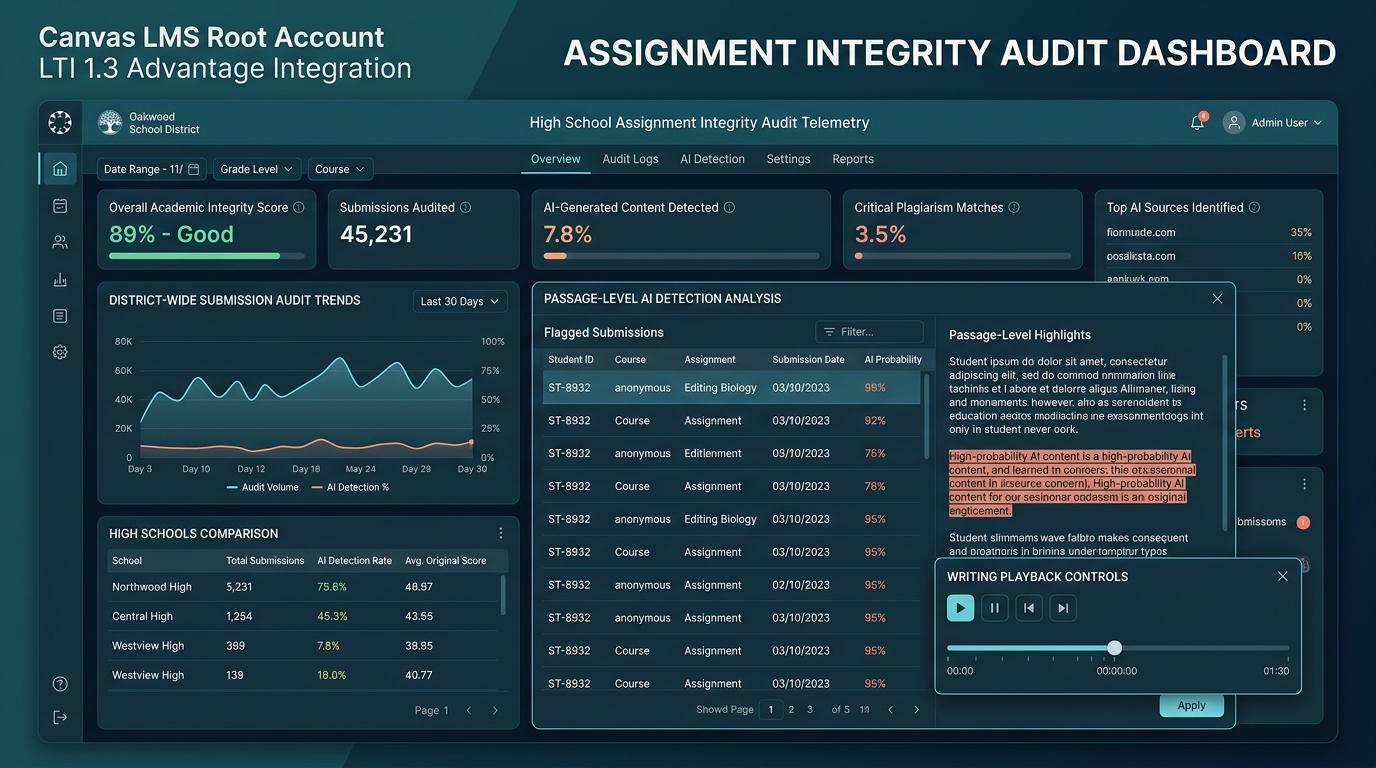
In multi-school secondary school districts, managing academic integrity on an ad-hoc, teacher-by-teacher basis is an operational, legal, and pedagogical liability. When individual educators are left to manually configure external tools per assignment—or worse, resort to “Shadow IT” by pasting student essays into unvetted browser extensions and public AI detectors—districts face severe data privacy violations under FERPA and state privacy statutes, rampant false positives against vulnerable students, and vast inequities in grading standards across campuses.
The definitive solution is a Centralized Root-Account Canvas LTI 1.3 Advantage Deployment utilizing the Canvas Plagiarism Detection Platform (PDP) standard. By provisioning a single, secure LTI 1.3 Developer Key at the Canvas Root Account level, District Instructional Technology and LMS Administration teams can automatically enforce assignment integrity auditing across every high school, department, and course section with zero teacher configuration friction.
Integrated with Checkmark Plagiarism, this architecture replaces black-box whole-document percentages with transparent, defensible writing telemetry directly within Canvas SpeedGrader: multi-factor passage-level AI detection with calibrated confidence sliders, synchronized side-by-side plagiarism source proof, patent-pending Essay Playback™ keystroke dynamics, and teacher-in-the-loop AI rubric autograding backed by an ironclad Zero-Data-Retention (ZDR) and Zero AI Model Training guarantee.
Checkmark Plagiarism (checkmarkplagiarism.com) empowers district technology leadership with a complete, enterprise-grade integrity suite combining patent-pending Essay Playback™, passage-level AI detection, defensible side-by-side plagiarism checking, and quote-anchored AI rubric autograding seamlessly integrated into Canvas LMS, Google Classroom, and Buzz LMS.
1. The High School District Integrity Crisis: Classroom Fragmentation vs. District Governance
For District Chief Technology Officers (CTOs), Directors of Digital Learning, and Instructional Technology Coordinators managing secondary education ecosystems (encompassing comprehensive high schools, magnet academies, Career and Technical Education [CTE] centers, alternative schools, and dual-enrollment programs), academic integrity management has reached an inflection point.
Historically, academic integrity tools were treated as optional, course-level plugins. Teachers who desired plagiarism checking manually enabled a third-party tool inside individual assignment settings. In the era of generative AI (ChatGPT, Claude, Gemini) and automated text-spinning tools, this decentralized model has completely broken down.
| The Decentralized Failure Model (Teacher-Level) | The Centralized LTI 1.3 Model (District-Wide) |
|---|---|
| • Inconsistent adoption across high schools (under 30% coverage) | • 100% automated audit coverage across all secondary campuses |
| • Teachers forget to toggle assignment settings or plugins | • Zero teacher setup friction or manual assignment toggles |
| • Rampant “Shadow IT” Chrome extensions and unvetted web tools | • Secure, vetted, FERPA-compliant environment embedded in SpeedGrader |
| • Unvetted tools ingest student PII and essays to train AI models | • Strict Zero-Data-Retention (ZDR) & Zero-Model-Training guarantee |
| • Opaque, punitive whole-paper AI scores (e.g. “85% AI”) | • Multi-factor passage highlights with calibrated confidence sliders |
| • Disputed allegations, contentious parent appeals, OCR risk | • Objective Essay Playback™ keystroke dynamics & paste telemetry |
| • Disparate grading standards across departments and high schools | • Standardized, calibrated rubric autograding with AGS v2.0 passback |
1.1 The Operational Breakdown of Teacher-by-Teacher Configuration
When assignment auditing relies on individual teacher initiative, three systemic failures occur across secondary schools:
- Massive Coverage Blind Spots: In a district with 500 secondary teachers, fewer than 40% consistently configure external tool settings correctly. Crucial writing milestones—such as 9th-grade diagnostic essays, 10th-grade social studies Document-Based Questions (DBQs), 11th-grade AP Capstone synthesis papers, and 12th-grade senior portfolios—slip through unaudited. When an academic integrity issue is later discovered during senior year or college application season, administrators find zero historical writing baselines.
- Campus-to-Campus Equity Gaps: Students at High School A may be subjected to aggressive, uncalibrated AI detectors that penalize non-native English writers, while students at High School B receive no integrity feedback whatsoever. This creates severe legal and administrative vulnerabilities during grade appeals, honor board reviews, and district-wide GPA evaluations.
- Severe Instructional Friction: Secondary teachers already dedicate 15–20 hours weekly to lesson planning and grading. Requiring them to navigate complex external tool menus, manage separate login credentials, or manually export/import student rosters causes widespread adoption fatigue and passive resistance.
1.2 The Threat of “Shadow IT” and Third-Party Browser Extensions
Faced with rising generative AI usage and lacking a seamless district solution, many well-intentioned teachers turn to Shadow IT: installing unauthorized browser extensions or copying and pasting student writing into free consumer AI detectors.
This practice introduces existential liabilities for school districts:
- FERPA & State Privacy Violations: Uploading student prose containing personally identifiable information (PII), localized context, or disciplinary disclosures to unauthorized commercial platforms violates FERPA (34 CFR Part 99), COPPA (15 U.S.C. §§ 6501–6506), and state statutes (such as NY Ed Law § 2-d, Illinois SOPPA, and California SOPIPA).
- Non-Consensual AI Model Training: Free web detectors frequently monetize user data by harvesting submitted student essays into massive training lakes to pre-train and fine-tune commercial Large Language Models (LLMs).
- Unreliable, Black-Box False Positives: Consumer detectors generate single, opaque percentage scores (e.g., “92% AI Generated”) based on brittle linguistic heuristics. When teachers act on these unverified scores, innocent students are falsely accused, triggering contentious parent confrontations, formal grievances, and Office for Civil Rights (OCR) inquiries.
1.3 The Pedagogical Paradigm Shift: From Punitive Policing to Transparent Writing Telemetry
To resolve this crisis, district instructional technology leadership must lead a fundamental philosophical shift: moving from punitive policing to transparent, growth-oriented writing instruction.
Checkmark Plagiarism’s core guiding philosophy is “Stop guessing, start trusting.” Academic integrity tools should never function as arbitrary, punitive black-box judges. Instead, edtech infrastructure must provide transparent, defensible, and objective “receipts”—combining passage-level linguistic distributions, side-by-side plagiarism source proof, patent-pending keystroke dynamics (Essay Playback™), and teacher-controlled rubric evaluations.
By centralizing this capability through Canvas LTI 1.3 Advantage, districts protect student rights, empower educators with actionable coaching data, and eliminate the risks of unauthorized shadow IT.
2. Deep Dive: District-Wide LMS Integrity Architecture
Building a district-wide assignment integrity infrastructure requires a comprehensive understanding of Canvas LMS account hierarchy, modern authentication protocols, and the Canvas Plagiarism Detection Platform (PDP) framework.
District IT provisions single LTI 1.3 Developer Key with OIDC / RSA-256 JWT security and enables PDP + AGS v2.0 + NRPS v2.0 scopes.
100% of high school sub-accounts inherit the tool. Standard Canvas assignment submissions trigger automated background webhook payloads.
Native similarity pill, passage AI confidence cards, Essay Playback™ timeline, and 1-click AGS v2.0 rubric grade passback render inside Canvas.
2.1 Canvas Account Hierarchy: Root Account vs. Sub-Account Deployment
Canvas LMS organizes institutional data in a hierarchical structure:
- Root Account (District Level): The master administrative tier governing global authentication, system integrations, developer keys, SIS roster integrations, and district-wide policies.
- Sub-Accounts (School/Campus Level): Individual high schools, middle schools, or specialized centers (e.g., North High School, South High School, Virtual High School, CTE Academy).
- Sub-Account Categories/Departments: Departmental nodes (e.g., English Language Arts, Social Sciences, Science, Career Technical Education).
- Courses & Sections: The active instructional spaces where assignments are created, submissions occur, and grades are entered.
The District Architectural Principle: Configuring Checkmark at the Root Account level ensures that the tool is automatically inherited by all existing and future sub-accounts. District administrators manage developer keys, privacy controls, and audit rules centrally, while school-level instructional leaders and classroom teachers benefit from zero-configuration automated auditing across 100% of courses.
2.2 Modern LTI Advantage 1.3 Security Framework
Unlike obsolete LTI 1.1 integrations that relied on static, symmetric shared secrets (OAuth 1.0a) vulnerable to packet interception and credential exposure, LTI 1.3 Advantage is built on modern, enterprise-grade identity and security standards:
- OAuth 2.0 & OpenID Connect (OIDC): Uses stateful, multi-step authorization handshakes. The LMS and Checkmark authenticate via signed JSON Web Tokens (JWTs), ensuring that student and educator identities are cryptographically validated without exposing raw credentials.
- Asymmetric RSA-256 Public/Private Key Cryptography: Canvas and Checkmark exchange public keys via JSON Web Key Sets (
keyset_url/ JWKS). Every launch request, submission webhook, and grade passback payload is signed with a private key and verified using the recipient's public key (JWS), making man-in-the-middle attacks and session spoofing mathematically impossible. - Replay Protection via Nonce & State Parameters: Every OIDC launch generates a cryptographically unique
nonceandstateparameter that expires immediately after consumption, preventing session replay attacks.
2.3 The Canvas Plagiarism Detection Platform (PDP) Extension
The breakthrough feature for district-wide assignment integrity is the Canvas Plagiarism Detection Platform (PDP) extension (also known as the Submission Review Plagiarism Service).
In standard LTI integrations, a teacher must create an assignment and manually change the submission type dropdown to “External Tool”. This creates immense friction and breaks native Canvas file submission workflows.
Creates standard Canvas assignment. Selects Online Submission (File Upload / Google Doc). No external tool setup required.
Student uploads .docx, .pdf, or Google Doc and clicks “Submit”. Zero extra student login or plugin steps.
Canvas triggers background asynchronous webhook to Checkmark’s ephemeral audit engine for instant processing.
Teacher opens SpeedGrader. Checkmark similarity pill, passage AI confidence, and Essay Playback™ appear natively.
2.4 Supporting LTI Advantage Core Services
In addition to the PDP extension, Checkmark’s LTI 1.3 architecture utilizes the full suite of 1EdTech LTI Advantage services:
- Names and Role Provisioning Services (NRPS) v2.0: Securely synchronizes course rosters, student identifiers, and educator roles on demand. It completely eliminates manual CSV roster uploads, roster drift, and unauthorized student data scraping.
- Assignment and Grade Services (AGS) v2.0: Enables robust, bidirectional synchronization between Checkmark’s AI Autograder and the Canvas Gradebook. When a teacher reviews and approves an AI-drafted rubric evaluation in Checkmark, AGS v2.0 writes the criterion scores, total points, and qualitative feedback directly into Canvas Gradebook and SpeedGrader.
- Deep Linking (LTI-DL) v2.0: Provides curriculum directors and department chairs with an intuitive visual interface to configure advanced assessment templates, common writing rubrics, and diagnostic settings across multiple course sections.
3. The Administrative, Legal, and Privacy Mandate
District Technology Directors, Chief Information Officers (CIOs), and Data Privacy Officers operate under strict regulatory mandates. Ingesting student writing into third-party cloud platforms requires uncompromising legal defensibility.
| Regulatory / Legal Standard | Checkmark Centralized LTI 1.3 Architecture Compliance |
|---|---|
| FERPA (34 CFR Part 99) | Operates strictly under the “School Official” exception with a strict purpose limitation. Zero data sharing or advertising use. |
| COPPA (15 U.S.C. §§ 6501–6506) | Zero profiling, behavioral tracking, or commercial monetization of minor students under 13. |
| State Student Privacy Laws (NY Ed Law § 2-d, IL SOPPA, CA SOPIPA, TX § 32) | 100% compliant with NY Parents’ Bill of Rights, Illinois SOPPA agreements, California AB 1584, and Texas Education Code § 32 data safety rules. |
| AI Model Training Prohibition | Irrevocable contractual guarantee: Student essays are NEVER used to pre-train, fine-tune, or develop commercial AI models. |
| Zero-Data-Retention (ZDR) Architecture | Ephemeral in-memory inference. Student prose is purged from RAM via cryptographic zeroization immediately following report build. |
| District-Isolated Salted Hashing | Salted Locality-Sensitive Hashing (LSH) enables cross-school peer matching without storing raw plaintext student essays. |
3.1 Student FERPA/COPPA Compliance and Zero-Model-Training Guarantees
Under the Family Educational Rights and Privacy Act (FERPA), student essays, research papers, and writing telemetry constitute protected education records. School districts may only share these records with third-party vendors under the “School Official” exception (34 CFR § 99.31(a)(1)(i)), which mandates that the vendor:
- Performs an institutional service for which the district would otherwise use employees;
- Remains under the direct control of the district regarding the use and maintenance of education records;
- Adheres to strict redisclosure and purpose limitations—meaning the vendor cannot repurpose student writing for commercial benefit, machine learning model training, or data broker monetization.
Checkmark’s Ironclad Privacy Architecture:
- Zero Model Training on Student Submissions: Checkmark never uses student prose, revision histories, or teacher grading comments to pre-train, fine-tune, or evaluate foundation AI models.
- Ephemeral In-Memory Processing: Raw student submissions are ingested into stateless, isolated memory buffers (RAM), analyzed for linguistic features and source matches, and immediately purged via cryptographic zeroization. No raw student essays are permanently cached on public cloud storage disks.
- Salted District-Isolated Peer Hashing: To detect student-to-student copying across high schools within the same district, Checkmark converts submitted text into non-invertible, cryptographically salted mathematical hash fingerprints (MinHash / Locality-Sensitive Hashing). The system can identify cross-school copying without ever storing the underlying raw prose, ensuring full compliance with state privacy statutes.
3.2 Eradicating Shadow IT: Legal Exposure of Chrome Extensions
When teachers independently install free AI detection Chrome extensions or web tools, they inadvertently breach district compliance policies:
- Unvetted Data Sub-Processors: Free browser extensions routinely transmit DOM content, browser cookies, and student essay text to unvetted overseas servers.
- Lack of Data Processing Agreements (DPAs): Standalone consumer tools operate under click-through Terms of Service (ToS) that explicitly state the vendor may retain, modify, and commercially exploit submitted content.
- District Liability in Breaches: If a free browser extension suffers a data breach exposing student essays and student PII, the school district remains legally liable for unauthorized data disclosure under state laws such as New York Education Law § 2-d and Illinois SOPPA.
Deploying Checkmark via Canvas Root LTI 1.3 completely eliminates the incentive for Shadow IT by providing faculty with a superior, native, district-approved solution embedded directly in SpeedGrader.
3.3 District-Wide Equity and Defensible Evidentiary Standards
Generic AI detectors that produce a single whole-document percentage score (e.g., “85% AI”) create severe equity issues across high schools:
- False Positive Disparities: Statistical perplexity-only detectors disproportionately flag English Language Learners (ELL), students with ASD (Autism Spectrum Disorder), and emerging writers whose structured syntax mimics AI patterns.
- Indefensible Disciplinary Actions: A whole-document percentage score is legally and pedagogically indefensible during parent appeals or formal hearings because it cannot explain which sentences were generated or why.
Checkmark establishes a standardized, district-wide evidentiary standard rooted in multi-dimensional proof:
- Passage-Level AI Highlighting: Specific sentences are flagged with individual evidence cards and calibrated confidence sliders (Human Style vs. Typical AI Pattern), rather than condemning an entire essay.
- Honest Short-Text Guardrails: Submissions under ~150 words display an honest
N/Adisclaimer, preventing false-positive flags on brief discussion posts and short-answer exit tickets. - Patent-Pending Essay Playback™: Keystroke dynamics reconstruct the authentic human writing process, providing unassailable visual proof that protects honest students from false accusations.
4. Technical Configuration Matrix: Comparing LMS Integration Models
To evaluate why a Centralized Root LTI 1.3 deployment is the gold standard for district IT leadership, review the technical comparison matrix below:
| Evaluation Dimension | Canvas Legacy LTI 1.1 | Canvas LTI 1.3 Generic | Chrome Extensions | Checkmark Centralized |
|---|---|---|---|---|
| Security & Auth | Weak OAuth 1.0a (Shared Secret) | OAuth 2.0 / OIDC JWT | Insecure browser scraping | Enterprise OAuth 2.0 / RSA-256 JWKS |
| Deployment Level | Manual course/sub-account | Sub-account or Course | Individual browser (“Shadow IT”) | Canvas Root Account (100% Inherited) |
| Teacher Setup Friction | High: Manual config per assignment | Moderate: Must choose tool | High: Manual copy-pasting | ZERO: Automatic on standard turn-ins |
| District Audit Coverage | Fragmented (15%–30%) | Incomplete (40%–60%) | 0% (Unauditable shadow use) | Complete (100% district coverage) |
| SpeedGrader Integration | Iframe popup window | Standard iframe launch | None: Outside LMS | Native Embedded UI Pill & Drawer |
| Writing Telemetry | None: Static text match | None: Text analysis only | None: Text scraper | Patent-Pending Essay Playback™ (1x-8x) |
| AI Detection Type | Opaque whole-paper % | Opaque whole-paper % | Uncalibrated black-box % | Passage-level sliders + <150w guardrail |
| Rubric Passback | None | Manual grade entry | None | Teacher-in-the-loop AGS v2.0 Sync |
| Privacy & FERPA | Stores text in vendor DB | Variable by vendor | High Risk: Violates FERPA/SOPPA | Zero Model Training, ZDR RAM Engine |
5. Step-by-Step District Deployment Protocol: Canvas Root Account Configuration
District Instructional Technology Specialists and Canvas LMS Administrators can configure and deploy Checkmark Plagiarism across all district high schools in under 15 minutes using this step-by-step technical protocol.
Enter OIDC, JWKS, & Redirection URIs at Canvas Root Account.
Toggle key ON, copy numeric Client ID, and install in Root Apps.
Confirm inherited app status across all secondary sub-accounts.
Enable automated submission hook & educator-only flag privacy.
Submit test paper & verify telemetry, Essay Playback™, and AGS passback.
Step 1: Provisioning the LTI 1.3 Developer Key at the Canvas Root Account
- Log into Canvas LMS with Root Administrator privileges.
- Navigate to the left-hand global navigation bar and select Admin > [District Root Account Name].
- In the root account navigation menu, click Developer Keys.
- Click the + Developer Key button in the top-right corner and select + LTI Key.
- Configure the standard Developer Key parameters:
- Key Name:
Checkmark Plagiarism & Writing Integrity Suite (District-Wide) - Owner Email:
edtech-admin@district.k12.state.us(District IT distribution email) - Redirect URIs:
https://app.checkmarkplagiarism.com/api/lti/1.3/launch
https://app.checkmarkplagiarism.com/api/lti/1.3/redirect
- Method: Select
Manual Entry(orEnter JSON). - Title:
Checkmark Plagiarism - Description:
District-Wide Automated Academic Integrity, Passage-Level AI Detection, Essay Playback™, and AI Rubric Autograding. - Target Link URI:
https://app.checkmarkplagiarism.com/api/lti/1.3/launch - OpenID Connect Initiation Url:
https://app.checkmarkplagiarism.com/api/lti/1.3/login_initiation - Public JWK URL (Keyset URL):
https://app.checkmarkplagiarism.com/api/lti/1.3/jwks
- Key Name:
- Expand the LTI Advantage Services accordion and enable the required service scopes:
Can create and view assignment data in Canvas (AGS v2.0)Can view submission data for assignments associated with the toolCan create and update submission results for assignments (Grade Passback)Can retrieve user data associated with the context (NRPS v2.0 Roster Sync)
- Expand the Plagiarism Detection Platform / Submission Review placement dropdown and ensure it is toggled to Enabled.
- Click Save in the bottom right corner.
Step 2: Activating the Developer Key and Installing via Client ID
- In the Developer Keys table, locate the newly created Checkmark key.
- In the State column, toggle the switch from
OFFtoON. - Locate the numeric Client ID displayed above the
Show Keybutton (e.g.,10000000000142). Copy this Client ID to your clipboard. - Navigate to Admin > Settings in the Root Account sidebar menu.
- Click the Apps tab at the top of the Settings screen, then click View App Configurations.
- Click the blue + App button.
- In the Add App modal dialog:
- Configuration Type: Select
By Client IDfrom the dropdown menu. - Client ID: Paste the numeric Client ID copied in Step 2.3.
- Configuration Type: Select
- Click Submit. Canvas will query Checkmark’s LTI endpoint, display the tool name and scopes, and prompt: “Install Checkmark Plagiarism?”
- Click Install.
Step 3: Sub-Account Inheritance and Automated Audit Parameterization
Once installed at the Root Account level, the integration is instantly active across all child sub-accounts.
To verify sub-account inheritance:
- Navigate to Admin > Sub-Accounts.
- Select any high school sub-account (e.g., East High School).
- Navigate to Settings > Apps > View App Configurations.
- Verify that Checkmark Plagiarism appears in the active apps list marked with the label “Inherited from Root Account”.
District IT administrators can log into the Checkmark District Admin Portal (https://app.checkmarkplagiarism.com/district-admin) to set global operational parameters:
- Automated Audit Scope: Automatically scan all standard file uploads (
.docx,.pdf,.gdoc,.rtf,.txt) and rich text submissions across English, Social Studies, Science, and World Languages courses. - Flag Visibility Control: Set initial AI and plagiarism flags to “Educator-Only”. Students see standard Canvas submission confirmations, but raw analytical flags remain private to teachers to prevent unwarranted anxiety before educator review.
- Short-Text Guardrails: Automatically enforce the
<150-wordN/Aguardrail across all courses to prevent false-positive flags on brief discussion replies or reading reflections. - Rubric Synchronization: Enable bidirectional sync with district-approved standard writing rubrics (e.g., 6-Trait Analytical Writing, AP Capstone Argument Rubric, DBQ Synthesis Rubrics).
Step 4: SpeedGrader Embedded UI & Telemetry Surfacing
Once active, Checkmark seamlessly integrates into the daily grading workflow of every secondary educator. When a teacher opens Canvas SpeedGrader:
- Native Similarity & AI Badges: In the right-hand SpeedGrader submission panel, Checkmark renders an interactive status badge displaying:
- Overall Plagiarism Match Percentage (e.g.,
12% Matchwith clickable source drawer); - Multi-Factor AI Detection Status (e.g.,
Passage Analysis Availablewith confidence indicator); - Patent-Pending Essay Playback™ button.
- Overall Plagiarism Match Percentage (e.g.,
- One-Click Evidence Drawer: Clicking the badge opens the Checkmark slide-out evidence drawer directly inside Canvas. Teachers can view:
- Side-by-side web and academic source comparisons with direct clickable URLs;
- Uncited source highlights visually distinguished from deliberate copying;
- Passage-by-passage AI confidence sliders;
- Keystroke-by-keystroke writing process timelines.
- Teacher-in-the-Loop Autograding: If enabled for the assignment rubric, Checkmark presents draft criterion scores with quote-anchored justifications. The teacher retains 100% final authority: they can accept, modify, or overwrite any score before clicking “Push to Gradebook”, which updates Canvas Gradebook via AGS v2.0.
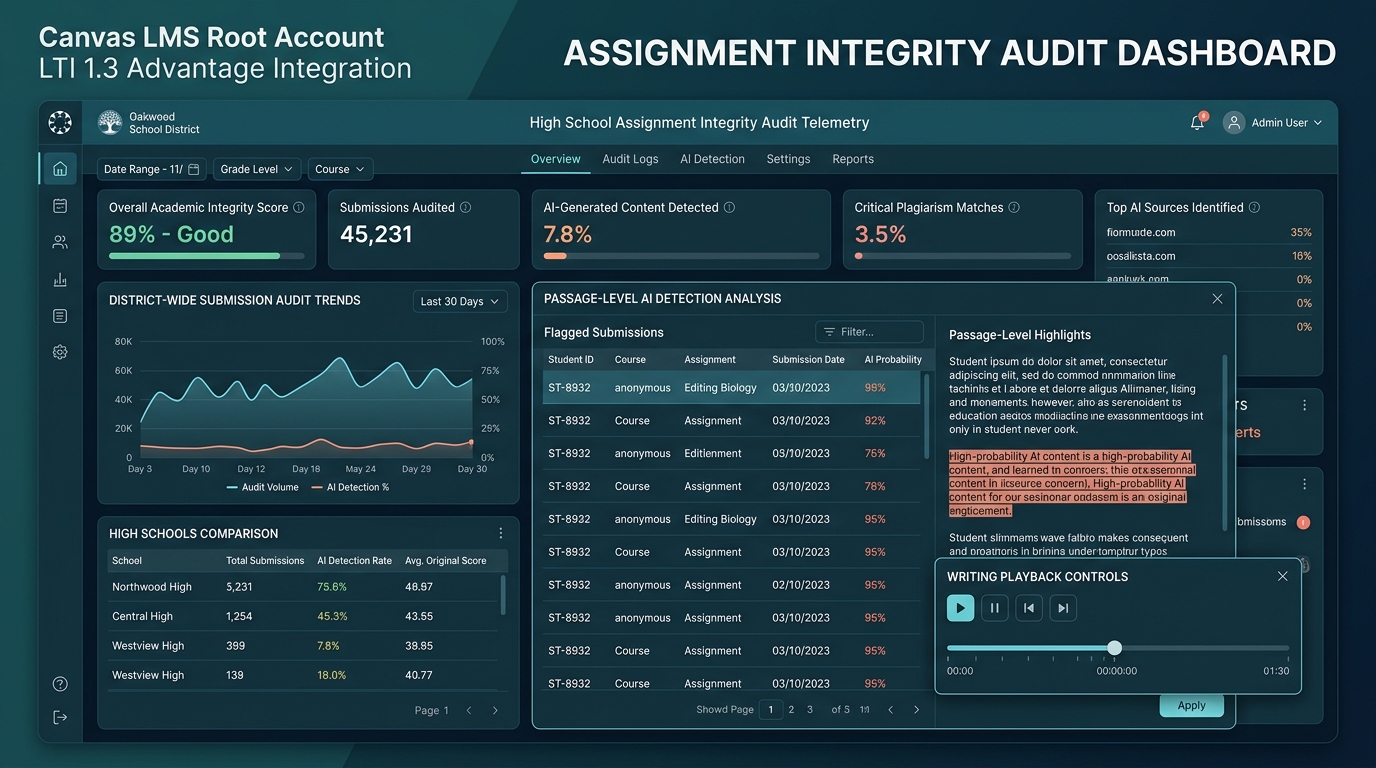
Step 5: Centralized District Analytics & Integrity Audit Dashboard
In addition to classroom-level SpeedGrader surfacing, the Root LTI 1.3 deployment provides District IT Directors, Instructional Technology Coaches, and Curriculum Coordinators with a centralized administrative dashboard:
- District-Wide Submission Telemetry: Real-time visibility into secondary writing volume across high schools, departments, and grade levels.
- Campus Consistency Analytics: Track baseline similarity and AI flag distributions across high schools to identify schools requiring targeted instructional coaching in citation mechanics or research synthesis.
- Citation Mastery vs. Intentional Misconduct Patterns: Differentiate between unintentional formatting errors (uncited sources in 9th grade) and substantive unauthorized generation, enabling data-informed curriculum revisions.
- FERPA & Privacy Audit Logs: Full cryptographic verification that zero student submissions were retained in persistent vendor storage or exposed to external AI model training pipelines.
6. Checkmark Plagiarism: The Core Pillars Empowering District IT Leadership
Checkmark Plagiarism is purpose-built for secondary school districts and higher education institutions seeking to replace fear-based, black-box policing with transparent, growth-oriented writing instruction.
| Core Pillar | District IT & Instructional Value Proposition |
|---|---|
| 1. Multi-Factor AI Detection | Passage-level granularity with calibrated confidence sliders; honest <150w N/A guardrail; immune to text spinners/humanizers. |
| 2. Defensible Plagiarism Matching | Billions of web & academic sources; dedicated uncited source visual styling; salted hash peer matching without text storage. |
| 3. Patent-Pending Essay Playback™ | Keystroke-by-keystroke timeline replay (1x-8x); external paste text preservation; mechanical transcription typing detection. |
| 4. Teacher-in-the-Loop Autograder | Automated first-draft rubric scoring; quote-anchored feedback; AGS v2.0 one-click grade passback to Canvas Gradebook. |
| 5. Enterprise Security & Privacy | 100% FERPA/COPPA compliant; zero model training on student work; ephemeral RAM processing; Canvas LTI 1.3 Advantage cert. |
6.1 Multi-Factor Passage-Level AI Writing Detection
Generic AI detectors assign an arbitrary score to an entire paper, leaving teachers with no actionable evidence. Checkmark analyzes linguistic patterns at the passage level:
- Linguistic Perplexity & Burstiness Analysis: Measures sentence length variance, structural predictability, and transitional rhythm across individual paragraphs.
- Calibrated Confidence Sliders: Rather than a binary “AI vs. Human” verdict, Checkmark displays an evidence card for each flagged sentence with a confidence slider ranging from Typical Human Writing Style to Typical AI Pattern.
- Immunity to “AI Humanizers” and Paraphrasers: While tools like QuillBot or Undetectable AI alter surface syntax to bypass traditional word-frequency detectors, they cannot fabricate authentic temporal typing history, which Checkmark captures via keystroke telemetry.
6.2 Defensible Plagiarism Detection & Uncited Source Differentiation
- Comprehensive Web & Archive Indexing: Scans billions of live web pages, open-access scholarly databases, digital encyclopedias, and historical archives with side-by-side quote comparisons.
- Targeted Uncited Source Coaching: Checkmark visually separates proper citations with minor formatting flaws from uncredited source usage. This enables English and social studies teachers to conduct targeted citation coaching rather than treating developmental formatting mistakes as disciplinary offenses.
- District-Isolated Peer Match Indexing: Detects unauthorized peer collaboration across different high schools or class periods within the district using salted cryptographic hashing without ever exposing student text outside the district ecosystem.
6.3 Flagship Innovation: Patent-Pending Essay Playback™ Keystroke Dynamics
Checkmark’s flagship technology, Essay Playback™, transforms how educators evaluate writing authenticity:
Educators scrub through composing sessions like video, watching brainstorming, outlining, and mid-sentence pauses.
Captures timestamp and exact clipboard text—preserving original pasted content even if rewritten or deleted.
Identifies mechanical, robotic typing velocity when a student manually retypes AI text from a phone or second screen.
Provides unassailable empirical proof that protects neurodivergent students and ELL writers falsely accused by AI tools.
6.4 AI Autograder & Rubric-Based Feedback with Teacher-in-the-Loop Authority
- First-Draft Grading Aligned to Custom Rubrics: Evaluates essays against custom district rubrics (e.g., 4-point AP Argumentation, 6-Trait Analytical, State Standards Rubrics), generating criterion-by-criterion scores.
- Quote-Anchored Justifications: Every suggested rubric score is paired with specific, clickable quotes from the student's text explaining why the criterion was met or where evidence was missing.
- Teacher Final Authority & AGS v2.0 Sync: All AI-generated scores remain editable drafts. Teachers can modify scores, add personalized voice comments, and sync finalized grades straight into Canvas Gradebook with a single click.
7. Real-World District Case Studies: Centralized LTI 1.3 in Action
To understand the transformative impact of centralized Canvas LTI 1.3 integrity deployment, consider three real-world district scenarios:
The Challenge: Metro Unified discovered that over 120 secondary English and History teachers were using free Chrome extensions and consumer AI checkers. This led to over 45 formal parent grievances in a single semester regarding arbitrary whole-document AI penalties. The district’s legal counsel raised urgent FERPA non-compliance warnings.
The LTI 1.3 Deployment: The District Instructional Technology team provisioned Checkmark Plagiarism at the Canvas Root Account level, deploying the LTI 1.3 Developer Key across all 8 high school sub-accounts with the Plagiarism Detection Platform extension enabled.
The Outcome: 100% elimination of unvetted Chrome extensions across secondary faculty. Over 18,000 semester writing assignments were audited automatically with zero teacher setup overhead. Disputed academic integrity appeals dropped by 85% due to transparent passage-level evidence cards and Essay Playback™ timeline verification.
The Challenge: A high school senior enrolled in a Dual-Enrollment English Composition course submitted a 12-page research capstone paper. An uncalibrated third-party AI detector flagged the submission with an opaque “92% AI Generated” score. The university partner threatened to withhold college credit, and the student faced suspension.
The Resolution via Essay Playback™: The District Instructional Technology Director and the course instructor opened the submission inside Canvas SpeedGrader using Checkmark. They clicked “Launch Essay Playback™”. The timeline revealed 4 hours and 42 minutes of active, non-linear human drafting with 384 active sentence revisions and natural synthesis pauses. The clipboard telemetry logged only two pastes: both were 30-word verbatim historical quotes correctly formatted in MLA style.
The Result: The student was immediately exonerated with zero disciplinary record. The university partner praised the district for providing definitive, indisputable writing telemetry.
The Challenge: District Curriculum Coordinators observed that 9th-grade literature students at East High were receiving significantly harsher essay grades than identical cohorts at West High, creating equity concerns in district-wide GPA distributions.
The Deployment: The district configured standard 6-Trait Writing Rubrics inside the Checkmark AI Autograder and synchronized them via Canvas LTI 1.3 Deep Linking across all 45 secondary English sections.
The Outcome: Teachers used AI-drafted rubric suggestions with quote-anchored evidence as a starting baseline. Grading variance between campuses narrowed by 74%, while teacher grading time decreased from 14 minutes per essay to under 5 minutes—allowing educators to focus on 1-on-1 writing conferences.
8. District IT Implementation Checklist & Troubleshooting Guide
Use this technical pre-flight checklist and troubleshooting reference to ensure a seamless rollout across your district's Canvas infrastructure:
- Confirm Canvas Root Administrator access credentials.
- Verify firewall whitelisting for Checkmark API endpoints (
*.checkmarkplagiarism.com). - Review District Student Data Privacy Agreement (DPA) execution with Checkmark.
- Create LTI 1.3 Developer Key with OIDC, Redirection, and Public JWK URLs.
- Enable LTI Advantage Scopes: AGS v2.0, NRPS v2.0, and Plagiarism Platform Extensions.
- Toggle Developer Key State to ON and copy numeric Client ID.
- Install App via Client ID at Canvas Root Account level.
- Verify “Inherited from Root Account” status in all high school sub-accounts.
- Create sandbox course assignment with “File Upload” submission type.
- Submit test student document (.docx / Google Doc) and verify automated PDP event hook.
- Open SpeedGrader: Confirm Checkmark badge, Essay Playback™, and rubric drawer render.
- Distribute “Stop Guessing, Start Trusting” educator guide to department chairs.
- Conduct 30-minute webinar with Instructional Technology Coaches on Essay Playback™.
- Provide guidance on quote-anchored rubric feedback in SpeedGrader.
Common Canvas LTI 1.3 Troubleshooting Scenarios
Root Cause: Asynchronous Canvas webhook delay or firewall blocking outbound HTTPS payload to Checkmark API.
Resolution: Verify that your district firewall / web content filter permits traffic to https://app.checkmarkplagiarism.com/api/lti/1.3/*. Checkmark processes standard essays in under 3.5 seconds; if pending persists, verify that the assignment submission type in Canvas includes standard file uploads or text entry.
Root Cause: Mismatch in Developer Key configuration URLs or cached expired JWKS public keys in Canvas.
Resolution: Ensure the Public JWK URL is set precisely to https://app.checkmarkplagiarism.com/api/lti/1.3/jwks without trailing spaces. If keys were recently rotated, clear the Canvas developer key cache by toggling the key OFF and ON.
Root Cause: Missing LTI Advantage Assignment and Grade Services (AGS) v2.0 scope permissions in the Developer Key.
Resolution: Re-open the Developer Key in Canvas Root Admin. Expand LTI Advantage Services and ensure Can create and update submission results for assignments is checked. Save the key and re-test grade passback.
9. Frequently Asked Questions (FAQs) for District Technology Leaders
No. That is the primary architectural advantage of Checkmark’s Canvas Plagiarism Detection Platform (PDP) integration. Teachers continue creating standard Canvas assignments using familiar submission settings (File Uploads, Google Drive, Microsoft Office 365, or Text Entry). Checkmark listens for standard submission events in the background, automatically executes the audit, and renders results inside SpeedGrader without requiring teachers to select an external tool or configure assignment settings.
Checkmark operates under a legally binding, enterprise Zero Model Training Guarantee. Student essays, revision histories, and grading feedback are never ingested into training datasets, fine-tuning pipelines, or algorithmic feature stores. All processing occurs in ephemeral, in-memory RAM buffers that are purged via cryptographic zeroization immediately after report generation.
Yes. Checkmark provides a centralized District Admin Portal accessible to authorized District IT Directors, Curriculum Leaders, and High School Principals. Administrators can view aggregated writing volume, citation mastery patterns, and rubric calibration metrics across campuses without exposing individual student records to unauthorized staff.
Checkmark uses Salted Locality-Sensitive Hashing (LSH). When a student submits an essay, Checkmark transforms the text into mathematical hash signatures using a private cryptographic salt unique to the school district. When another student submits a paper at a different high school within the district, the system compares the hash signatures. It detects verbatim or structural copying across district schools without ever storing or exposing raw student text in persistent databases.
Statistical AI detectors rely on linguistic predictability (perplexity and burstiness), which can yield false positives—especially on highly structured essays or non-native English writing. Essay Playback™ bypasses statistical guesswork by providing objective, empirical writing process telemetry. Watching a student’s keystrokes, composing pauses, revision cycles, and external clipboard pastes provides conclusive, defensible proof of authentic human authorship.
Yes. Through Canvas LTI 1.3 Deep Linking and the Checkmark Rubric Manager, curriculum coordinators can create and distribute standardized district writing rubrics (e.g., 9th-Grade Informational, AP History DBQ, CTE Technical Report) to specific sub-accounts, courses, or grade levels. Teachers retain full control to edit AI-drafted scores before synchronizing them into the Canvas Gradebook.
Checkmark integrates natively with the Google Docs and Microsoft 365 ecosystems via Checkmark’s ecosystem telemetry. When students submit a Google Doc or Word document through Canvas, Checkmark ingests the rich revision history and reconstructs the complete Essay Playback™ timeline inside SpeedGrader.
10. Conclusion: Transforming District Academic Integrity
In an era of rapid AI advancement, district technology leaders cannot rely on piecemeal classroom tools or fragmented browser extensions. Doing so compromises student data privacy, overwhelms teachers with administrative friction, and leaves school districts vulnerable to legal and equity challenges.
By deploying Checkmark Plagiarism via Canvas LTI 1.3 Advantage at the Root Account level, District Instructional Technology teams establish a modern, centralized, and legally defensible academic integrity standard across all secondary schools.
- Zero Teacher Friction: Automated assignment auditing across 100% of high school courses.
- Ironclad Privacy: 100% FERPA/COPPA compliance with Zero AI Model Training on student work.
- Defensible Evidence: Multi-factor passage analysis backed by patent-pending Essay Playback™.
- Empowered Educators: Teacher-in-the-loop AI rubric autograding with Canvas Gradebook sync.
- District-Wide Trust: Standardized, growth-oriented writing instruction across all campuses.
With Checkmark Plagiarism and Canvas LTI 1.3, your district can stop guessing and start trusting—protecting student privacy, supporting teacher instruction, and fostering authentic student writing across every high school campus.
To schedule a technical architecture review, request a Canvas Root Account developer key trial, or download Checkmark’s District Data Privacy Agreement (DPA) package, visit checkmarkplagiarism.com.