
Executive Summary
As students realize that modern plagiarism checkers and learning management systems easily flag clipboard paste events, many turn to the "transcription loophole"—generating essays via ChatGPT, Claude, or AI humanizers on a smartphone, tablet, or secondary monitor and manually retyping the content character-by-character into their assignment window. Because no paste event is triggered and static text classifiers are easily confounded by minor edits, traditional software is blind to this tactic. However, original cognitive drafting produces a radically different physical biometric profile than optical transcription. By analyzing Inter-Key Intervals (IKI), pause distributions (P-bursts vs. R-bursts), revision absence, and cursor trajectories, Checkmark Plagiarism's patent-pending Essay Playback™ reconstructs the writing process to provide indisputable, visual proof of mechanical transcription—while protecting and exonerating honest students from arbitrary AI detector accusations.
Checkmark Plagiarism closes the transcription loophole by combining patent-pending Essay Playback™ with passage-level AI detection, comprehensive plagiarism checking, rubric autograding, and native LMS integrations for Canvas LMS, Google Classroom, and Buzz LMS.
The "Transcription Loophole": Why Students Retype AI Outputs
In the rapid evolution of academic evasion tactics, the direct copy-and-paste is practically obsolete. Today's digitally literate students understand that pasting 1,500 words into Google Docs or Canvas LMS in 0.2 seconds leaves an indelible digital fingerprint. When schools deployed paste-monitoring extensions and clipboard loggers, students adapted by developing workarounds designed to simulate manual writing:
Smartphone / Tablet / 2nd Monitor
AI Model: ChatGPT / Claude / Humanizer output displayed on phone propped beside keyboard.
Zero content formulation; mechanical transcription transfers text character-by-character.
Target Document (Canvas / Docs)
- Zero clause-boundary pauses
- Metronomic 68–85 WPM cadence
- 0.3% backspace / deletion ratio
- Strictly monotonic cursor path
This workaround—often termed the "retype bypass" or "transcription loophole"—operates in three distinct phases:
- Generation: The student prompts an LLM (such as ChatGPT, Claude, or a specialized essay writer) on a smartphone, tablet, or auxiliary monitor.
- Surface Manipulation (Optional): The student runs the text through an "AI humanizer" or paraphraser (e.g., QuillBot, Undetectable AI) to alter vocabulary and bypass static perplexity detectors.
- Manual Transcription: The student props the phone next to their keyboard and manually types the prose into their school Google Doc, Microsoft Word document, or LMS text editor character-by-character.
Why Legacy Tools Fail to Detect the Retype Bypass
To legacy academic integrity software, a transcribed essay appears immaculate:
- No Paste Flags: Because every character is entered via physical keypresses, clipboard detection logs show zero paste events.
- Active Time Spent: The document metadata reflects 20 to 40 minutes of continuous typing activity, giving the superficial illusion of honest effort.
- Inconclusive Text Classifiers: Paraphrased and transcribed AI text frequently returns ambiguous 15%–40% probability scores on generic statistical AI detectors, leaving educators without defensible proof.
Despite bypassing superficial checks, manual copy-typing creates a severe biomechanical anomaly. Composing original thought is mentally taxing, fragmented, and recursive. Copy-typing pre-finalized text from a screen is steady, linear, and automatic.
Keystroke dynamics captures this fundamental distinction.
Cognitive Science: Organic Drafting vs. Optical Transcription
To understand how keystroke dynamics identifies second-screen retyping, we must examine the cognitive architecture of writing. In the classic cognitive model of writing established by John R. Hayes and Linda S. Flower, original text production requires continuous coordination among three competing mental processes: Planning, Translating, and Reviewing.
- 1. Goal Setting & Memory Retrieval: Writer pauses to retrieve evidence, organize conceptual structure, and choose argumentation strategy.
- 2. Syntactic Formulation: Drafting occurs in short cognitive bursts of 5–15 words before pausing for the next clause.
- 3. Continuous Monitoring & Micro-Revisions: High backspace frequency (8%–18%), immediate word deletions, and cursor navigation back to earlier sentences.
- 4. Dynamic Pause Latencies: Multi-second pause spikes (2,000–8,000+ ms) naturally occur at clause and sentence boundaries.
- 1. Optical Fixation: Eyes scan 4–7 words from the secondary device into short-term visual working memory.
- 2. Motor Execution: Fingers mechanically type buffered characters with no semantic or syntactic ideation.
- 3. Immediate Next Glance: Eyes shift back to the phone screen instantaneously upon finishing the buffered word chunk.
- 4. Mechanical Fluidity: Flatline 180–350 ms intervals across all syntactic boundaries; zero macro-revisions or paragraph rewrites.
The Cognitive Writing Cycle in Organic Drafting
When a student writes an original argument:
- Idea Formulation (Planning): The student experiences frequent, multi-second cognitive pauses (often 3 to 15 seconds) before drafting new sentences or paragraphs while retrieving evidence, structuring claims, and selecting syntax.
- Production Bursts (P-Bursts): Text is generated in short, uneven bursts (averaging 5 to 12 words) corresponding to working-memory capacity.
- Immediate Revision (R-Bursts): The student continuously re-evaluates their own output. They strike the backspace key to fix typos, delete full clauses to test alternate phrasing, and hop the cursor backward to modify preceding sentences.
The Optical Buffer in Second-Screen Transcription
When a student transcribes text from a phone or second screen:
- Zero Content Formulation: The student does not plan arguments, evaluate rhetoric, or choose vocabulary; the generative AI model has already finalized the prose.
- Short-Term Visual Buffering: The student's cognitive activity is limited to reading a 4-to-7 word chunk off the secondary screen, holding it in visual working memory, and typing it into the keyboard.
- Absence of Evaluative Friction: Because the text on the second screen is already grammatically complete, the student never experiences the linguistic hesitation that characterizes human drafting. Sentences containing graduate-level syntax and multisyllabic vocabulary are typed with the exact same fluid cadence as common conversational words.
The Physics of Typing: Keystroke Dynamics & Telemetry
When an essay is written within a telemetry-aware learning environment—such as Checkmark Plagiarism's integrations for Google Docs, Microsoft Word, Canvas LMS, and Buzz LMS—every interaction records five critical telemetry datapoints:
Where:
k_iis the specific physical key code pressed.t_downandt_upare millisecond-accurate timestamps for key press and release.pos_iis the exact linear index of the cursor within the document buffer.actionis the event classification (insert,delete,selection_replace,paste,cursor_hop).
From this rich temporal telemetry, Checkmark extracts five diagnostic biometric markers that expose second-screen transcription:
| Telemetry Metric | Authentic Human Drafting | Second-Screen Transcription |
|---|---|---|
| Inter-Key Interval (IKI) Variance | High (Coefficient of Variation CV > 0.65) | Very Low (CV < 0.25; Metronomic) |
| Syntactic Pause Boundary Ratio | Sharp multi-second spikes at periods/commas | Flatline across sentence/clause boundaries |
| Deletion / Revision Ratio | 7% – 18% of total keypress events | < 1.5% of total events (Single slip fixes only) |
| Cursor Trajectory Monotonicity | Highly non-linear; recursive cursor jumps | Strictly monotonic forward (0 to N) |
| Net Drafting Production Velocity | 18 – 38 WPM (Drafting with cognitive load) | 55 – 90+ WPM (Continuous copy speed) |
| Pause Bursts vs Revision Bursts | Balanced P-bursts punctuated by R-bursts | Unbroken 200-word P-bursts; zero R-bursts |
1. Inter-Key Interval (IKI) and Coefficient of Variation
The Inter-Key Interval (IKI) is the duration in milliseconds between two consecutive keydown events:
In genuine writing, IKIs follow a multimodal distribution with high variance:
- Intra-word IKI: 90–160 ms (fast motor chunking for familiar letter pairings like
th,ing,tion). - Inter-word IKI: 220–500 ms (micro-planning pause at spacebar).
- Inter-clause IKI: 800–2,500 ms (syntactic pause at commas, semicolons, dashes).
- Sentence boundary IKI: 2,500–8,000+ ms (macro-planning pause at period).
In transcription, the Coefficient of Variation (CV = σ / μ) of IKIs collapses. Because the student is executing a steady reading-typing loop, the time between the period ending one sentence and the capital letter starting the next sentence drops to a mechanical 250–400 milliseconds.
2. Pause Distribution Analysis: P-Bursts vs. R-Bursts
Educational linguists categorize writing flow into two primary behavioral episodes:
- Production Bursts (P-Bursts): Continuous runs of typing unbroken by pauses exceeding a predefined threshold (e.g., 2,000 ms).
- Revision Bursts (R-Bursts): Sequences of editing keystrokes (backspaces, text selections, arrow navigation, cursor relocations) aimed at restructuring existing prose.
In organic drafting, P-bursts are short (median 7–14 words) and are regularly punctuated by R-bursts. In second-screen transcription, P-bursts extend uninterrupted for 100 to 300 words at a time, while R-bursts drop to near zero. The student types continuously because they are not evaluating what they write—they are merely transferring visual data from one screen to another.
3. Deletion Entropy and Backspace Ratio
Drafting is inherently destructive: writers constantly rephrase, delete sentences, correct spelling, and modify grammar.
Across millions of analyzed student sessions:
- Organic Drafting: Deletion ratios consistently range between 7% and 18%.
- Second-Screen Transcription: Deletion ratios plummet to 0.2% to 1.8%. The few backspaces that do appear are single-character corrections of immediate slip errors (e.g., striking
rinstead ofe), with an absolute absence of structural or multi-word deletions.
4. Cursor Trajectory Monotonicity
In genuine essay writing, the cursor position exhibits non-monotonic, multi-directional motion. Students jump back to paragraph 1 to add a missed detail, scroll down to write a conclusion, return to paragraph 2 to insert a citation, and move across sentences.
In second-screen transcription, the cursor trajectory is strictly monotonic (cursor index increases constantly without decreasing for 99.8% of events). The cursor begins at index 0 and moves relentlessly forward to character index 12,450 without ever revisiting prior paragraphs until the final word is typed.
5. Net Production Velocity Anomalies
While touch typists can easily reach 80–100 words per minute during simple copy tests (like TypeRacer), cognitive writing research confirms that human drafting velocity rarely exceeds 25 to 40 WPM due to the mental friction of ideation.
When a student produces a 2,000-word philosophical or literary analysis in a single 26-minute session without prior drafts, notes, or outlines, they have sustained a net production velocity of 76.9 WPM. Sustaining 77 WPM across complex analytical prose without pauses or major revisions is cognitive impossibility—it is the signature of pure transcription.
Patent-Pending Essay Playback™: Visualizing the Proof
While keystroke interval mathematics and variance algorithms power Checkmark Plagiarism's backend detection engine, educators and school administrators require intuitive, indisputable visual evidence. Checkmark's patent-pending Essay Playback™ translates complex telemetry into a clear, interactive visual interface.
"The existential alienation depicted in Franz Kafka's 'The Metamorphosis' serves as a profound critique of bureaucratic dehumanization in early twentieth-century industrial society. Gregor Samsa's physical transformation into an insect is not merely a biological impossibility, b-u-t..."
Telemetry Profile: Metronomic IKI (CV = 0.14) | Zero Sentence-Boundary Pauses | 2 Backspaces Across 1,148 Words | Strictly Monotonic Forward Path
Key Features of Essay Playback™
- Scrubbable Keystroke-by-Keystroke Video Timeline: Educators can scrub through the entire writing session like a high-definition video. With playback speeds ranging from 1x to 8x, teachers can watch an essay assemble itself in 60 seconds, observing drafting pauses, typing rhythms, and cursor jumps in real time.
- Transcription Velocity Heatmaps: Essay Playback™ overlays color-coded velocity bands across the document text:
- Green (Organic Drafting): Variable speed, natural sentence-start pauses, regular backspace activity.
- Amber (Unusual Cadence): Elevated velocity with modest revision activity.
- Red (Mechanical Transcription): High sustained WPM, zero boundary pauses, near-zero backspaces.
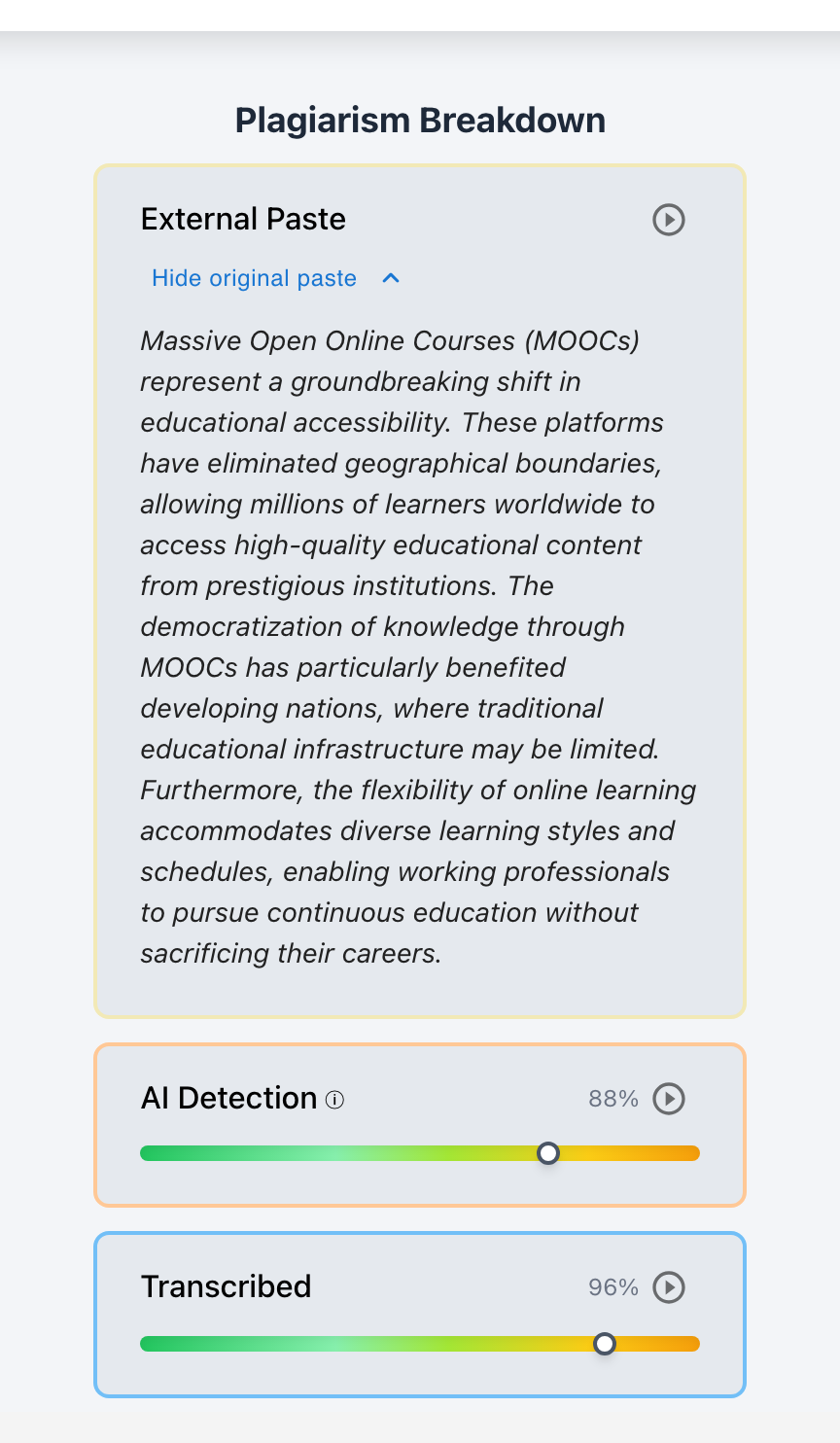
- External Paste Tracking with Complete Original Text Preservation: If a student pastes text from an external source, Checkmark captures the timestamp, character count, and exact pasted text. Crucially, Checkmark permanently preserves the original pasted text, even if the student subsequently spends thirty minutes manually rewriting, paraphrasing, or deleting individual words. Clicking the "Jump to Playback" button on any paste card transports the teacher directly to the exact second in the timeline when the paste occurred.
- Two-Way Linked Evidence Cards: Clicking any highlighted sentence or paragraph in the essay immediately scrolls to its corresponding Evidence Card in the sidebar, displaying calibrated confidence sliders (typical human drafting style vs. typical AI pattern), local typing velocity, and pause metrics. Conversely, clicking an evidence card jumps the timeline directly to that drafting segment.
Statistical Detectors vs. Process Telemetry
To appreciate why keystroke playback is the definitive solution for modern classrooms, we must contrast text-only AI detectors with writing process telemetry:
| Feature / Capability | Statistical Text Detectors (GPTZero, Turnitin AI, etc.) |
Checkmark Keystroke Telemetry & Patent-Pending Essay Playback™ |
|---|---|---|
| Primary Data Analyzed | Final static text only | Full temporal keystroke telemetry & process logs |
| Susceptibility to Paraphrasers & Humanizers | High (fooled by QuillBot, Undetectable AI, synonyms) | Zero (paraphrased text must still be typed; telemetry detects copy) |
| Susceptibility to 2nd-Screen Retyping | Complete blindness (appears as manual typing) | High accuracy (detects constant velocity, zero clause pauses) |
| Protection for Honest Fast Writers & ESL | Poor (frequently flags concise, formal writing) | Absolute (authenticates bursty pauses & recursive backspaces) |
| Evidence Defensibility | Opaque percentage score ("87% AI" black box) | Visual, scrubbable video receipts of the exact drafting session |
| Pedagogical Dialogue Utility | Low (causes student denial and adversarial friction) | High ("Show, don't accuse" collaborative playback review) |
Why Statistical Detectors Are Inadequate for Secondary Screen Retyping
Static detectors evaluate perplexity (word choice predictability) and burstiness (sentence length variation). When a student retypes an essay from a phone, they often make slight lexical adjustments on the fly—swapping an adjective, breaking a compound sentence into two, or introducing minor spelling errors. These superficial edits dramatically increase perplexity scores, causing static detectors to drop confidence levels below actionable thresholds.
Why Process Telemetry Provides Indisputable Proof
Writing telemetry does not guess based on linguistic style; it observes the physical reality of human text production. A student can change every fourth word to fool a linguistic detector, but they cannot alter the biological constraints of human cognitive drafting while copy-typing.
If a student claims they conceived and authored a 1,500-word essay on their own, their drafting record must demonstrate cognitive pauses, revision loops, and syntactic hesitation. The absence of these biological markers is forensic, objective proof of transcription.
Realistic Classroom Scenarios: Telemetry in Action
The following three case studies demonstrate how Checkmark's multi-factor integrity suite resolves common classroom dilemmas with empathy and clarity:
The Phone-on-the-Desk Transcription
The Context: An 11th-grade AP United States History essay analyzing the economic causes of the Civil War (1,400 words).
The Submission: Sophisticated rhetoric and historiographical framing. A traditional static AI detector returned an inconclusive 24% AI probability because the student tweaked several adjectives.
The Checkmark Investigation: Essay Playback™ showed the entire 1,400 words entered in a single 19-minute session at an unbroken 73.6 WPM with exactly 1 single backspace across the entire document and zero clause-boundary pauses.
Exonerating an Honest Student Falsely Accused by Static Detectors
The Context: A freshman college English Composition argumentative essay on renewable energy policy (2,200 words).
The Submission: An international ESL student wrote a concise, structured essay. A generic static AI classifier flagged it as 91% AI Generated due to predictable transitional phrases.
The Checkmark Investigation: Writing Process Analysis revealed 5 hours and 40 minutes of drafting spread across four sessions over five days, 518 backspaces, two complete introduction rewrites, and natural high-burstiness IKI variance (CV = 0.88). The only external pastes were three properly cited government report quotations.
The "QuillBot Humanizer + Retype" Evasion
The Context: An 8th-grade physical science research paper on thermodynamics.
The Submission: The student prompted an AI model, pasted the output into QuillBot to spin synonyms, and retyped the spun text into Buzz LMS while viewing a tablet.
The Checkmark Investigation: Multi-Factor AI Detection highlighted awkward synonym substitutions on passage cards, Defensible Plagiarism Engine identified a 38% matching phrase structure with indexed educational websites, and Essay Playback™ confirmed steady 62 WPM copy-typing with zero clause-boundary pauses.
Step-by-Step Teacher Protocol: Investigating AI Transcription
When writing telemetry flags an essay for suspected transcription, educators should follow a supportive, structured protocol focused on learning and student trust:
Examine passage-level AI evidence cards with calibrated confidence sliders, side-by-side plagiarism matches with live links, and overall writing telemetry (active time, net WPM, deletion percentages).
Watch the session unfold in the video timeline. Check if the essay appeared in a single unbroken session without planning pauses, or if natural hesitations exist at paragraph transitions.
Review the Paste Breakdown in the sidebar. If a student pasted their own handwritten notes or pre-approved offline outline, the preserved text will confirm legitimate process habits.
Execute Checkmark's AI Autograder against your custom rubric. Review draft scores and quote-anchored feedback cards to understand the essay's pedagogical merits prior to meeting the student.
Play the writing playback alongside the student. Ground the discussion in observable drafting analytics: "When we look at your playback, we see 1,200 words typed in 15 minutes without any pauses or deletions. Can you walk me through how you developed the argument in this section?"
Mark the submission privately in the teacher dashboard as Resolved (addressed via coaching/rewrite), Flagged (referred for intervention), or Not Flagged / Cleared (valid justification provided).
Institutional Policies: Addressing the Transcription Loophole
To prevent ambiguity, school boards, academic integrity committees, and department chairs must update their honor codes and syllabi to explicitly address process telemetry and mechanical transcription:
| Tier | Student Behavior | Telemetry & Policy Status |
|---|---|---|
| 1. Authorized Assistance | Brainstorming, outlining, grammar checking | Organic keystrokes; normal IKI variance & revision loops. ✅ PERMITTED |
| 2. Direct Clipboard Paste | Generating AI text and pasting into assignment | Instant block insertion captured in Paste Log. ❌ PROHIBITED |
| 3. Second-Screen Retype | Retyping AI/peer text from phone character-by-character | Metronomic IKI, zero clause pauses, deletion ratio < 1.5%. ❌ PROHIBITED AUTHORSHIP FRAUD |
| 4. Legitimate Offline Drafting | Drafting essay in notebook, then typing into LMS | Fast typing, but student presents original physical draft. ✅ PERMITTED (Cleared in Conference) |
Recommended Syllabus Policy Clauses
Enterprise Privacy, FERPA Compliance & Security
Capturing keystroke telemetry requires the highest standards of data security and student privacy:
Zero AI Model Training & FERPA Compliance
- Zero AI Model Training: Checkmark Plagiarism never uses student writing, keystrokes, or submissions to train commercial AI models.
- FERPA & COPPA Compliant: All telemetry data is stored within your institution's private, encrypted tenant. Student records are never sold, monetized, or indexed into public databases.
Enterprise Security & Native LMS Integrations
- Enterprise Encryption: Data is protected with AES-256 encryption at rest and TLS 1.3 in transit.
- Native Ecosystem Integration: Seamless single sign-on (SSO) and deep integration with Canvas LMS, Google Classroom, Buzz LMS, Moodle, and Microsoft Word.
Frequently Asked Questions (FAQ)
1. What if a student is simply an exceptionally fast typist? Will keystroke dynamics falsely flag them?
No. Keystroke telemetry does not flag submissions based on speed alone. An expert typist composing an original argument still exhibits high temporal variance (CV > 0.65), multi-second planning pauses at sentence boundaries, and natural revision/backspace ratios (typically 7%–15%). Transcription detection triggers only when high velocity coincides with metronomic intervals, flatline pause variance across syntactic boundaries, and an absence of structural revisions.
2. How does Checkmark handle students who legitimately draft by hand in a notebook before typing?
If a student writes their draft by hand in a notebook and subsequently types it into the LMS, their typing will naturally exhibit fewer on-screen revisions. Under Checkmark's educator-in-the-loop workflow:
- The teacher notices the elevated velocity and schedules a brief restorative conference.
- The student presents their physical handwritten notebook pages.
- The teacher updates the educator-only flag to Not Flagged / Cleared.
- The student is cleared without punitive measures, demonstrating how transparent evidence supports diverse student workflows.
3. Can paraphrasing tools or "AI humanizers" bypass keystroke playback?
No. While paraphrasers (like QuillBot or Undetectable AI) alter vocabulary to evade static perplexity detectors, they have no influence over physical typing dynamics. If a student transcribes paraphrased text from a phone, the mechanical, pause-less biometric signature of transcription remains fully visible in Essay Playback™.
4. What about students using speech-to-text dictation or accessibility software?
Assistive speech-to-text tools (such as Apple Dictation, Google Voice Typing, or Dragon NaturallySpeaking) insert words in acoustic phrase bursts with distinct operating system input markers rather than single-character physical keystrokes. Checkmark's telemetry engine recognizes accessibility signatures, ensuring students with 504 plans or IEP accommodations are never penalized.
5. Can a student fake authentic keystroke dynamics by artificially pausing or backspacing?
In theory, a student could try to artificially pause and delete random letters while transcribing from a phone. In practice, doing so requires double the cognitive effort and increases transcription time exponentially. Furthermore, artificial pauses do not align with natural syntactic boundaries (commas, semicolons, topic sentences), creating a distinct erratic pattern that Essay Playback™ highlights for educator review.
6. Are student keystrokes tracked outside of assignment windows?
No. Checkmark's telemetry monitoring operates exclusively within designated assignment document windows (such as the student's Google Doc, Canvas editor, or Buzz LMS submission box). Keystrokes on external applications, web searches, or private messaging are never logged or monitored.
7. How does Essay Playback™ protect students from false accusations by black-box AI detectors?
When a generic AI detector flags a well-written student paper as "90% AI," the student is often left with no way to prove their innocence. Checkmark's Essay Playback™ provides definitive, irrefutable proof of original authorship—displaying every deleted draft, rearranged paragraph, and hours-long writing struggle—instantly clearing the student.
Conclusion: Stop Guessing, Start Trusting
The arrival of generative AI in education does not require an adversarial arms race of black-box text detectors and punitive accusations. When educators rely on static percentages, honest students are harmed by false positives, while students exploiting the second-screen transcription loophole slip through undetected.
By combining passage-level AI analysis, side-by-side plagiarism source matching, patent-pending Essay Playback™, and keystroke dynamics, Checkmark Plagiarism equips educators with transparent, defensible evidence.
When you can see the complete writing journey unfold keystroke-by-keystroke, you no longer have to guess what happened behind the screen. You can have honest, supportive, and restorative conversations that uphold academic integrity while fostering student growth.
Ready to bring transparent writing process verification to your school or district? Explore a sample report or request a demonstration of patent-pending Essay Playback™ today.