
Executive Summary
As clipboard monitoring and standard copy-paste detectors have become common across learning management systems, students attempting to bypass academic integrity systems have increasingly adopted the “retype bypass”—placing an AI-generated essay or external draft on a smartphone, iPad, or secondary monitor and manually typing it into the LMS editor character-by-character. While this evasion tactic registers zero clipboard paste events and accumulates realistic active time, it leaves a distinct biometric signature in writing telemetry. Authentic human composition is non-linear, marked by high Inter-Key Interval (IKI) variance, deep clause-boundary formulation pauses (3–15+ seconds), and recursive revision churn (15–35% backspacing and restructuring). In contrast, optical transcription produces a flat, metronomic cadence (CVIKI < 0.20), near-zero revision friction (KFR < 3%), and short, syntax-independent gaze-shift pauses (0.8–2.2 seconds). Through patent-pending Essay Playback™ and granular cadence analytics, Checkmark Plagiarism provides educators, writing program administrators, and honor councils with defensible, transparent process evidence—fostering restorative, growth-oriented student conferences while definitively exonerating authentic writers.
1. The Retype Bypass: The Modern Frontier of Integrity Evasion
In the initial wave of generative artificial intelligence in academic settings, student misuse was characterized by overt, high-volume clipboard pasting. Students prompted large language models (LLMs) like ChatGPT or Claude, copied the full generated output, and pasted 800 words into Canvas, Google Docs, or Buzz LMS in a single millisecond timestamp. First-generation integrity tools caught these submissions through basic document event logs: instant text jumps, mismatched paste formatting, and zero session duration.
As awareness of clipboard logging spread across student forums and social platforms, evasion techniques evolved rapidly toward manual optical transcription (commonly known in student circles as the “retype bypass”).
Direct Copy/Paste
- Direct clipboard dump into editor
- Millisecond text jumps (>800 words)
- Caught by clipboard listeners
- Flagged by HTML/CSS formatting markers
AI Humanizers
- QuillBot / Undetectable AI paraphrasing
- Perturbs surface token selection
- Evades static perplexity models
- Still vulnerable to clipboard paste logging
Retype Bypass (Optical)
- Smartphone or second screen on desk
- Manual character-by-character entry
- 0 clipboard paste events logged
- Simulates 35+ minutes of active duration
The Diagnostic Dilemma: Zero paste events + Realistic 35-min active session + Inconclusive static score = Unprovable by legacy tools. Only keystroke cadence and pause topography reveal the biometric reality.
The Retype Workflow in Practice
In a typical optical transcription workflow:
- External Generation: The student generates an outline, argument, or full essay on an unmonitored secondary device—such as a smartphone propped on the laptop keyboard, a tablet on the desk, a smartwatch, or an adjacent second monitor.
- Surface Perturbation (Optional): The text may be processed through a paraphraser or AI “humanizer” to alter surface vocabulary and bypass static whole-document AI classifiers.
- Manual Copy-Typing: The student places their hands on their primary laptop keyboard and manually copy-types the text into the LMS essay text area or Google Docs window, word-for-word, line-by-line.
- Superficial Compliance: The submission logs 35 minutes of continuous typing activity, records zero clipboard paste actions, and appears cleanly formatted.
To a teacher inspecting only the final static document or basic LMS metadata, the submission appears completely legitimate. There are no sudden 1,000-word paste spikes, the time-on-task metric looks reasonable, and standard plagiarism databases show no direct web matches.
| Diagnostic Tool | What the Tool Sees | Why It Fails on Optical Retyping |
|---|---|---|
| Basic Clipboard / DOM Paste Listeners | Logs zero onPaste events. |
Characters were entered via discrete keypresses; no clipboard API was invoked. |
| Document Session Timers | Records 30 to 60 minutes of active drafting. | Physical manual typing consumes real time, creating an illusion of authentic effort. |
| Static AI Classifiers (Whole-Doc %) | Yields an ambiguous score (e.g., “52% AI Probability”). | Static scores evaluate text in isolation without context, leading to contentious disputes. |
| Standard LMS Revision History | Displays periodic snapshot intervals every 5–10 minutes. | Periodic snapshots aggregate changes, obscuring micro-cadence, pause dynamics, and keystroke friction. |
However, the physical and cognitive acts of authoring original thought versus optically copying external symbols rely on fundamentally different neurological pathways. These neurological differences translate directly into distinct, measurable telemetric patterns in keystroke dynamics and pause topography.
2. Psycholinguistic Foundations: Cognitive Drafting vs. Optical Transcription
To understand how keystroke telemetry differentiates organic composition from manual retyping, we must examine the psycholinguistic architecture of human writing.
Writing is among the most cognitively demanding activities the human brain performs. In the classic cognitive writing models established by John R. Hayes and Linda S. Flower (1980) and expanded by Ronald T. Kellogg (1996, 2008), authentic composition is modeled not as a linear text assembly line, but as a recursive, three-part cognitive cycle:
- Generating ideas & retrieving schema
- Goal setting & rhetorical structuring
- Assignment constraint evaluation
- Generates macro-formulation pauses (3–25s+)
- Propositional encoding & lexical search
- Syntactic assembly & motor execution
- Production bursts (P-bursts: 3–12 words)
- High Inter-Key Interval (IKI) variance
- Monitoring text against rhetorical goals
- Recursive diagnosing, editing & rewriting
- Non-linear cursor navigation across clauses
- Keystroke Friction Ratio (KFR = 15%–35%)
These three subprocesses—Planning, Translating, and Reviewing—compete constantly for limited Working Memory (WM) capacity, governed by the central executive, the phonological loop, and the visuospatial sketchpad.
A. The Anatomy of Natural Human Brainstorming & Composing
When a student composes an authentic essay, their keystroke telemetry reflects the ongoing cognitive friction of planning, lexical selection, and self-monitoring.
1. Clause-Boundary Formulation Pauses (Pform)
In authentic writing, long pauses do not occur at random intervals. Instead, they cluster systematically at major syntactic frontiers:
- Paragraph Transitions: Extended cognitive pauses (8–25+ seconds) where the writer plans thematic goals, narrative direction, and macro-arguments.
- Sentence Boundaries: Intermediate pauses (3–12 seconds) dedicated to propositional encoding and syntactic structuring.
- Complex Clause Junctions: Focused hesitations (2–6 seconds) occurring before subordinating conjunctions (although, whereas, because), coordinate conjunctions with independent clauses, or semicolons.
During these formulation pauses, the writer's working memory is actively constructing the next proposition, retrieving domain knowledge from long-term memory, and organizing rhetorical structure. Once the proposition is planned, the motor cortex releases a burst of keystrokes (known as a P-burst or Production Burst) to commit the formulated thought to the screen.
2. Variable Inter-Key Intervals (IKI)
The time elapsed between consecutive keystrokes—the Inter-Key Interval (IKI)—is naturally irregular in human composition:
- Intra-Word Transitions: Highly practiced letter pairs (digrams like th, er, in) execute rapidly and fluently (80–140 ms).
- Inter-Word Boundaries: Navigating from the end of one word across the spacebar to the beginning of the next requires micro-retrieval (250–550 ms).
- Lexical Choice Points: Selecting a precise adjective, verifying spelling, or deciding between synonyms introduces intermediate hesitations (600–1,800 ms).
This produces a wide, right-skewed IKI probability distribution with high standard deviation (σIKI > 120 ms) and a high Coefficient of Variation:
3. Recursive Revision Churn & Keystroke Friction Ratio (KFR)
Human thinking is imperfect and developmental. As writers generate text, the Reviewing subprocess constantly inspects the output on the screen against the mental goal. Writers frequently backspace, strike out awkward phrases, restructure dependent clauses, insert parenthetical qualifiers, and move punctuation.
Checkmark Plagiarism quantifies this natural friction through the Keystroke Friction Ratio (KFR):
A student who writes a 1,000-word paper (approx. 5,500 characters) typically generates 6,500 to 8,500 total keystrokes as they refine their prose in real time.
B. The Telemetric Signature of External Device Transcription
When a student transcribes text from a secondary device, the cognitive architecture changes completely. The student is no longer engaging the Planning or Reviewing cognitive sub-systems. Instead, their brain operates strictly as an optical-motor relay: reading a string of 4–8 words from the phone screen, holding that string temporarily in the phonological loop, and typing it out mechanically until the buffer is exhausted.
1. Collapsed IKI Variance & Cadence Isochronicity
Because the student is not inventing ideas or searching for words, cognitive friction disappears. Keystrokes flow with mechanical, metronomic regularity:
- The micro-variance between intra-word and inter-word keystrokes collapses.
- The standard deviation of keystroke intervals drops sharply (σIKI < 55 ms).
- The Coefficient of Variation plummets into the abnormal isochronous zone:
CVIKI < 0.20
The student's typing profile resembles an automated data-entry clerk or an optical transcription typist rather than a student formulating an argumentative thesis.
2. Syntactic Disconnect in Pause Topography
In optical transcription, pauses still occur—but their topographical placement is disconnected from linguistic syntax:
- Gaze-Shift Intervals: Pauses last between 0.8 and 2.2 seconds, representing the physical time required for the human eye to saccade from the laptop screen down to the mobile phone, visually locate the next line of text, and return to the keyboard.
- Non-Syntactic Placement: These gaze shifts occur in the middle of prepositional phrases (“...in the [1.6s pause] middle of the battle...”), between articles and nouns (“...an [1.4s pause] unprecedented economic...”), or across syllables, rather than at paragraph or sentence boundaries.
- Absence of Deep Ideation Pauses: Pauses exceeding 5 seconds at major thematic transitions or introductory topic sentences are completely absent.
3. Near-Zero Keystroke Friction (KFR < 3%)
Because the transcribed text was pre-generated by an AI model or external source, it already possesses polished grammar, sophisticated sentence structures, and seamless transitions:
- The student does not need to fix awkward phrasing or test different vocabulary words.
- Characters are entered in a strictly monotonic, linear progression (0 → N).
- Total session keystrokes equal the final character count within a 1–2% margin.
- Backspacing is limited to occasional minor motor slips (e.g., typing teh instead of the and immediately correcting it).
3. Comparative Telemetry Matrix: Authentic Ideation vs. Optical Transcription
The following matrix contrasts the telemetric dimensions of authentic human drafting, optical transcription from a secondary device, and traditional clipboard pasting:
| Telemetric Dimension | Authentic Brainstorming & Drafting | External Device Optical Transcription | Standard Clipboard Copy-Paste | Pedagogical & Forensic Significance |
|---|---|---|---|---|
| Keystroke Friction Ratio (KFR) | 15% – 35% (High backspace, word substitution, restructuring) | < 3% (Near-zero deletion; strictly linear character entry) | 0% (Block text insertion) | Demonstrates whether text underwent developmental formulation or was pre-composed. |
| Inter-Key Interval Variance (CVIKI) | High (CV ≥ 0.45, σ > 120ms) (Fluctuates by cognitive difficulty) | Collapsed (CV < 0.20, σ < 55ms) (Metronomic, rhythmic data entry) | N/A (No discrete typing events) | Reflects presence of active lexical retrieval and syntactic planning friction. |
| Pause Placement Topography | Syntax-Anchored (Clusters at clause, sentence, & paragraph borders) | Gaze-Shift Arbitrary (Mid-phrase, intra-clause, uncorrelated with syntax) | Boundary-Only (Single pause before massive block insertion) | Reveals whether pauses represent cognitive ideation (Pform) vs physical eye movements (Tgaze). |
| Pause Duration Distribution | Bimodal / Multimodal (200ms motor pauses up to 30s deep planning breaks) | Unimodal / Clustered (Tight cluster at 0.8s – 2.2s gaze-shift intervals) | N/A (Instantaneous insertion) | Differentiates deep reflective thinking from periodic reading of a secondary display. |
| Linear Progression (0 → N) | Non-Linear (Frequent cursor jumps, insertions, reorganizations) | Monotonic Linear (Characters entered continuously start to finish) | Step Function (0 to 1,000 words in 10ms) | Confirms whether document grew organically or was fed sequentially from an external script. |
| P-Burst Length (Words/Burst) | Variable (3–12 words) (Bound by working memory proposition chunks) | Uniform (5–8 words) (Bound by visual span and phonological loop buffer) | Infinite (Entire document in single event) | Indicates whether text chunks match cognitive proposition formulation or visual reading span. |
| Clipboard Event Log | Normal (Occasional quote pastes with subsequent editing) | Clean (0 Pastes) (Deliberate evasion of clipboard listeners) | Flagged (Single large external paste payload) | Exposes deliberate evasion when zero pastes accompany impossible linear perfection. |
4. Checkmark Plagiarism’s Cadence & Essay Playback™ Architecture
To equip educators, writing program directors, and academic integrity boards with transparent, verifiable evidence, Checkmark Plagiarism provides a multi-layered writing process analytics suite centered on patent-pending Essay Playback™.
- Canvas LMS SpeedGrader
- Google Docs Extension
- Buzz LMS & Moodle LTI 1.3
- Standalone Web Ingestion
- Millisecond KeyDown & KeyUp
- Cursor Navigation Tracking
- 100% Paste Buffer Storage
- Session Durations & Focus Gaps
- Calculates CVIKI, σIKI, & KFR
- Pause-Syntax Correlation (PSCI)
- Isochronous stream detection
- Gaze-shift cluster identification
- 1x–8x scrubbable video replay
- Typing velocity curves
- Passage-level AI confidence cards
- Direct LMS grade passback
1. 1x to 8x Scrubbable Essay Playback™ Timeline
Rather than relying on opaque statistical probability scores, educators can watch the student’s complete writing session unfold like a video recording:
- Variable Speed Scrubbing: Play back the entire 45-minute writing session in 3 minutes at 8x speed, or slow down to 1x speed to inspect critical transition points.
- Typing Velocity Curves: Visual graph overlaying words-per-minute (WPM) across time, highlighting unnatural bursts or flatline mechanical cadences.
- Pause Topography Heatmap: Interactive timeline markers displaying exact pause durations and their precise textual locations.
- Visual Keystroke Color-Coding: Green characters indicate newly drafted text, red highlights represent backspaced/deleted passages, and orange blocks flag external paste events.
2. Cadence & Transcription Detection Engine
Behind the visual playback, Checkmark’s statistical engine continuously audits keystroke rhythm:
- Isochronous Stream Flagging: Automatically flags sustained typing sequences (>100 words) where the Coefficient of Variation (CVIKI) drops below 0.20 with zero backspacing.
- Gaze-Shift Rhythm Recognition: Identifies the distinctive “read-type-read-type” periodicity characteristic of secondary screen transcription.
- Pause-Syntax Correlation Index (PSCI): Evaluates whether pauses align with syntactic boundaries (clauses, sentences) or occur at random lexical intervals.
3. External Paste Buffer Inspector
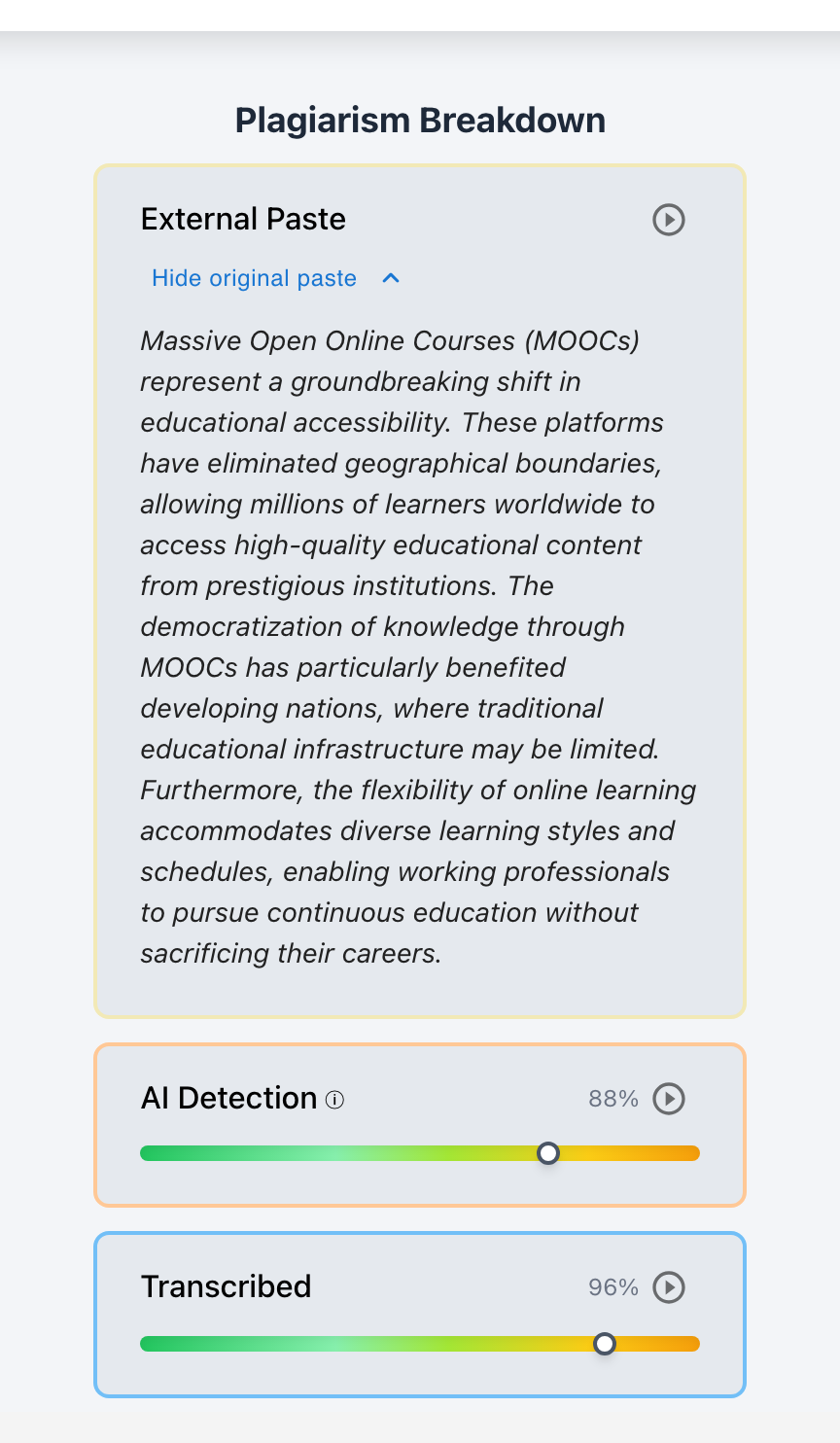
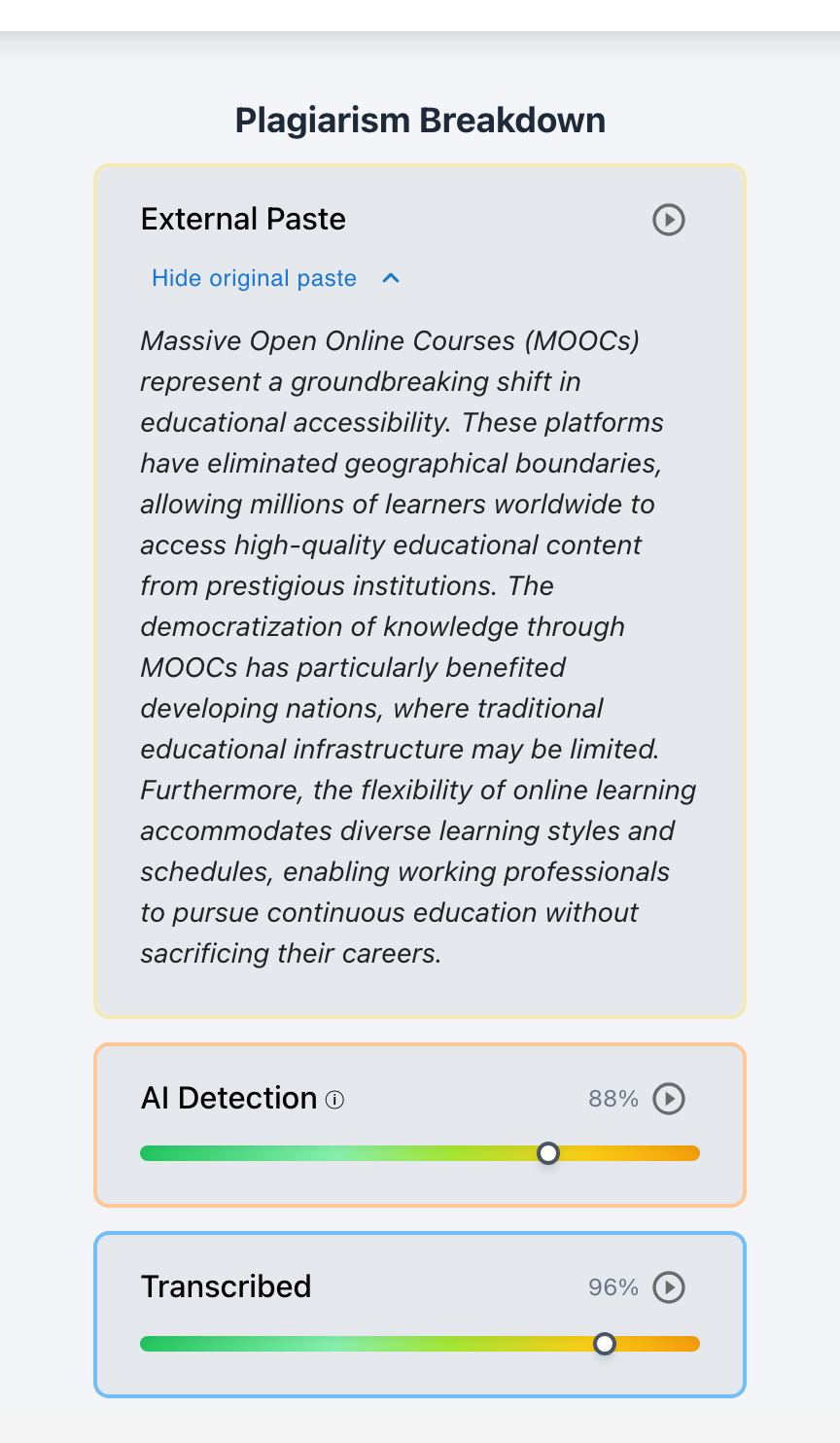
When students do use the clipboard—or when they paste an initial prompt before retyping—Checkmark preserves 100% of the original clipboard text payload. Even if the student subsequently deletes, overwrites, or rewrites every word in the document, the teacher can click the “View Original Paste Payload” button to view the exact text that entered the clipboard, timestamped to the millisecond, with a direct jump link to that moment in the playback timeline.
4. Teacher-in-the-Loop AI Rubric Autograding & LMS Sync
Checkmark pairs process integrity with pedagogical utility. Once writing authenticity is verified:
- Custom Rubric Evaluation: The AI Autograder generates formative, sentence-level feedback justifications anchored directly to student quotes.
- Teacher Final Authority: Grades and feedback remain fully editable drafts until approved by the teacher.
- Direct Gradebook Sync: Push finalized scores and rubric breakdowns straight into Canvas SpeedGrader, Buzz LMS, or Google Classroom with one click.
“Roosevelt's administration enacted the National Industrial Recovery Act...”
28 gaze-shift pauses (1.1s–1.8s) scattered mid-clause; 0 formulation pauses.
Sophisticated historical synthesis entered without drafting hesitation.
5. Real-World Case Studies: Telemetry in the Classroom
To illustrate how Essay Playback and cadence telemetry operate in real educational contexts, consider the following three documented classroom scenarios:
The Phone Transcriber
- Assignment: 750-word DBQ essay on New Deal economic reforms.
- Static Flag: 0% Plagiarism Match; Legacy AI Detector flagged 52% (inconclusive).
- Checkmark Telemetry: 24m 12s duration, 0 pastes, KFR = 1.4%, CVIKI = 0.16 (52 WPM flat).
- Pause Topography: 0 paragraph formulation pauses; 28 mid-clause 1.1s–1.8s gaze shifts.
Exonerating an Accused ESL Writer
- Student: First-Year Multilingual (ESL) Undergraduate.
- Static Flag: Legacy whole-paper detector scored 88% AI due to formal syntax.
- Checkmark Telemetry: 3h 42m duration across 4 sessions, KFR = 31.8% (1,840 revisions), CVIKI = 0.62.
- Pause Topography: Authentic 12–45s pauses at thesis, paragraph, and comparative transitions.
Hybrid Research Synthesis
- Assignment: 2,000-word Senior Capstone on Frankenstein & bioethics.
- Telemetry Profile: Section A (CV = 0.51, KFR = 24.2%, authentic), Section B (CV = 0.18, KFR = 2.1%, 58 WPM flat), Section C (CV = 0.49, authentic).
- Playback Finding: Abrupt transition to metronomic cadence in Section B secondary source analysis.
6. The 4-Phase Telemetry Investigation Protocol
To ensure consistency, fairness, and defensibility across departments, academic integrity officers and teachers should follow Checkmark’s structured 4-Phase Telemetry Investigation Protocol:
- Passage AI confidence sliders
- Side-by-side plagiarism matches
- Check 150-word short-text guardrail
- Set private status to
Flagged
- 1x–8x scrubbable video replay
- Check non-linear vs linear (0 → N)
- Audit major structural transitions
- Inspect 100% paste buffer payload
- Evaluate KFR (<3% severe indicator)
- Verify CVIKI (<0.20 isochronous)
- Check pause-syntax alignment
- Differentiate gaze shifts (1–2s)
- Export timestamped telemetry dossier
- Formulate growth-oriented questions
- Schedule co-viewing conversation
- Establish restorative learning path
Phase 1: Multi-Report Triage
- Inspect Passage-Level Granularity: Examine the essay in Checkmark Plagiarism. Look at specific highlighted passages rather than relying on a whole-paper score.
- Review Side-by-Side Plagiarism Sources: Verify whether matches represent uncited direct quotations, patchwriting, or peer copying.
- Check Short-Text Guardrails: Ensure the text sample exceeds 150 words (under 150 words displays
N/Ato prevent false positives). - Set Private Flag: Mark the submission status as
Flagged(private to educator view only) to avoid prejudicing the student prior to verification.
Phase 2: Playback Timeline & Pause Topography Audit
- Open Essay Playback™: Launch the session replay and set playback velocity to 4x or 8x speed.
- Scan the Macro-Timeline: Observe whether the document grew in non-linear bursts (typing, pausing, moving, revising) or through a monotonic linear progression (0 → N).
- Inspect Major Structural Transitions: Jump to the beginning of paragraphs and thesis statements. Check if the student paused for 5–20 seconds to plan the transition.
- Audit External Pastes: Check the External Paste Buffer tab. If paste events exist, inspect the full original pasted text payload.
Phase 3: Biometric Cadence & Statistical Metric Evaluation
- Evaluate Keystroke Friction Ratio (KFR):
- KFR ≥ 15%: Typical human cognitive drafting with active self-monitoring.
- KFR < 5%: Severe indicator of pre-composed transcription or memorized script entry.
- Evaluate Inter-Key Interval Variance (CVIKI):
- CVIKI ≥ 0.40: Normal cognitive-motor friction.
- CVIKI < 0.20: Isochronous optical transcription cadence.
- Examine Pause-Syntax Alignment:
- Do pauses occur before conjunctions and full stops, or do they occur mid-phrase at 1.0–1.8 second intervals (gaze shifts)?
Phase 4: Restorative Dossier Preparation
- Export Telemetry Evidence: Generate a timestamped Checkmark Integrity Dossier containing the velocity graph, pause topography map, and passage evidence cards.
- Formulate Supportive Questions: Frame conference inquiries around writing habits and process rather than punitive accusations.
7. Step-by-Step Teacher Co-Viewing & Restorative Conferencing Guide
The core philosophy of Checkmark Plagiarism is “Stop guessing, start trusting.” When telemetric anomalies arise, the goal of an integrity conference is not to extract a confession through confrontation, but to co-view objective process evidence together with the student, demystify the writing process, and restore academic trust.
“I want to understand your drafting journey and talk through your ideas.”
“Let's watch your essay unfold together on the Playback timeline.”
“I notice you typed this paragraph steadily without a pause. Walk me through composing it.”
Supervised rewrite, Writing Center referral, and restored grade pathway.
Word-for-Word Teacher Dialogue Scripts
Opening the Conference in a Supportive, Non-Accusatory Manner
Teacher: “Hi Alex, thanks for meeting with me today. I really enjoyed the central thesis of your paper on the New Deal. As part of our writing program, I regularly review our students' writing process replays so we can talk about drafting strategies, pacing, and revision habits. I'd love to pull up your Essay Playback timeline and have you walk me through how you put this piece together.”
Co-Viewing the Playback Timeline and Guiding Reflection
Teacher: (Plays session replay at 4x speed on screen) “Let's watch the drafting of your third body paragraph here. When we look at how writers work, we usually see people write a sentence, pause to think, delete an awkward phrase, or look back at their notes. In this section, the text appears in a steady, continuous stream at 54 words per minute with almost zero backspaces, and the only pauses are brief one-second breaks in the middle of sentences. Can you tell me what your setup was like when you were typing this part?”
When the Student Acknowledges External Device Transcription
Student: “I was running out of time before midnight, so I had Claude write an outline on my phone and I typed it into the doc so it wouldn't count as a copy-paste.”
Teacher: “I appreciate your honesty in telling me that, Alex. Managing deadlines when you're overwhelmed is tough, and it's easy to see why typing from a phone might seem like a shortcut. But what we're assessing in this class is your ability to analyze evidence and form your own arguments, not your ability to transcribe text. Let's look at our department's restorative revision policy. We'll schedule a time for you to draft a revised argument during office hours, and we'll review the research notes together first.”
Exonerating and Validating an Accused Student
Teacher: “Jordan, I noticed that an automated detector flagged your essay because of your advanced vocabulary. But when I looked at your Checkmark Essay Playback, I saw the complete opposite of an AI text: you spent over three hours working on this, you rewrote your introduction four times, and you took long, thoughtful pauses at every paragraph break. Your keystroke telemetry proves this is 100% your authentic work. I wanted to tell you personally that your effort and dedication are clear, and you earned full credit.”
8. Institutional Governance, FERPA Compliance & Enterprise Security
Deploying keystroke telemetry and AI integrity analytics across a school district or university requires stringent adherence to student privacy, ethical data governance, and regulatory compliance.
Student essays, keystroke telemetry streams, and clipboard logs are never indexed, cached, or utilized to train general AI models, foundation LLMs, or commercial classifiers. Student intellectual property remains strictly confidential.
All telemetry data and document revisions are encrypted using TLS 1.3 in transit and AES-256 at rest. Keystroke timing data is captured strictly within assigned LMS course containers and assignment windows.
Integrity flag statuses (Flagged, Resolved, Not Flagged) are private to educators to prevent unwarranted bias or student confrontation. Seamless LTI 1.3 integrations with Canvas SpeedGrader, Buzz LMS, Moodle, and Google Classroom.
1. Absolute Zero Model Training Guarantee
Checkmark Plagiarism enforces an unconditional Zero Model Training Policy. Student writing submissions, keystroke telemetry streams, and clipboard logs are never indexed, cached, or utilized to train general AI models, foundation LLMs, or commercial classifiers. Student intellectual property remains strictly confined to the educational institution's secure private instance.
2. FERPA, COPPA, and State Privacy Compliance
- Data Minimization: Keystroke timing data is captured strictly within assigned LMS course containers and assignment windows. Checkmark does not monitor keystrokes across other browser tabs, desktop applications, or personal activities.
- Encryption Standards: All telemetry packets and document revisions are encrypted using TLS 1.3 in transit and AES-256 at rest.
- Role-Based Access Control (RBAC): Process replays and integrity dossiers are restricted to authorized course instructors, department chairs, and designated academic integrity deans.
3. Enterprise LTI 1.3 & LMS Interoperability
Checkmark integrates natively into school district and university ecosystems:
- Canvas LMS: Full SpeedGrader integration with embedded Essay Playback viewers and rubric grade passback.
- Google Classroom & Google Docs: Real-time extension capturing authentic keystroke revision history directly inside standard student workflows.
- Buzz LMS & Moodle: Standards-compliant LTI 1.3 tool launching with two-way grade synchronization.
- Single Sign-On (SSO): Frictionless authentication via Google Workspace for Education and Microsoft Entra ID (Azure AD).
9. Frequently Asked Questions (FAQs)
1. What is the mathematical difference between an authentic brainstorming pause and a gaze-shift transcription pause?
An authentic brainstorming pause (Pform) typically lasts between 3.0 and 15.0+ seconds (and up to 45 seconds at major structural transitions) and clusters systematically at syntactic boundaries (paragraph breaks, sentence boundaries, and complex clause junctions). During this time, the brain is actively performing ideation and proposition planning. In contrast, a gaze-shift pause (Tgaze) is short (0.8 to 2.2 seconds) and represents the physical ocular-motor time required to shift visual attention from a secondary screen (phone/iPad) to the primary keyboard. These gaze shifts occur randomly mid-phrase or across arbitrary word counts, uncorrelated with grammatical clause boundaries.
2. Can a fast, skilled touch-typist be falsely flagged for transcription cadence?
No. While a skilled touch-typist possesses a high average Words-Per-Minute (WPM) speed (e.g., 80–100+ WPM), their typing still exhibits the natural psycholinguistic markers of organic thought. Skilled typists still experience significant IKI variance between easy digrams (th, er) and complex lexical retrievals, still pause for several seconds at clause boundaries to plan their next point, and still engage in natural revision churn (KFR ≥ 15%). Optical transcription flags only trigger when high typing speed is combined with collapsed IKI variance (CVIKI < 0.20), zero clause-boundary formulation pauses, and <3% keystroke friction.
3. How does Essay Playback account for students using speech-to-text dictation or assistive technology?
Checkmark Plagiarism is designed to support diverse learning accommodations. Speech-to-text dictation engines (such as Apple Dictation, Google Voice Typing, or Dragon NaturallySpeaking) insert text in distinct sentence-level or phrase-level audio buffer bursts, which Checkmark’s ingestion engine tags specifically as assistive speech events. Furthermore, neurodivergent students or writers using specialized 504/IEP typing accommodations show rich revision histories and variable pause topographies that reflect their unique composition styles without triggering optical transcription alerts.
4. What if a student drafts their essay by hand in a paper notebook and then types up their handwritten draft?
If a student drafts an essay offline on paper and subsequently types it into the LMS, their telemetry will resemble transcription cadence (steady typing speed with low revision churn). However, Checkmark’s transparent reporting empowers the teacher to have an immediate, restorative conversation. When the teacher asks the student to explain the steady cadence, the student can simply present their physical handwritten notebook or outline draft. The teacher can then verify the authentic drafting timeline and validate the submission without friction.
5. Does Checkmark store or monitor keystrokes outside of the official assignment window?
No. Checkmark adheres strictly to educational data privacy principles. Keystroke telemetry logging is active only within the assigned LMS essay editor, Google Docs document, or course assignment portal. Checkmark has zero visibility into personal browsing history, other desktop applications, private chats, or external websites.
6. How does Checkmark differentiate between legitimate grammar assistants (e.g., spell check) and unapproved AI transcription?
Legitimate grammar assistants and spell-check tools involve localized, discrete user interactions: a student pauses, right-clicks a squiggly red line, selects a replacement word, or accepts an inline punctuation fix. These actions generate clear, isolated correction events surrounded by organic typing streams (KFR ≥ 15%). In contrast, unapproved AI transcription involves the continuous, monotonic entry of hundreds of fully polished words without any local spelling checks or developmental corrections.
7. Can students use Essay Playback for their own metacognitive reflection and revision?
Yes. Many progressive English departments and writing centers enable student-facing playback views. Allowing students to watch their own writing replays helps them analyze their pacing, recognize where they get stuck in drafting ruts, observe how much time they spend revising versus brainstorming, and develop stronger metacognitive awareness of their writing habits.
10. Summary Checklist for Educators & Department Chairs
When evaluating a suspicious writing submission for potential external device transcription: