
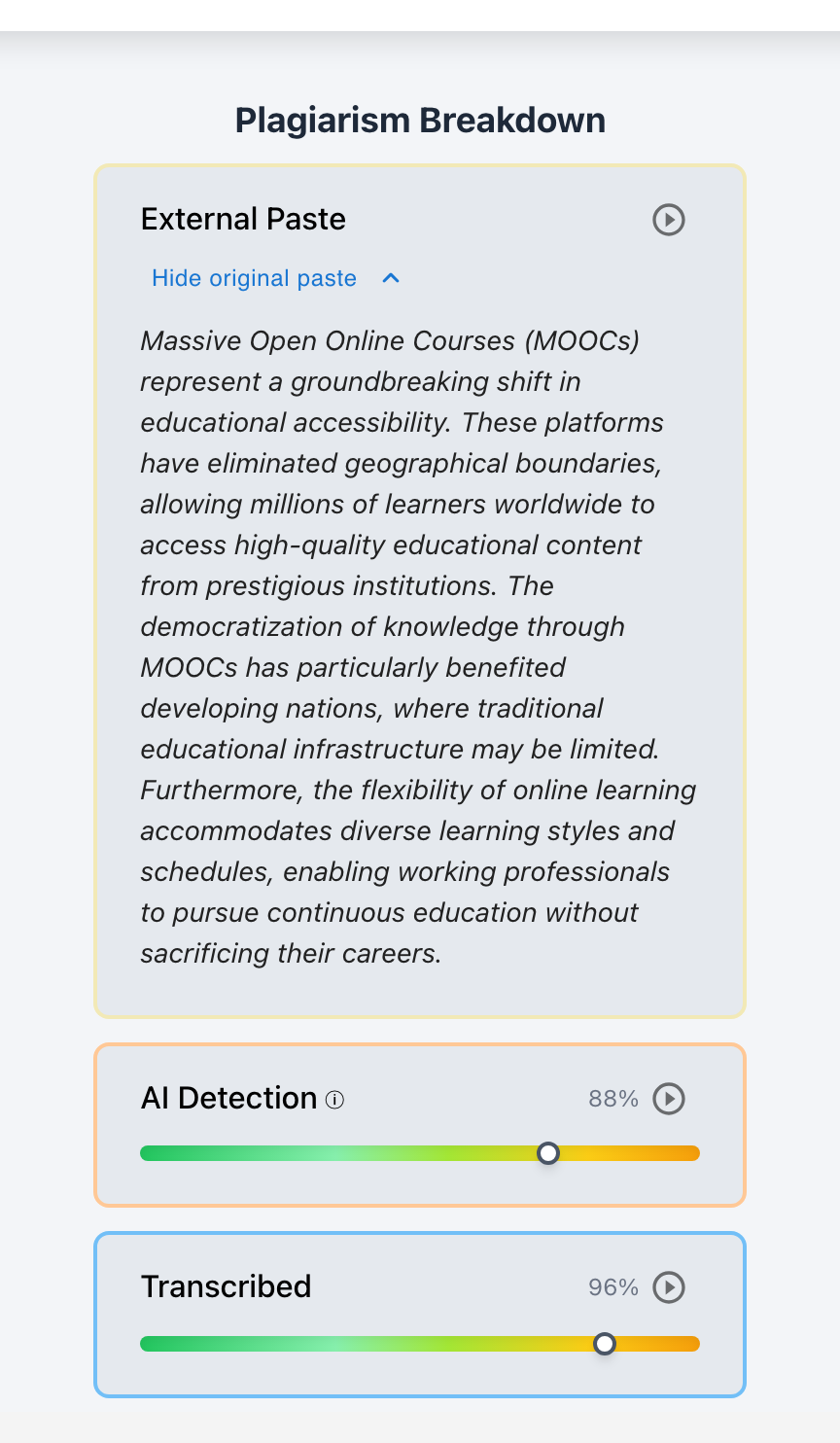
When a student submits a polished, multi-thousand-word essay that appears inside a Learning Management System (LMS) or Google Doc in a single, instantaneous paste event, educators are placed in a high-stakes pedagogical dilemma. The student frequently offers a common defense: “I wrote the entire draft on my phone in Apple Notes during my commute and pasted it into Canvas right before the deadline.” Because conventional LMS text fields and basic document revision histories record zero keystroke telemetry outside their immediate browser viewport, teachers have historically been forced into an unfair choice between blind trust and hostile accusation. Guided by Checkmark Plagiarism’s foundational philosophy of “Stop guessing, start trusting,” this guide delivers an objective, four-phase audit protocol. By combining patent-pending Essay Playback™, permanent external paste preservation, digital note metadata forensics (iCloud sync logs, SQLite revision timestamps, local file histories), passage-level AI confidence analysis, and structured restorative viva voce conferences, educators can verify authentic external drafting, protect honest students, and hold bad-faith submissions accountable with transparent, indisputable receipts.
Checkmark Plagiarism equips educators with complete writing process transparency, combining patent-pending Essay Playback™ writing telemetry with side-by-side source verification, passage-level AI writing analysis, and teacher-in-the-loop rubric autograding.
1. The Modern Classroom Reality: The “Drafted in Notes App” Phenomenon
In contemporary secondary and postsecondary education, the linear model of essay composition—where a student sits at a desktop computer, opens a designated Google Doc or LMS submission box, and composes an entire paper from a blank screen to a final conclusion—is no longer the exclusive norm.
Today’s students live in a highly mobile, multi-device ecosystem. They brainstorm on smartphones during school bus rides, sketch thesis statements in Apple Notes on iPads while waiting for extracurricular practices, dictate paragraphs into Google Keep, organize research databases in Notion, jot reflections in Samsung Notes, or write offline in Microsoft Word, Pages, Obsidian, or Scrivener during internet outages and long commutes.
How mobile and offline drafting environments interact with institutional LMS submission portals
- Apple Notes: iOS, iPadOS, macOS cloud sync
- Google Keep: Android, iOS, web notes with version logs
- Notion & Obsidian: Block history & snapshot recoveries
- Offline Desktop Word / Pages: Local editing minute properties
- Distraction-Free Markdown Editors: Bear, Ulysses, iA Writer
- Canvas LMS: SpeedGrader standard text area
- Agilix Buzz LMS: Course dropbox submission
- Google Docs / Classroom: Cloud assignment document
- Moodle & Schoology: Rich-text essay boxes
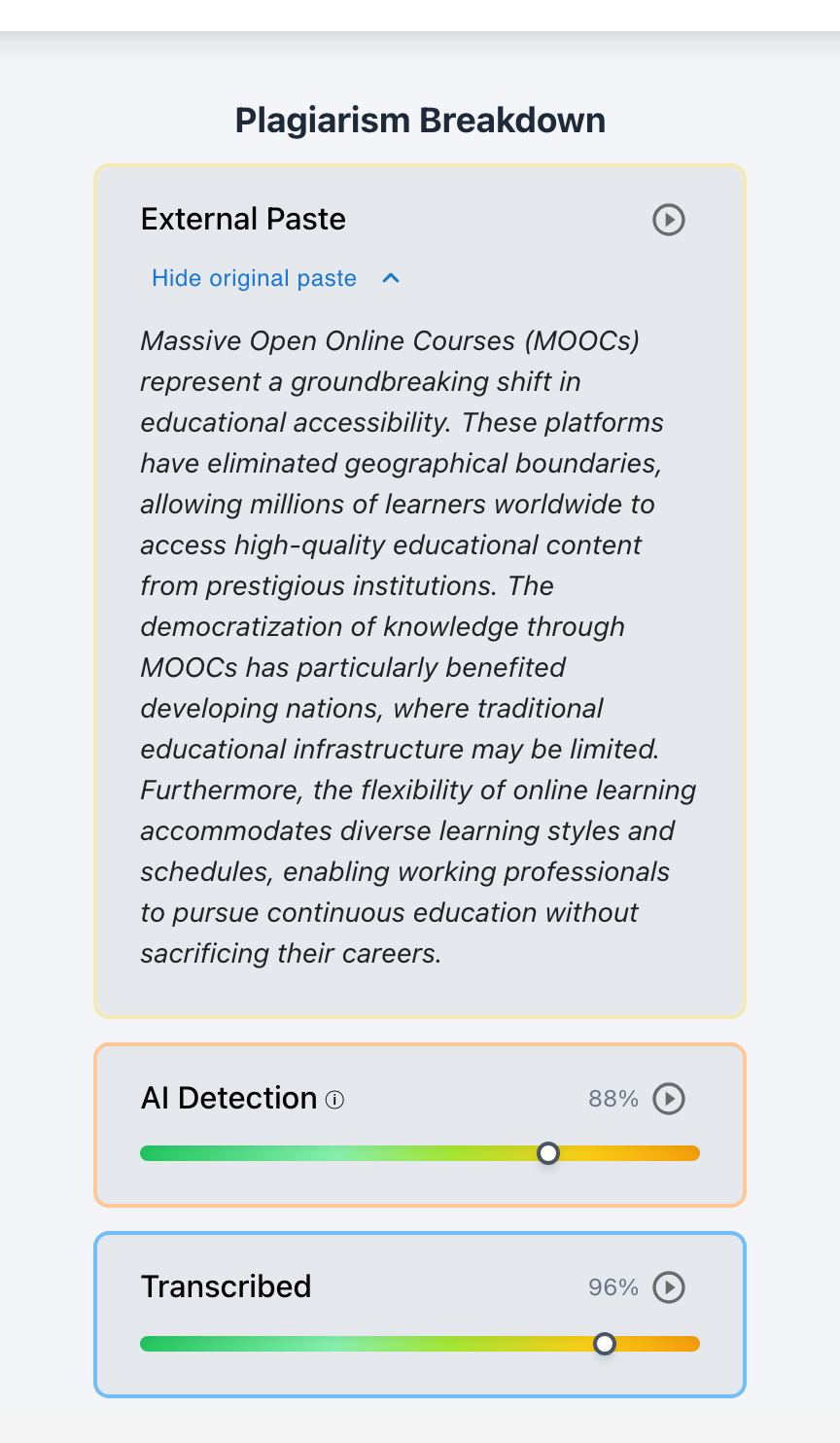
Ctrl+V paste, standard LMS boxes discard the intellectual drafting process.
When it comes time to turn in the assignment, the student copies their completed text from their external application, opens the LMS assignment portal or course Google Doc, presses Ctrl+V (or Cmd+V), and hits Submit.
The Anatomy of the Submission Anomaly
To the educator opening the submission in Canvas SpeedGrader, Agilix Buzz LMS, Google Classroom, or Moodle, the document telemetry presents an alarming profile:
When asked about the sudden appearance of nearly two thousand words of polished prose in eighteen seconds, the student immediately provides the standard defense:
“I get anxious about Canvas crashing and losing my work, so I wrote the whole essay in the Notes app on my iPhone over the weekend while traveling for my soccer tournament. I just pasted it in when I got back to Wi-Fi right before midnight.”
For an English teacher, humanities department chair, or academic integrity dean, this explanation represents a classic investigative crossroads. The student’s claim may be completely true—or it may be a convenient cover story for an unapproved Large Language Model (LLM) generation copied from ChatGPT, Claude, or an online essay-spinning service.
2. The Pedagogical & Evidentiary Dilemma: The Black Hole Between LMS and Student Claims
When an educator is faced with a single-paste submission accompanied by a “Notes app” defense, traditional learning management systems and standalone plagiarism checkers create an evidentiary black hole.
Standard LMS dropboxes capture only the payload (the final static text file or rich-text submission), completely discarding the process (the temporal, cognitive sequence of how those ideas were formed).
How speculative integrity workflows fail students and how transparent provenance resolves disputes
- Assume single paste equals academic dishonesty
- Rely on black-box whole-document AI probability scores
- Issue immediate zero grade without verification
- Alienate honest, mobile-first, and neurodivergent writers
- Accept “Notes app” defense without verifying receipts
- Overlook unauthorized LLM generations and essay spinning
- Create an exploitable loophole across the student body
- Surrender formative feedback on revision and thesis evolution
1. The Punitive Trap (The Cost of False Accusations)
When educators assume that every single-paste submission is dishonest, they cause profound pedagogical harm:
- Punishing Neurodivergent & Mobile-First Learners: Many students with ADHD, executive dysfunction, or sensory processing differences prefer minimalist, distraction-free markdown editors (like Bear, Obsidian, or iOS Notes) over complex browser-based LMS interfaces. Accusing them because of their tool choice punishes their cognitive coping strategies.
- Destroying Student-Teacher Rapport: Being falsely accused of academic fraud when a student genuinely spent fifteen hours laboring over a phone screen inflicts lasting academic trauma, causing students to disengage from writing entirely.
- Escalating Administrative Hostility: Without verifiable proof, punitive actions crumble during parent meetings, academic integrity committee appeals, and formal administrative reviews.
2. The Abdication Trap (The “Notes App” Loophole)
Conversely, accepting every “I drafted it in Apple Notes” claim without verification destroys academic integrity:
- The “Get Out of Jail Free” Card: If word spreads across a student body that claiming offline drafting in a notes app immediately neutralizes any process investigation, students who generate essays using generative AI will systematically paste prompts into Apple Notes or Google Keep first before transferring them into Canvas.
- Erosion of Writing Standards: Educators lose the ability to provide meaningful formative feedback on revision, thesis evolution, and draft progression.
The Checkmark Solution: “Stop Guessing, Start Trusting”
The solution to this dilemma is neither blind cynicism nor naive trust. It is transparent, verifiable provenance. Academic integrity should not depend on a teacher’s subjective suspicion or an opaque, black-box AI percentage score. It must rely on objective, multi-dimensional evidence—combining writing process telemetry, external metadata verification, side-by-side source cross-referencing, and restorative dialogue.
3. The Forensics of Paste Provenance vs. Native Composition
To evaluate a student’s claim that an essay was composed in an external notes application, educators must understand the digital forensics of notes apps. Authentic human composition leaves identifiable digital footprints across operating systems, cloud synchronization layers, and local file systems. Conversely, a one-click AI generation copied from a web browser into a notes app exhibits an entirely distinct forensic signature.
| Forensic Attribute | Authentic Notes App Drafting | Unauthorized AI Copied into Notes App |
|---|---|---|
| 1. Temporal Span & Timestamps | Multi-Hour/Multi-Day: Creation timestamp matches assignment timeline; modification logs show active work across sessions. | Last-Minute Cluster: Note created minutes before LMS submission; near-zero interval between creation and final copy. |
| 2. Textual Evolution & Fragments | Scratchpad Evidence: Contains rough outlines, fragmentary bullet points, misspelled search terms, working titles, and discarded notes. | Pristine Monolith: Fully-formed essay structure from the first character with zero rough drafting notes or deleted fragments. |
| 3. Cloud / OS Revision Metadata | Active Deltas: Multiple sync revisions in iCloud, Google Cloud, or local file system; non-zero editing duration recorded. | Single Write Event: Single creation event; no intermediate cloud synchronization deltas or file system modification steps. |
| 4. Syntactic & Phrasing Consistency | Natural Student Voice: Voice matches student’s historical baseline, containing idiosyncratic vocabulary and characteristic phrasing. | Flat Perplexity: Unnatural burstiness/perplexity flatness, generic filler transitions, AI hallmarks, or hallucinated citations. |
| 5. Viva Voce Defense | High Authorial Fluency: Student can fluently explain research logic, source selection, thesis shifts, and specific sentence choices. | Cognitive Detachment: Student struggles to define advanced terms, cannot recall source context, and cannot explain argumentative flow. |
Digital Artifacts Inside Popular Notes Applications
When a student claims they composed their essay in a third-party application, that application stores specific metadata that can easily be examined during a supportive, five-minute conference:
- Creation & Modified Badges: Immutable creation date and live modification date visible at note header or via Info panel (
Cmd+I). - iCloud Sync History: Synchronized notes log modification timestamps across devices.
- Recently Deleted & Undo Stack: Earlier fragments or discarded outlines reside in the Recently Deleted folder or undo history.
- Typographic Artifacts: Direct typing produces mobile typographic artifacts (smart apostrophes, auto-capitalization), whereas copied web AI text often retains markdown headers (
###) or unrendered delimiters.
- Timestamp Badges: Displays the exact creation date and last edited time (e.g., “Edited Oct 22, 4:15 PM”).
- Version History: Web version offers a built-in Version History feature (via three-dot menu) with downloadable timestamped snapshots.
- Archive & Trash: Prior drafts, brainstorm lists, and linked web research clippings remain accessible in the archive.
- Notion Page History: Granular block-level version history records every editing session, user attribution, and character addition over a 7-day to 30-day window.
- Obsidian File Recovery: Automated snapshot plugin saves local backups every 5 minutes, providing an undeniable local timestamped audit trail.
- Bear / Craft / Ulysses: Document statistics, word count over time, and exportable version logs.
- Document Properties (
File > Properties > Statistics): Displays Date Created, Date Last Saved, Total Editing Time (in minutes), and Revision Number. - AutoRecover & Cache: Offline sessions store temporary
.asdauto-save files and timestamped cache entries.
When a student presents a Word document showing 342 minutes of active editing time across four calendar days, the teacher immediately possesses conclusive, defensible proof that the single-paste submission into Canvas was simply an innocent logistical transfer—exonerating the student instantly without anxiety or friction.
4. The Telemetry of Native Writing vs. External Pasting vs. Transcription
To understand how Checkmark Plagiarism analyzes submission timelines, it is essential to visualize the four primary technical patterns of student essay production:
Analyzing the Four Telemetry Patterns
- Pattern A (Authentic Native Composition): The gold standard of direct typing. Inter-Key Intervals (IKIs) fluctuate naturally (80ms to 4,500ms), cognitive composing pauses occur at sentence boundaries, and deletion rates average 8%–18%.
- Pattern B (Authentic External Drafting with In-App Polish): The student drafted elsewhere, but after pasting into Canvas or Google Docs, they spent 20 to 45 minutes fixing line breaks, adjusting thesis wording, adding blockquote indents, or formatting MLA works cited entries. Checkmark’s Essay Playback™ clearly visualizes this post-paste active engagement.
- Pattern C (Raw Unmodified External Paste): The text arrives as a monolithic block and is submitted within seconds. This pattern does not prove cheating, but it triggers the need for a Process Audit because the LMS contains zero telemetry receipts.
- Pattern D (Manual Transcription / Retyping): Some students, aware that large paste blocks get flagged by modern tools, attempt to bypass paste detection by opening ChatGPT on their phone and manually typing the text into their LMS essay box. Checkmark’s Transcription Detection algorithms flag this immediately: the typing exhibits a completely flat, robotic cadence without natural human composing pauses, thought hesitations, or structural rewrites.
5. Comprehensive Comparative Matrix: Investigating External Drafting Across Tools
When an educator must investigate a single-paste essay submission, how do existing market tools compare against Checkmark Plagiarism’s comprehensive integrity suite?
| Diagnostic Capability | Legacy LMS Dropboxes (Canvas / Buzz / Moodle) | Google Docs Version History | Standalone Black-Box AI Detectors (Turnitin / GPTZero) | Checkmark Plagiarism Suite |
|---|---|---|---|---|
| Keystroke Telemetry Granularity | ❌ None (Only stores final string) | ⚠️ Coarse (5–15 min batches) | ❌ None (Static text scan) | ✅ Full Microsecond Telemetry (Every keypress, pause, backspace) |
| External Paste Tracking & Capture | ❌ None (Cannot detect paste event) | ⚠️ Partial (Shows block, loses clipboard) | ❌ None (Blind to clipboard insertion) | ✅ Permanent Paste Preservation (Stores original text even if rewritten) |
| Visual Process Reconstruction | ❌ None | ⚠️ Clunky Diff Viewer (Static snapshots) | ❌ None (Probability number only) | ✅ Patent-Pending Essay Playback™ (1x to 8x scrubbable replay) |
| Transcription / Retyping Detection | ❌ None | ❌ None | ❌ None | ✅ Automated Transcription Flagging (Detects mechanical typing) |
| Passage-Level AI Analysis | ❌ None | ❌ None | ⚠️ Opaque Percentage (Whole-paper guess) | ✅ Passage-Level Confidence Sliders (Underlines specific text patterns) |
| Short-Text Honesty Guardrails | ❌ None | ❌ None | ❌ None (Guesses on <150w texts) | ✅ Built-In Guardrails (Displays N/A under 150 words) |
| Defensible Plagiarism Matching | ⚠️ Basic Text Overlap | ❌ None | ⚠️ Static Match Report | ✅ Two-Way Linked Evidence Cards (Separates uncited from plagiarism) |
| Formative Rubric Autograding | ❌ None (Manual grading only) | ❌ None | ❌ None | ✅ Teacher-in-the-Loop Autograder (Quote-anchored LMS passback) |
| Student Exoneration Capability | ❌ Zero | ⚠️ Low (Cannot verify external logs) | ❌ Zero (Falsely flags ESL/neurodivergent) | ✅ Maximum (Reconstructs complete student drafting timeline) |
6. Four-Phase Step-by-Step Teacher Audit Protocol
When a student submits an essay via a single paste event and claims they drafted it offline in a notes application, educators need a standardized, repeatable, and non-punitive investigative workflow. Following Checkmark’s four-phase audit protocol ensures that honest students are rapidly exonerated while bad-faith submissions are addressed with clear, objective receipts.
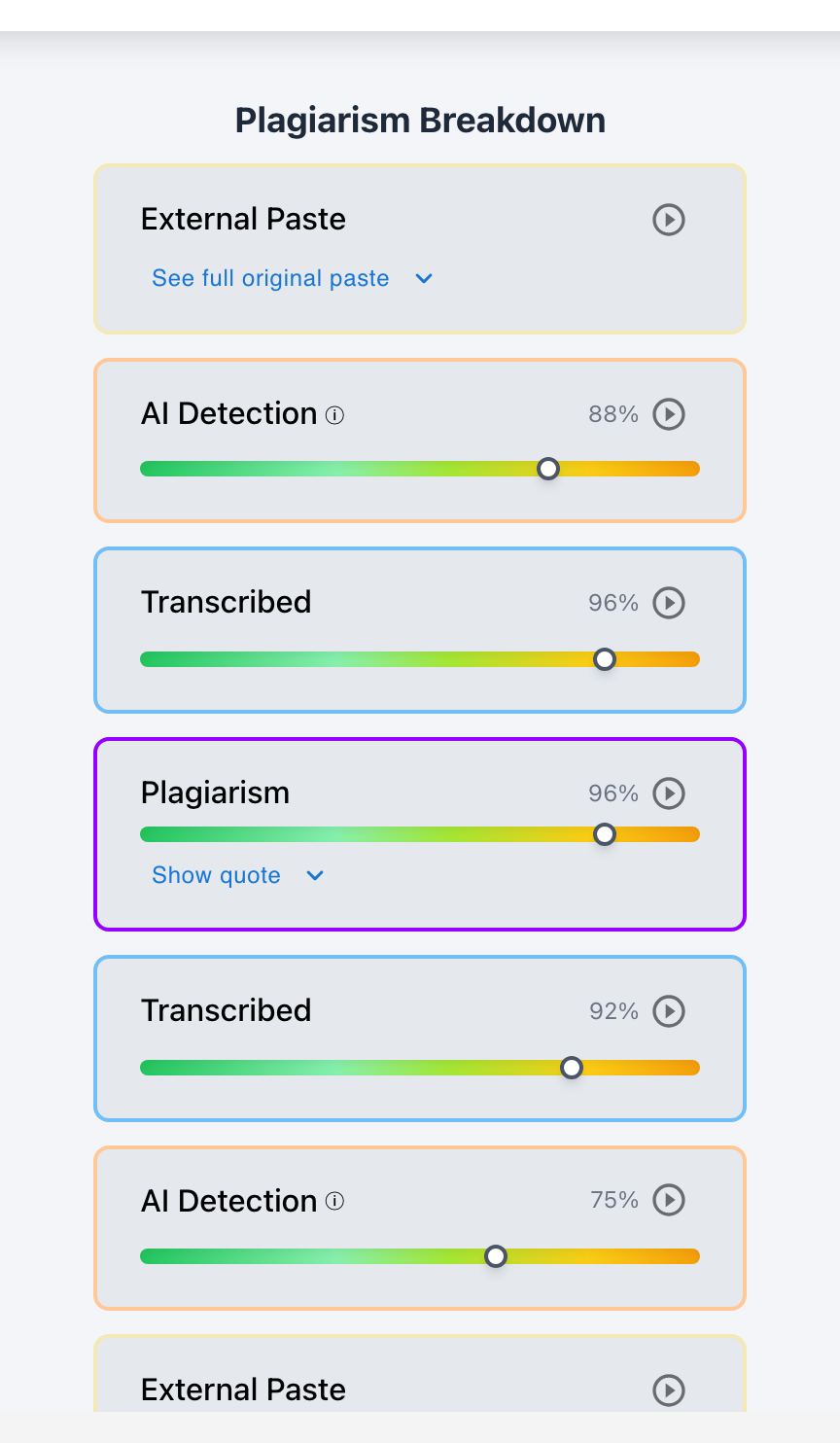
- Step 1.1: Inspect Checkmark External Paste Inspector for the original clipboard payload.
- Step 1.2: Scrub Essay Playback™ (1x–8x) to evaluate post-paste formatting and in-document revision.
- Step 1.3: Check passage-level AI confidence sliders and side-by-side plagiarism source links.
- Send supportive, process-focused email requesting notes app export or device screen check.
- Request file metadata: creation timestamps, iCloud/Google Keep logs, or Word active editing minutes.
- Host a 5-minute supportive screen-share session with the student.
- Co-view Essay Playback™ alongside the student’s Notes app outline and scratchpad.
- Reconcile the timeline of ideas between mobile drafts and the LMS submission.
- Ask targeted questions regarding thesis evolution, vocabulary choices, and source synthesis.
- Update private educator-only flag status (
Resolved,Not Flagged, orFlagged). - Apply formative autograder rubric feedback and publish finalized grade directly to Canvas/Buzz.
Phase 1: Pre-Conference Telemetry & Evidence Triage
Before contacting the student, the educator spends two minutes reviewing the multi-dimensional data inside Checkmark Plagiarism:
Phase 2: Requesting External Artifact Provenance (The Non-Adversarial Request)
If the submission consists of a raw, unmodified paste (Pattern C) and lacks in-document revision history, the teacher reaches out to the student with a curious, supportive tone:
Subject: Checking in on your draft timeline for ENG 101 Essay #2
Hi Alex,
I am currently reviewing your final submission for Essay #2 on rhetorical strategies. Your main thesis and argumentation look very compelling!
When I looked at the document activity log in our writing dashboard, I noticed that the entire essay was pasted into the submission portal in a single event without an in-app drafting history. As part of our department’s standard writing process verification, we confirm the drafting timeline for all papers composed outside our primary LMS editor.
If you drafted this in Apple Notes, Google Keep, Word, or another app, could you please bring your device or send over a quick screenshot showing the note’s creation/modified date, or export the note history? We will do a quick 3-minute check-in during office hours tomorrow.
Thanks for your help documenting your creative process!
Best regards,
Professor Vance
Phase 3: The Restorative Co-Viewing Conference
The writing conference is a supportive space where the educator and student look at the writing process together on screen:
“Thanks for meeting with me, Alex. Our goal today is simply to celebrate your writing and connect your drafting notes to your final submission so we have clean receipts for your portfolio.”
The teacher shares their screen displaying Checkmark’s timeline playback. “Here is where the draft was pasted into Canvas at 11:57 PM. Let’s look at the notes app where you built these ideas.”
The student shares their phone screen, iPad, or notes app export. The teacher looks for the rough thesis, brainstorming lists, or outline fragments that formed the foundation of the essay.
The teacher confirms the timeline alignment, validates the student’s authentic labor, and transitions immediately into formative feedback on the paper’s arguments.
Phase 4: The Viva Voce Oral Defense & Authentic Inquiry
The viva voce (Latin for “with living voice”) is the oldest and most dependable method of verifying authorship in academic history. If a student wrote an essay themselves—even if they composed it on a phone screen without saving a single draft—they possess deep, intrinsic cognitive ownership of the ideas, the vocabulary, and the structural logic.
| Targeted Inquiry Area | Sample Teacher Prompts |
|---|---|
| 1. Thesis & Conceptual Evolution |
|
| 2. Vocabulary & Sentence Phrasing |
|
| 3. Source Selection & Synthesis |
|
| 4. Counterargument Construction |
|
7. Real-World Case Scenarios: Resolving the “Notes App” Claim
To illustrate how this audit protocol operates in practice, consider three realistic classroom scenarios across different educational environments:
8. Proactive Classroom Architecture: Preventing the “Notes App Blindspot” Before It Happens
While forensic audits resolve disputed submissions after the fact, the most effective pedagogical strategy is to design classroom writing architectures that eliminate the “Notes app blindspot” entirely.
1. Syllabus Process Transparency Policy
Include clear, supportive language in course syllabi that explains the role of process telemetry in protecting student work:
In this course, we value the process of writing just as much as the final product. Writing is an act of thinking, refining, and revising.
To protect your original work against false AI flags and to provide targeted feedback on your draft progression, our class uses Checkmark Plagiarism embedded within Canvas LMS and Google Docs. Checkmark tracks writing timelines, keystroke dynamics, and revision history.
Drafting Outside Canvas / Google Docs:
We recognize that students occasionally compose offline in Apple Notes, Google Keep, or Microsoft Word. If you choose to draft in an external application and paste your final text into Canvas, you are responsible for maintaining your drafting receipts (such as saving your notes outline, preserving your Word file properties, or keeping your cloud sync history). If a submission contains a single paste block without an in-app drafting timeline, you may be asked to participate in a brief 3-minute writing conference to share your external notes before your grade is finalized.
2. Formative Four-Stage Milestone Workflow
Breaking major essays into four low-stakes milestones prevents last-minute panic pasting and ensures continuous process verification:
| Milestone | Pedagogical Activity & Telemetry Artifact |
|---|---|
| Milestone 1 (Week 1) | Thesis & Research Outline: Submitted via LMS. 200 words. Generates baseline vocabulary and structural telemetry. |
| Milestone 2 (Week 2) | Rough First Draft: Checked via Checkmark AI Autograder. Generates quote-anchored rubric feedback on argument structure. |
| Milestone 3 (Week 3) | Peer Review & Revision Cycle: In-document sentence restructuring, source synthesis refining, and citation formatting. |
| Milestone 4 (Week 4) | Final Polish & Passback: One-click grade passback to Canvas/Buzz gradebooks with verified end-to-end Essay Playback™ receipts. |
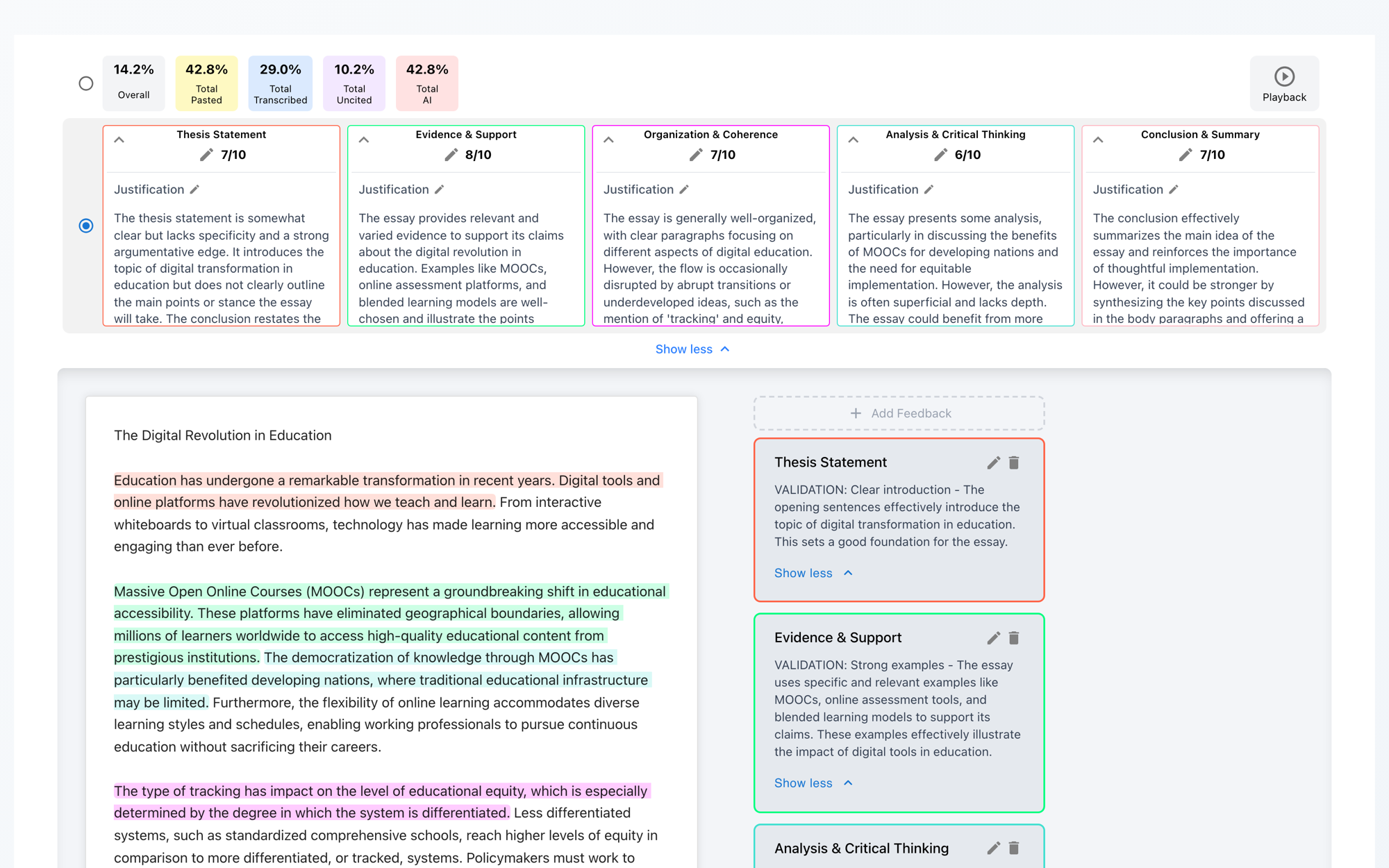
9. Checkmark Plagiarism: The Complete Process-First Integrity Suite
Checkmark Plagiarism was engineered specifically to bridge the divide between educators and students, replacing punitive guesswork with transparent, defensible proof.
- Keystroke-by-keystroke video-style timeline reconstruction.
- Variable scrub speeds from 1x to 8x.
- Visualizes drafting, pauses, deletions, rewrites, and paste insertions.
- Timestamped capture of all external clipboard pastes.
- Permanently preserves original pasted text even if student later deletes or rewrites it.
- Dedicated “Jump to Playback” button for every paste event.
- Identifies unnatural typing velocity without cognitive composing pauses.
- Detects when students retype text off a phone, second monitor, or dictation feed.
- Passage-level granularity with calibrated confidence sliders (Typical Human vs. AI).
- Analyzes burstiness, perplexity, syntactic diversity, and rhythm transitions.
- Honest guardrails: Short texts (<150 words) display
N/Arather than guessing. - Immune to “AI humanizers” (QuillBot, Undetectable AI) via temporal keystroke proof.
- Scans billions of live web pages, academic publications, and school peer repositories.
- Side-by-side quote comparison with clickable direct links.
- Distinct visual highlighting for uncited sources to facilitate citation coaching.
- Two-way linked evidence cards connecting essay text to sidebar breakdowns.
- Generates first-draft rubric scores with quote-anchored evidence justifications.
- Supports custom in-app rubrics, uploaded PDF rubrics, or synced Canvas/Buzz rubrics.
- Teacher retains 100% final grading authority; direct 1-click grade passback to LMS.
- Zero student data used to train AI models. Full FERPA and COPPA compliance; encrypted in transit and at rest.
- Enterprise SSO and LTI 1.3 integrations for Canvas, Buzz, Google Classroom, and Moodle.
10. Frequently Asked Questions (FAQs)
1. If a student genuinely drafted an essay in Apple Notes on their phone, how can they prove it without advanced technical expertise?
Proving authentic drafting in Apple Notes is straightforward and takes less than thirty seconds. The student can open the note on their iPhone, iPad, or Mac and show the date/time header at the top of the note (e.g., “October 22, 2026, 3:14 PM”). On macOS, pressing Cmd+I opens the note summary window showing creation and modification timestamps. Furthermore, authentic notes almost always contain rough scratchpad fragments, bulleted thesis outlines, or earlier working drafts that demonstrate how the essay evolved over time.
2. What should a teacher do if a student claims their Notes app crashed or deleted their version history?
If a student cannot produce an external note history, the educator should never jump straight to a punitive accusation. Instead, conduct a brief, 3-to-5-minute viva voce oral conference. Ask the student to explain the central thesis, define three key vocabulary terms used in the paper, describe where they found their primary research sources, and summarize their main counterargument. A student who genuinely wrote the paper will comfortably speak to their ideas; a student who pasted an unread AI generation will struggle to explain the basic premise of their submission.
3. How does Checkmark distinguish between pasting an authentic offline draft vs. pasting text from ChatGPT or QuillBot?
Checkmark analyzes multiple layers of evidence simultaneously. First, the External Paste Inspector preserves the exact clipboard payload for inspection. Second, Essay Playback™ examines whether the student engaged in active in-document revision (formatting, restructuring, refining) after the paste occurred. Third, Checkmark’s Passage-Level AI Engine analyzes the underlying linguistic structure (perplexity, burstiness, syntax rhythm) across individual paragraphs. Finally, while paraphrasing tools like QuillBot alter surface vocabulary to trick simple detectors, they cannot fabricate a legitimate historical writing timeline or authentic keystroke dynamics.
4. Why is a whole-document AI detection percentage dangerous when evaluating a pasted essay?
Whole-document AI detectors produce a single, opaque score (e.g., “78% AI Probability”) based on statistical text averages. They provide zero visibility into where the suspected text is located, cannot account for legitimate offline drafting habits, and frequently trigger false positives on non-native English writers or neurodivergent students who use formal sentence structures. Checkmark rejects whole-document guessing in favor of passage-level evidence cards with calibrated confidence sliders and objective keystroke telemetry receipts.
5. Can students bypass paste detection by retyping text from a Notes app on their phone into the LMS?
No. When a student reads text off an external screen and retypes it manually into an essay box, they exhibit a distinct psychological and physical pattern known as manual transcription. Checkmark’s Transcription Detection algorithms recognize the mechanical, uniform cadence of transcription: a continuous stream of keystrokes without the natural pauses, hesitations, restructuring breaks, and deletion bursts that accompany original human thought.
6. How does Checkmark handle student privacy and FERPA compliance when auditing external paste telemetry?
Checkmark Plagiarism is fully compliant with FERPA, COPPA, and state-level student data privacy mandates. All telemetry data, keystroke logs, and clipboard payloads are encrypted in transit and at rest within secure cloud infrastructure. Crucially, Checkmark enforces a strict Zero Model Training guarantee: student essays and telemetry are never used to train, fine-tune, or develop commercial or public AI models. All integrity flag statuses (Resolved, Not Flagged, Flagged) remain strictly private to authorized educators.
7. What are the best practices for holding a non-punitive writing conference with an anxious student?
Always frame the conference around curiosity, process documentation, and growth rather than suspicion. Begin by praising specific ideas or arguments in the paper. Explain that process verification is a standard departmental practice for all externally drafted submissions to protect student portfolios. Share your screen to view Essay Playback™ together, invite the student to walk you through their notes app outline, and ask open-ended questions about their research journey.
8. Can Checkmark integrate directly with Canvas SpeedGrader and Buzz LMS to show Essay Playback without leaving the grading screen?
Yes. Checkmark provides seamless LTI 1.3 integrations for Canvas LMS, Buzz LMS, Google Classroom, and Moodle. When grading inside Canvas SpeedGrader or Buzz, educators can launch the Checkmark Integrity Dossier and Essay Playback™ modal directly within their existing workflow. In addition, teacher-approved rubric scores and quote-anchored feedback generated by Checkmark’s AI Autograder sync directly back to the LMS gradebook with a single click.
Conclusion: Stop Guessing, Start Trusting
The emergence of mobile devices, offline notes applications, and generative AI tools has permanently altered the landscape of student writing. In this complex environment, educators cannot afford to oscillate between paranoid suspicion and helpless resignation.
Relying on black-box percentage scores or assuming guilt from a single paste event harms innocent students, fractures academic trust, and fails to teach the authentic craft of writing. Conversely, ignoring submission timelines allows academic dishonesty to go unchecked.
By implementing Checkmark Plagiarism’s process-first methodology—leveraging patent-pending Essay Playback™, External Paste Text Preservation, Passage-Level AI Confidence Analysis, and Restorative Viva Voce Protocols—schools and universities can replace uncertainty with clarity.
Educators gain the objective receipts they need to uphold rigorous academic standards, while students receive the trust, advocacy, and formative feedback they deserve.
Bring Transparent Writing Process Forensics to Your School
Ready to verify authentic drafting timelines, eliminate false AI accusations, and streamline formative essay feedback in Canvas and Buzz LMS?
Schedule an Institutional Demo