
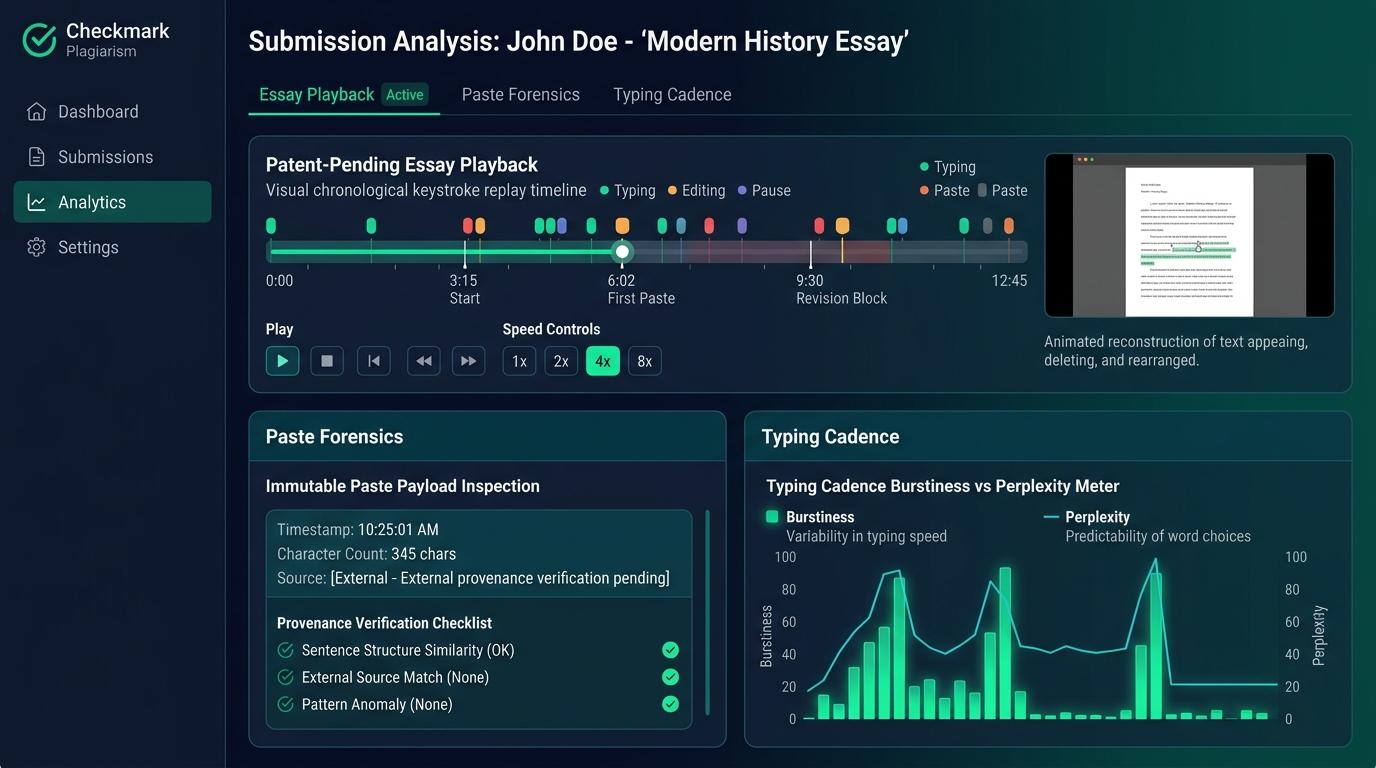
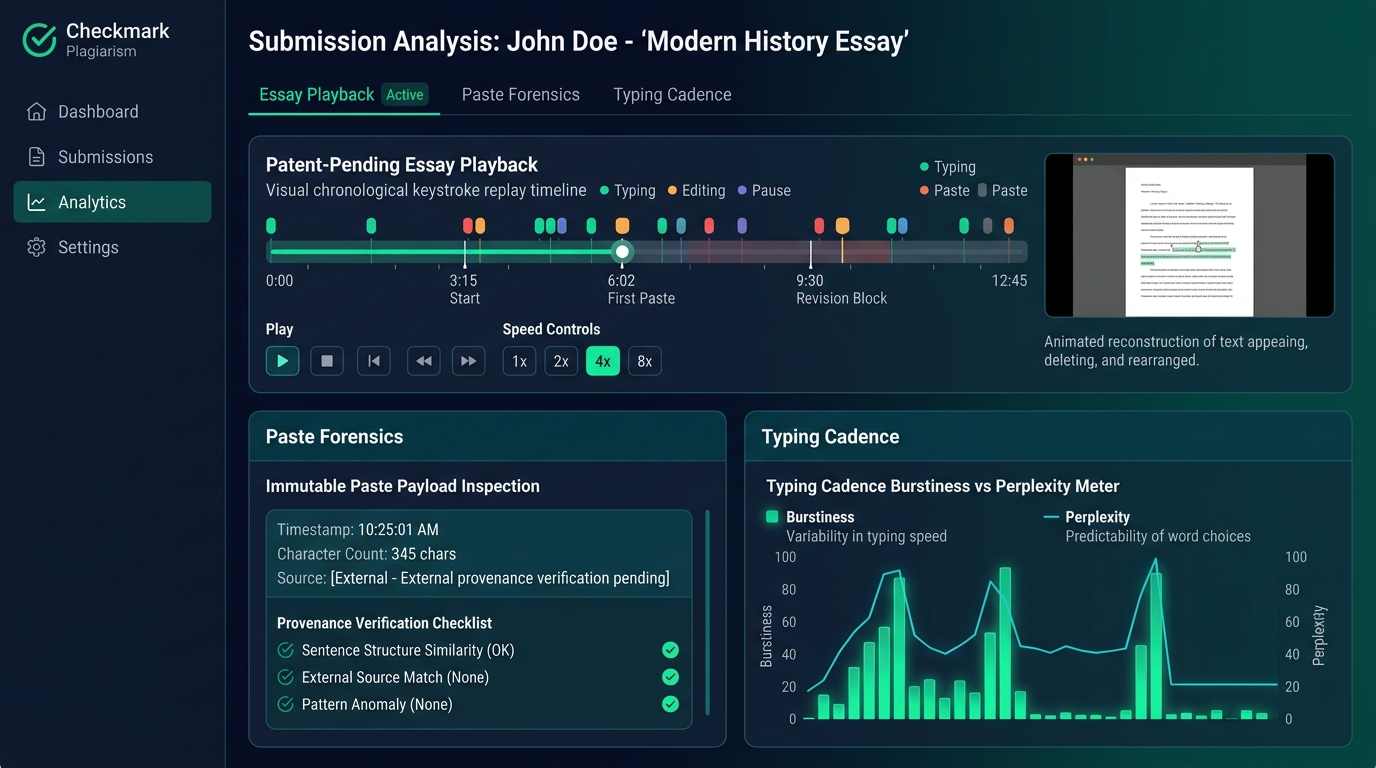
When an educator opens a submitted essay and discovers that 1,200 words appeared in a single, instantaneous paste event, the immediate institutional reaction is often suspicion, anxiety, and the temptation to issue a punitive accusation. However, a clipboard paste event is merely a technical transport mechanism, not prima facie evidence of academic misconduct. Students routinely draft in offline word processors, mobile note apps during commutes, specialized distraction-free editors, or local desktop suites before transferring their final prose into their Learning Management System (LMS) or Google Docs. Rather than relying on speculative whole-document AI probability scores or making adversarial accusations, institutions must adopt a defensible, evidence-based verification protocol. Guided by Checkmark Plagiarism’s core philosophy of “Stop guessing, start trusting,” this guide details how patent-pending Essay Playback™, permanent paste text preservation, post-paste revision telemetry, external artifact provenance, and restorative oral conferences allow educators to definitively distinguish between authentic external drafting and unapproved generative AI copying.
Checkmark Plagiarism provides the pedagogical and technical foundation for process-based academic integrity by combining patent-pending Essay Playback™ with passage-level AI detection, comprehensive plagiarism checking, quote-anchored rubric autograding, and direct LMS integrations for Canvas LMS, Google Classroom, and Buzz LMS.
The Educator’s High-Stakes Dilemma: The Single-Paste Submission
It is 11:30 PM on a Sunday grading marathon. An English teacher or humanities professor opens an essay submission on Canvas LMS or Google Docs.
The student has submitted a polished, 1,600-word argumentative research paper on The Rhetorical Strategy of Civil Rights Court Filings. The prose is articulate, the arguments are coherent, and the citations are in place. However, when the educator opens the document’s version history or activity log, they encounter a startling anomaly:
| Timestamp | Author | Action | Characters Added | Total Word Count |
|---|---|---|---|---|
| 11:14:02 PM | Jordan Taylor | Session Open | +0 chars | 0 words |
| 11:14:18 PM | Jordan Taylor | Paste Event | +9,842 chars | 1,612 words |
| 11:15:04 PM | Jordan Taylor | File Submitted | +0 chars | 1,612 words |
The entire 1,612-word essay materialized inside the document in under sixteen seconds. There are zero recorded keystrokes of brainstorming, zero drafting pauses, zero mid-sentence typos, and zero deleted paragraphs within the LMS submission environment.
- Assume wholesale unapproved LLM generation
- Run an opaque statistical black-box detector (e.g. “78% AI”)
- Issue an immediate punitive zero and disciplinary referral
- Send an accusatory, high-stress late-night email
- Recognize that a paste is a technical transport event, not misconduct
- Audit writing process receipts in Essay Playback™
- Inspect post-paste revision telemetry and preserved text snapshots
- Request non-invasive external drafting artifacts (Word .docx, version logs)
The Cost of Knee-Jerk Accusations
In the absence of clear diagnostic frameworks, educators confronted with single-paste submissions frequently fall into two damaging traps:
- The Punitive Trap (Presumption of Guilt): The instructor assumes that because the writing did not occur inside the monitored browser tab, the text must have originated from ChatGPT, Claude, an online essay mill, or peer copying. The teacher issues an academic dishonesty referral or an automatic zero. If the student actually drafted the essay legitimately over three weeks in Microsoft Word desktop or Scrivener while offline, the false accusation inflicts severe emotional distress, alienates the student from the academic community, and triggers adversarial parent or administrative grievances.
- The Paralysis Trap (Unenforceable Standards): Paralyzed by the fear of falsely accusing an innocent student—and lacking the tools to prove where the text originated—the instructor ignores the paste anomaly entirely and grades the text at face value. If the essay was indeed generated by an unapproved Large Language Model (LLM) in four seconds, authentic academic standards erode, and the student learns that evasion is effortless.
To escape this false dichotomy, educators need to understand the technical mechanics of clipboard events, the legitimate reasons students compose externally, and the multi-dimensional writing process forensics that establish true authorship provenance.
The Technical Mechanics: Clipboard Events vs. Keystroke Telemetry
To evaluate a single-paste essay objectively, educators and educational technology administrators must understand what happens under the hood when text enters a digital document.
[Keydown: 'T'] → (110ms) → [Keyup: 'T'] → (340ms Pause) → [Keydown: 'h'] → (95ms) → ...
- • Total Time for 1,500 words: 45 to 180+ minutes
- • Inter-Key Intervals (IKI): 80ms to 4,500ms (High variance / Cognitive burstiness)
- • Deletion Ratio: 8% to 18% of all keystrokes (Typo correction, syntactic rework)
[Event: 'paste'] → Clipboard Decoded → Buffer: +9,842 chars at Index 0
- • Total Time for 1,500 words: 0 milliseconds (Δt ~ 0)
- • Inter-Key Intervals: N/A (Atomic block insertion)
- • Deletion Ratio: 0% at insertion moment
1. The Anatomy of a Paste Event
In modern web applications (including Canvas LMS, Buzz LMS, Google Docs, and Checkmark Plagiarism’s embedded editors), text entry occurs via Document Object Model (DOM) events:
- Native Composition (
keydown,keypress,keyup): When a human types, each individual character is dispatched with distinct microsecond timestamps, cursor coordinates, and key codes. The time between keystrokes—the Inter-Key Interval (IKI)—exhibits natural cognitive fluctuations. Pauses lengthen at syntactic boundaries (commas, periods, paragraph breaks) and shorten during high-frequency word patterns. - Clipboard Insertion (
paste/clipboardData): When a user triggers a paste command (Ctrl+V,Cmd+V, or right-click paste), the operating system transfers the entire text payload from the system clipboard into the application's document model as a single, discrete mutation. Regardless of whether the payload contains two words or twenty thousand words, the time delta (Δt) is instantaneous.
2. Why a Paste Flag Alone Is Never Proof of Misconduct
A clipboard event records how text entered the browser viewport, but it does not record where the text was composed or who authored it. Treating a paste flag as definitive proof of cheating is a severe methodological error.
Consider the vast spectrum of legitimate student drafting behaviors that produce single-paste submissions:
| Drafting Origin | Technical & Pedagogical Context | Classification |
|---|---|---|
| 1. Offline Desktop Word Processor | Student drafts in Word, Pages, or LibreOffice during a flight or commute without active internet connectivity. | Authentic |
| 2. Distraction-Free & Mobile Apps | Student outlines ideas in Apple Notes, Google Keep, or Obsidian, developing long-form arguments incrementally. | Authentic |
| 3. Technical & STEM Editors | Student writes humanities or technical essays in LaTeX, Typst, or Markdown with local Git version tracking. | Authentic |
| 4. Crash-Anxiety Workarounds | Student fears LMS session timeouts or browser crashes, drafting locally before transferring to the final box. | Authentic |
| 5. Dictation & Accessibility Tools | Student uses specialized offline speech-to-text engines that batch-paste transcribed paragraphs into documents. | Accessible |
| 6. Unauthorized Generative AI | Student prompts ChatGPT/Claude, copies raw output, and pastes directly into the assignment document. | Misconduct |
| 7. Contract Cheating / Peer Copy | Student receives an essay file from an older sibling, classmate, or paid service and pastes it to submit. | Misconduct |
Because origins 1 through 5 represent completely valid, often commendable writing workflows, an educator cannot make a disciplinary determination based on a paste flag alone.
The essential question is: How can teachers inspect the true writing process behind that pasted text without invading student privacy or relying on unverified guesswork?
The Limitations of Generic Tools vs. Checkmark Essay Playback™
When educators attempt to investigate single-paste submissions using standard tools, they immediately run into severe technical limitations.
| Feature / Capability | Standard LMS / Google Docs | Checkmark Plagiarism Suite |
|---|---|---|
| Paste Event Logging | Coarse (Version snapshot grouping) | Exact millisecond timestamp & character count |
| Original Paste Text Stored | ❌ Lost if edited or rewritten later | ✅ Permanent immutable character snapshot |
| Video-Style Playback Player | ❌ Stepped revision jumps only | ✅ 1x to 8x scrubbable chronological timeline |
| Post-Paste Revision Tracking | ❌ Manual diff inspection | ✅ Automated revision entropy audit & dwell time |
| Passage-Level AI Analysis | ❌ Whole-paper score or none | ✅ Granular sliders per passage (Human vs AI pattern) |
| Side-by-Side Source Matching | ❌ Unlinked % similarity score | ✅ 2-way linked side-by-side source comparison |
| Private Educator Flags | ❌ Public or binary grade entry | ✅ Educator-only private workflows (Resolved / Not Flagged) |
Google Docs and Standard LMS Version Histories: The Snapshot Blindspot
Google Docs Version History and standard LMS rich-text boxes group document changes into arbitrary time-bucketed “snapshots” (e.g., “Edited at 4:12 PM by Jordan”).
If a student pastes 1,500 words of AI text at 4:12 PM, and then spends five minutes changing six words and deleting two sentences, standard version history often merges those edits into a single snapshot. The teacher cannot easily see the original pasted text in isolation, cannot calculate the student’s actual typing cadence, and cannot watch how the student interacted with the text after pasting.
Black-Box AI Detectors: The Peril of the 85% Score
If the educator copies the pasted essay into a legacy, whole-document AI detector, the detector returns a single opaque percentage (e.g., “78% Likely AI”).
This score provides zero forensic provenance:
- It cannot tell the teacher if the text was written in Microsoft Word over fourteen hours.
- It cannot identify whether specific paragraphs were written by the student while others were generated by an LLM.
- It offers no verifiable “receipts” that can be defended in a conversation with the student, parents, or an academic integrity board.
Checkmark’s Patent-Pending Essay Playback™: The Forensic Solution
Checkmark Plagiarism transforms the single-paste dilemma from an unsolvable mystery into a transparent, defensible forensic review. Through patent-pending Essay Playback™ and its integrated multi-dimensional suite, educators gain access to deep, non-punitive writing process telemetry.
Timestamp: 00:00:15 into session (Oct 14, 7:14:22 PM EST)
Volume: 1,420 words (8,940 characters)
Insertion Index: Character 0 (Empty Document Root)
Post-Paste Engagement Index: 88.4% (Substantial downstream editing)
Original Payload Snapshot: [View Exact Original Paste Payload]
Passage AI Pattern Confidence: Typical Human Writing Style (Perplexity: 74.2)
1. Permanent Original Paste Text Preservation
When an external paste event occurs within Checkmark’s monitored ecosystem (via Google Docs integration, Canvas LMS / Buzz LMS embedded editors, Microsoft Word add-in, or standalone web editor), Checkmark creates an immutable, character-level snapshot of the exact text payload at the moment of insertion.
Even if the student subsequently edits, paraphrases, reorders, or deletes every single sentence across fifty subsequent revision passes, the educator can click [View Exact Original Paste Payload] to inspect the pristine, unedited text that entered the clipboard.
This capability is vital for academic integrity investigations:
- If the student pasted a raw ChatGPT response complete with conversational preambles (e.g., “Certainly! Here is a 1,500-word essay on the American Civil War...”), Checkmark preserves that preamble even if the student deleted it three seconds later.
- If the student pasted their own authentic rough draft and spent forty minutes polishing it, the preserved snapshot proves the text was already complete and coherent prior to entering the LMS.
2. 1x–8x Scrubbable Chronological Timeline
Essay Playback™ reconstructs the entire writing session keystroke-by-keystroke. Educators can scrub through the session using intuitive playback controls:
- Variable Speed Scrubbing (1x, 2x, 4x, 8x): Watch the drafting process unfold in real time or accelerate through long sessions in seconds.
- Event Jump Buttons: Instantly skip forward or backward between discrete typing bursts, paste events, long pauses (> 30 seconds), and mass-deletion episodes.
- Synchronized Text Highlighting: As the timeline scrubs, the document text dynamically types, deletes, and reorganizes in exact synchronization with the telemetry graph.
3. Post-Paste Revision Telemetry & Entropy Analysis
One of the most powerful forensic indicators of student authorship is what occurs after the paste event.
| Telemetry Metric | Profile A: Authentic External Draft | Profile B: Raw LLM / Contract Cheating |
|---|---|---|
| Post-Paste Dwell Time | 15 to 60+ minutes active in editor | < 90 seconds (Monotonic rush to submit) |
| Post-Paste Deletions | 40 to 150+ backspaces / text cuts | 0 to 5 characters |
| Cursor Navigation | Non-linear hops across paragraphs & headings | Monotonic scroll straight to bottom |
| Formatting & Citation Edits | Manual quote indentation, italics, sentence tweaks | None (or quick Ctrl+A uniform font change) |
| Downstream Text Entropy | High (Dynamic syntactic rework) | Zero (Static untouched payload) |
When a student pastes an authentic draft from an external word processor, they rarely submit it instantly. They scroll through the text, fix formatting glitches caused by the clipboard transfer, adjust italics on citations, tweak a transition sentence, or re-read paragraphs with natural pauses.
Conversely, when a student copies an unapproved AI output to meet a deadline, the post-paste telemetry is typically barren: the text is pasted, the student scrolls directly to the submit button, and the assignment is dispatched within sixty seconds.
4. Triad Multi-Dimensional Verification
Checkmark Plagiarism never relies on a single forensic vector. Instead, it cross-correlates writing process telemetry with two additional defensive pillars:
- Keystroke replay at 1x–8x speed
- Permanent paste snapshot preservation
- Revision entropy & pause distribution
- Optical transcription cadence flags
- Perplexity & burstiness analysis
- Granular sliders per passage
- Distinguishes Human vs AI patterns
- N/A assigned for short text (< 150 words)
- Billions of live web pages & repositories
- Side-by-side matching quotes with URLs
- Uncited source differentiation
- Internal peer-to-peer cross checks
Together, these three pillars feed into Checkmark’s Quote-Anchored AI Autograder, which generates rubric-aligned formative feedback tied directly to specific quotes in the student’s text, maintaining teacher-in-the-loop authority before pushing finalized grades to Canvas, Buzz LMS, or Google Classroom.
Verifying External Provenance: The Educator’s Evidence Toolkit
When an essay arrives as a single paste event, how does an educator determine whether the external drafting was legitimate?
Educators do not need to conduct invasive forensic audits of student laptops. Instead, they can request standard, non-invasive composition artifacts that legitimate writers naturally accumulate during the drafting process.
| External Draft Source | Key Provenance Artifacts | How to Verify Authenticity |
|---|---|---|
| Microsoft Word (.docx) |
|
File → Info → Properties → Statistics: Examine Total Editing Time (legitimate drafts show 120–400+ minutes vs. 0–2 mins for AI copy). |
| Apple Pages / macOS |
|
File → Revert To → Browse All Versions: Visually inspect time-stamped snapshots showing multi-day incremental development. |
| External Google Account (Personal Doc) |
|
Share View Access: Educator inspects File → Version History to verify organic multi-day typing increments and edits. |
| Offline Notes / Mobile (Notes, Keep, Obsidian) |
|
Inspect note creation timestamp and incremental sync logs showing the outline developing prior to submission night. |
| Research Scratchpads (Zotero, PDFs, printouts) |
|
Cross-reference library checkout times and annotated margin notes with specific quotes cited in the student’s essay. |
1. Microsoft Word Document Statistics & Version History
If a student claims they drafted their essay in Microsoft Word before pasting it into the LMS, the instructor can ask the student to share or email the original .docx file.
Inside Microsoft Word:
- Navigate to File > Info > Properties > Advanced Properties > Statistics.
- Examine the Total Editing Time metric. A 1,500-word organic draft typically exhibits between 120 and 400+ minutes of total editing time. An unapproved AI copy-paste into Word will typically show an editing time of 0 to 2 minutes.
- Check the Created and Last Modified timestamps. Legitimate student papers show creation dates spanning days or weeks prior to the submission deadline.
2. Apple Pages and macOS Version Trees
On macOS, Apple Pages maintains a continuous local shadow tree of document versions.
- By selecting File > Revert To > Browse All Versions, the student can visually display the timeline of their draft evolving over multiple days.
3. Personal Google Account Version Histories
Often, high school and university students begin drafting on a personal Gmail account on their home computer and subsequently copy-paste the finished text into their official school-managed Google Classroom or Canvas account.
- The student can simply grant view access to the original personal Google Doc. The educator can then inspect the native revision history to confirm that the text was typed organically over time.
Detailed Classroom Case Studies
To see how keystroke telemetry, paste preservation, and external provenance operate in real-world academic settings, consider the following three classroom scenarios.
The Offline Flight Drafter (Authentic Exoneration)
Student: Jordan M. (12th Grade)
Assignment: 1,480-word comparative analysis of Beloved and The Color Purple
Initial Flag: Legacy detector flagged document at 62% AI Probability
Checkmark Telemetry Audit:
• Single paste event (+1,480 words) at 11:42 PM Sunday
• Followed by 34 minutes of active formatting & thesis refinement
• Passage-level AI: Typical Human Writing Style across all paragraphs
Jordan’s teacher noticed the single paste event and the generic detector’s 62% flag. Rather than issuing an immediate zero, the teacher opened Checkmark Essay Playback™.
The teacher observed that Jordan opened the Canvas editor, pasted 1,480 words, and spent 34 minutes actively engaged: adding four block-quote indentations, italicizing book titles, and rewriting the final two sentences of the conclusion. Checkmark’s passage-level AI detection confirmed organic human syntax.
In a brief 3-minute morning check-in, Jordan explained they were traveling home from an out-of-state debate tournament and wrote the entire essay offline on a laptop during the four-hour flight. Jordan opened Microsoft Word, showing an auto-saved document with 218 minutes of total editing time, three intermediate draft saves, and annotated margin notes in their paperback copy of Beloved.
The Notes App AI Expansion (Unauthorized Generation)
Student: Ethan K. (Freshman College Student)
Assignment: 1,350-word persuasive essay on municipal water infrastructure
Submission: 100% single paste event at 11:58 PM (2 min before midnight)
Checkmark Telemetry Audit:
• Session duration: 62 seconds total. 0 subsequent keystrokes
• Preserved paste snapshot contains formulaic LLM transition markers
• Passage AI: High AI Pattern Confidence (94%–98%) across all paragraphs
Instructor: “Ethan, let’s look at your drafting session together. We can see that the entire 1,350-word paper was pasted in one block at 11:58 PM, and no edits were made before submitting. Can you walk me through the external drafting file where you wrote this?”
Ethan: (Hesitates, opens Apple Notes on phone) “I had my outline on my phone with four bullet points... but I ran out of time after my shift at work. I pasted my bullet points into ChatGPT, asked it to write a 5-paragraph essay, and pasted the output right into the box.”
The Split-Drafting & Synthesis Scholar (Complex Workflow)
Student: Maya S. (11th Grade Dual-Enrollment)
Assignment: 2,100-word historiographical paper on New Deal Agricultural Policy
Initial LMS Flag: Four separate large clipboard insertions over two days
Checkmark Telemetry Audit:
• Total drafting time: 3 hours 12 minutes across 2 active sessions
• Session 1: Drafted analysis around 450-word National Archives quotes
• Session 2: Pasted LaTeX statistical tables with typed synthesis
Maya’s instructor immediately recognized this as advanced, authentic research synthesis. Checkmark Plagiarism linked all direct quotes to the National Archives digital repository and classified Maya’s commentary as Typical Human Writing Style. Maya’s flag was marked “Not Flagged / Authentic Synthesis”.
The 4-Phase Educator Verification Protocol: “Stop Guessing, Start Trusting”
To standardize how single-paste and external drafting submissions are evaluated across departments, schools and universities should implement the following 4-Phase Restorative Verification Protocol.
Scrub playback, inspect preserved paste snapshot, and review passage AI & plagiarism cards.
Send a supportive email requesting original external draft files (Word .docx, version logs, or notes).
Sit side-by-side, screen-share Essay Playback™, and explore thought process using 4 inquiry pillars.
Resolve flag in Checkmark, guide citation repairs, or activate a 48h restorative revision plan.
Phase 1: Objective Telemetry & Evidence Triage
Before contacting the student, the educator conducts a 2-minute multi-dimensional audit in Checkmark Plagiarism:
- Scrub Essay Playback™: Was the essay pasted in a single burst, or were there multiple modular paste events?
- Audit Post-Paste Activity: How long was the student active in the document after the paste? Did they revise sentences, format citations, and restructure paragraphs, or did they submit instantly?
- Inspect the Preserved Original Paste Snapshot: Look for telltale LLM artifacts (conversational intros, generic bullet-point summaries, superficial transition words like “delve”, “tapestry”, “testament”, or “beacon”).
- Evaluate Passage-Level AI & Plagiarism Cards: Do specific passages trigger high AI pattern confidence, or is the text characterized by high linguistic burstiness and organic syntax?
Phase 2: The Non-Accusatory Provenance Request
If the telemetry indicates a single paste with minimal post-paste revision, the educator reaches out to the student using supportive, non-accusatory language.
Educator Email Template:
“Hi [Student Name], I’m currently reviewing your draft of [Assignment Title]. I noticed that your final text was pasted into the submission window in a single block, which usually means you did your drafting in an external application like Word, Pages, or a notes app. To help me give you the best possible feedback on your writing process, could you please email me your original drafting file (e.g., your Word .docx with version history, Pages file, or preliminary notes) before our class conference tomorrow? Looking forward to reading your work!”
Phase 3: The Restorative Oral Provenance Conference
During the conference, the teacher and student sit side-by-side (or share a screen over Zoom) to examine the writing artifacts together.
| Inquiry Pillar | Sample Restorative Questions |
|---|---|
| 1. Drafting Context & Environment |
• “Tell me about where and how you wrote this draft.” • “What tools or apps did you use while working?” |
| 2. Argumentative Evolution |
• “How did your thesis change between your initial idea and this final draft?” • “Which paragraph was the most difficult to write?” |
| 3. Lexical & Conceptual Fluency |
• “Can you explain what you meant by [complex term] in paragraph 3?” • “Why did you choose this specific quote from Source B?” |
| 4. Playback Timeline Walkthrough | • “Let’s look at your Essay Playback™ timeline together. Walk me through what you were doing during this pass.” |
An authentic writer can speak passionately and fluidly about their research struggle. They remember which sources were difficult to find, why they cut an earlier idea, and what their core argument represents.
A student who copied an unread AI output will struggle to define advanced vocabulary appearing in their own paper, cannot explain the logical flow of their arguments, and exhibits significant cognitive dissonance when asked about specific claims.
Phase 4: Resolution, Documentation, and Pedagogical Follow-Up
Based on the evidence and oral walkthrough, the educator selects an appropriate pedagogical pathway:
- Scenario A: Authentic External Provenance Verified: The educator marks the flag as “Resolved — Verified Authentic” in Checkmark’s educator dashboard. The student receives full credit and feedback without penalty.
- Scenario B: Citation Confusion / Incomplete Sourcing: If the student pasted legitimate external research but failed to format citations correctly, the educator uses Checkmark’s Uncited Source Differentiation to guide citation coaching.
- Scenario C: Unauthorized AI / Contract Generation Confirmed: The educator activates the school’s restorative revision pathway:
- The student completes an in-class reflection identifying where their writing process broke down.
- The student is granted a structured 48-hour revision window to draft an authentic paper using Checkmark’s in-app scaffolding editor.
- The educator logs the restorative conference in the private institutional dashboard.
Institutional Policies & Syllabus Templates
To eliminate confusion and set clear expectations, institutions should establish transparent policies regarding external drafting and writing process verification.
Sample Syllabus Clause: External Drafting & Process Provenance
“In this course, we value the writing process—including brainstorming, outlining, drafting, and revising—just as much as the final product.
You are welcome to compose your assignments using your preferred writing software (e.g., Microsoft Word, Google Docs, Apple Pages, Scrivener). However, if you choose to draft in an external program and paste your completed essay into the submission portal, you are responsible for retaining your drafting provenance. This includes keeping your original draft files with auto-save version history, dated rough drafts, research outlines, or handwritten notes.
In the event of a technical anomaly or writing process question, you may be asked to participate in a brief, collaborative writing conference and share your drafting artifacts. Our goal is to support your authentic voice and ensure you receive actionable feedback on your personal growth as a writer.”
Assignment Design: Fostering In-Tool Drafting and Natural Provenance
Educators can proactively minimize single-paste confusion by designing assignments that naturally scaffold the writing journey:
100-word thesis pitch completed as a 10-minute in-class quick-write in Canvas.
3-source annotated bibliography linked directly to primary database links.
Peer review exchange using Essay Playback™ to observe classmate drafting flow.
2-sentence Writer’s Note debrief submitted alongside finalized essay.
- Intermediate Milestone Submissions: Require students to submit a 100-word thesis pitch in Week 1, a 3-source annotated bibliography in Week 2, and an introductory rough draft in Week 3.
- Integrated LMS Drafting Incentives: Use Checkmark’s Canvas LMS, Google Classroom, and Buzz LMS embedded editors for low-stakes in-class quick-writes, building students’ comfort with writing inside the monitored platform.
- Drafting Debrief Reflections: Ask students to include a 2-sentence “Writer’s Note” at the top of their submission explaining where they wrote the piece and what revision gave them the greatest challenge.
Frequently Asked Questions (FAQ)
1. What if an honest student drafted an essay offline and accidentally deleted their original Word or Pages file after pasting?
Honest accidents happen, especially when students clean up their desktops before a deadline. In such cases, educators should rely on the Restorative Oral Provenance Conference (Phase 3). Ask the student to walk through their paper, define key concepts, explain why they selected particular sources, and summarize their arguments. A student who spent hours drafting an authentic essay will demonstrate deep cognitive fluency with the text, regardless of whether they retained their .docx file.
2. Can a student “simulate” authentic typing by writing a script that types out an AI-generated essay key-by-key?
While simple browser automation scripts can simulate keypresses, they cannot replicate the intricate biometrics of human cognition. Automated scripts almost universally output text with uniform, mechanical inter-key intervals (e.g., exactly 120ms between every character) and zero natural cognitive pauses at syntactic boundaries. Checkmark’s keystroke telemetry engine instantly flags this metronomic cadence as an automated transcription pattern.
3. How does Checkmark differentiate between pasting a legitimate block quote vs. pasting an entire essay?
Checkmark’s telemetry engine tracks the proportion, context, and formatting of paste events. When a student pastes a 60-word quote into quotation marks or an indented block, surrounded by hundreds of organically typed words and immediate citation tags, Checkmark recognizes this as standard research integration. It only triggers a single-paste provenance alert when an entire document or major structural chapter enters in an isolated, monolithic clipboard event.
4. How does Essay Playback™ handle offline work in Google Docs or Microsoft Word?
When a student works in Google Docs or Word with offline mode enabled, the application buffers local keystrokes and synchronizes the complete revision delta once internet connectivity is restored. Checkmark’s native extensions capture these synchronized revision trees, preserving the chronological drafting progression rather than collapsing it into a blank paste block.
5. Does Checkmark share student paste logs, writing telemetry, or essay drafts with third-party AI companies?
Never. Checkmark Plagiarism operates under a strict, enterprise-grade privacy architecture. Student submissions are never used to train public AI models. Checkmark is fully compliant with FERPA, COPPA, and CSPC data privacy mandates, utilizing end-to-end encryption in transit and at rest.
6. Why are Checkmark’s integrity flags visible only to educators and not to students upon submission?
Exposing automated integrity flags or AI probability percentages directly to students creates severe submission anxiety, incentivizes students to run their essays through adversarial “AI humanizers” to game the system, and provokes unnecessary conflict. Checkmark keeps all flags private to educators, ensuring that teachers maintain final instructional authority and can investigate anomalies contextually before initiating a supportive dialogue.
7. How does Checkmark’s AI Autograder assist teachers when reviewing single-paste submissions?
Checkmark’s AI Autograder evaluates essays against custom, teacher-defined rubrics, generating quote-anchored criterion breakdowns and formative feedback. If a single-paste essay is verified as authentic, the teacher can review and approve the autograded rubric feedback with a single click, syncing grades directly back to Canvas, Buzz LMS, or Google Classroom gradebooks without re-entering data.
Conclusion: Stop Guessing, Start Trusting
The presence of a single paste event in an essay submission should never be a trigger for panic, paranoia, or premature accusations. It is simply a technical marker that invites educators to explore the student’s broader writing journey.
By pairing patent-pending Essay Playback™, permanent paste preservation, and passage-level AI detection with collaborative external provenance verification, educators can replace punitive guesswork with transparent, defensible evidence.
When schools focus on the authentic writing process, they protect honest students from false accusations, provide compassionate off-ramps for struggling learners, and build a classroom culture rooted in genuine human trust.
Checkmark Plagiarism supports this comprehensive approach with AI detection, essay writing playback, static AI detection, plagiarism detection, autograding, and integrations with Canvas and Google Classroom.
See how Checkmark tracks external paste events, preserves original text snapshots, and visualizes writing process telemetry in Canvas SpeedGrader. View a sample report or request a demonstration for your school or district.